
Arduino UNO Controlled Traffic Light with Joystick Module
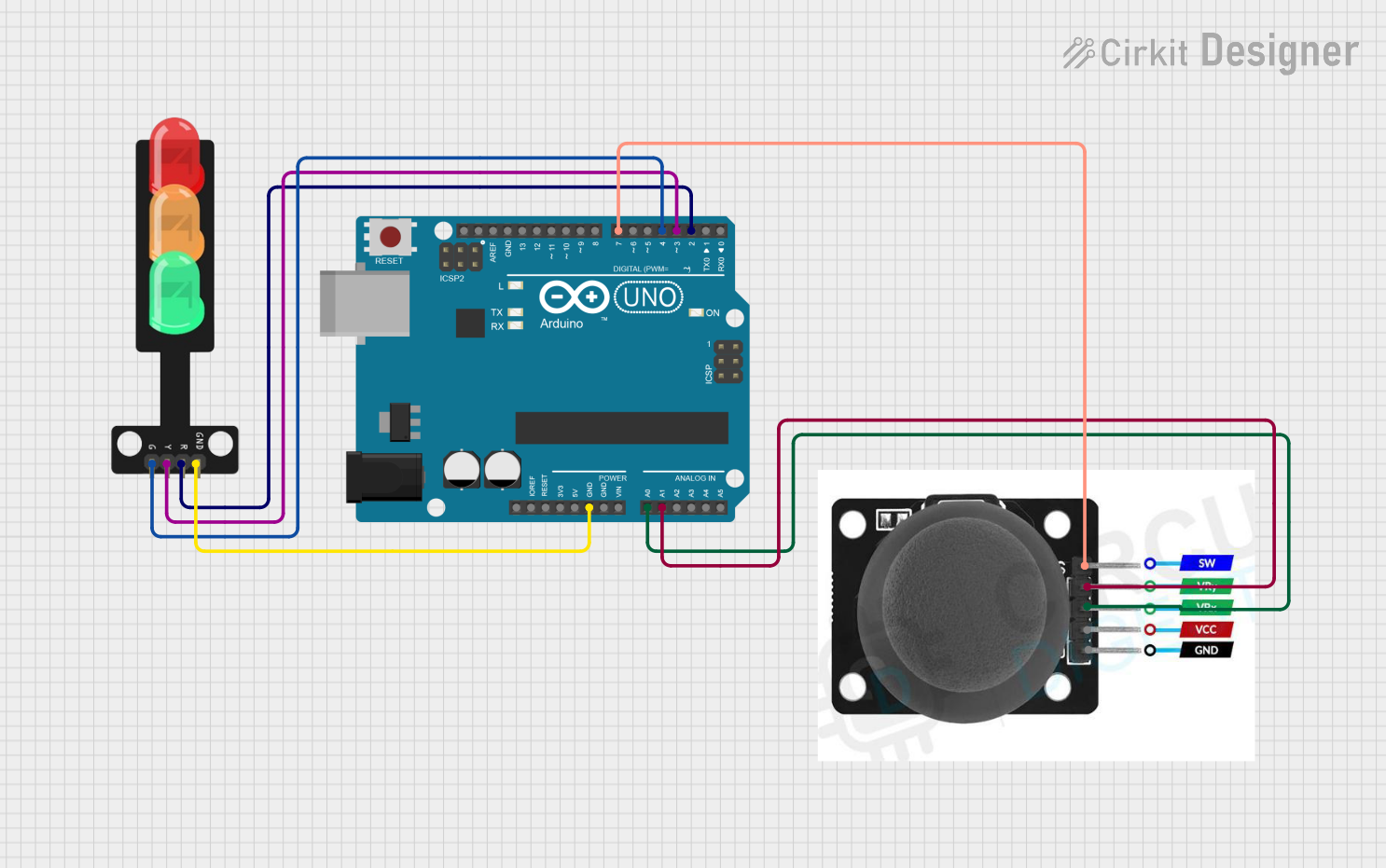
Circuit Documentation
Summary of the Circuit
This circuit is designed to control a traffic light using an Arduino UNO and a joystick module. The traffic light has three LEDs (red, yellow, and green) that are controlled by the joystick's position. When the joystick is moved in different directions, the corresponding LED on the traffic light is activated. The joystick also has a switch that can be used for additional input if needed.
Component List
Arduino UNO
- Description: A microcontroller board based on the ATmega328P.
- Purpose: Acts as the central processing unit of the circuit, reading inputs from the joystick and controlling the output to the traffic light LEDs.
- Pins Used: GND, A0, A1, D2, D3, D4, D7.
Traffic Light
- Description: A simple module with three LEDs representing a traffic light.
- Purpose: Displays the status of the traffic light as controlled by the Arduino UNO.
- Pins Used: Green, Yellow, Red, GND.
Joystick Module
- Description: An input device with two axes of control and a pushbutton switch.
- Purpose: Provides user input to the Arduino UNO to control the traffic light LEDs.
- Pins Used: SW, VRY, VRX, GND.
Wiring Details
Arduino UNO
- GND connected to Traffic Light GND and Joystick Module GND.
- A0 connected to Joystick Module VRX.
- A1 connected to Joystick Module VRY.
- D2 connected to Traffic Light Red.
- D3 connected to Traffic Light Yellow.
- D4 connected to Traffic Light Green.
- D7 connected to Joystick Module SW.
Traffic Light
- Green connected to Arduino UNO D4.
- Yellow connected to Arduino UNO D3.
- Red connected to Arduino UNO D2.
- GND connected to Arduino UNO GND.
Joystick Module
- SW connected to Arduino UNO D7.
- VRY connected to Arduino UNO A1.
- VRX connected to Arduino UNO A0.
- GND connected to Arduino UNO GND.
Documented Code
/*
 * This Arduino sketch controls a traffic light using a joystick module.
 * When the joystick is moved up, the red LED turns on.
 * When the joystick is moved left, the yellow LED turns on.
 * When the joystick is moved right, the green LED turns on.
 * When the joystick is moved down, all LEDs turn on.
 */

const int redLedPin = 2;
const int yellowLedPin = 3;
const int greenLedPin = 4;
const int joystickXPin = A0;
const int joystickYPin = A1;
const int joystickSWPin = 7;

void setup() {
  pinMode(redLedPin, OUTPUT);
  pinMode(yellowLedPin, OUTPUT);
  pinMode(greenLedPin, OUTPUT);
  pinMode(joystickSWPin, INPUT);
  Serial.begin(9600);
}

void loop() {
  int xValue = analogRead(joystickXPin);
  int yValue = analogRead(joystickYPin);
  int swValue = digitalRead(joystickSWPin);

  // Joystick moved up
  if (yValue < 300) {
    digitalWrite(redLedPin, HIGH);
    digitalWrite(yellowLedPin, LOW);
    digitalWrite(greenLedPin, LOW);
  }
  // Joystick moved left
  else if (xValue < 300) {
    digitalWrite(redLedPin, LOW);
    digitalWrite(yellowLedPin, HIGH);
    digitalWrite(greenLedPin, LOW);
  }
  // Joystick moved right
  else if (xValue > 700) {
    digitalWrite(redLedPin, LOW);
    digitalWrite(yellowLedPin, LOW);
    digitalWrite(greenLedPin, HIGH);
  }
  // Joystick moved down
  else if (yValue > 700) {
    digitalWrite(redLedPin, HIGH);
    digitalWrite(yellowLedPin, HIGH);
    digitalWrite(greenLedPin, HIGH);
  }
  // Joystick in neutral position
  else {
    digitalWrite(redLedPin, LOW);
    digitalWrite(yellowLedPin, LOW);
    digitalWrite(greenLedPin, LOW);
  }

  delay(100); // Small delay for debounce
}
This code is designed to be uploaded to the Arduino UNO microcontroller. It initializes the pins connected to the traffic light LEDs as outputs and the joystick switch as an input. In the main loop, it reads the analog values from the joystick's X and Y axes and the digital value from the joystick's switch. Depending on these values, it controls the state of the traffic light LEDs.