
ESP8266-Based Health Monitoring System with MAX30102 and LM35 Sensors
View and Edit Project In Cirkit Designer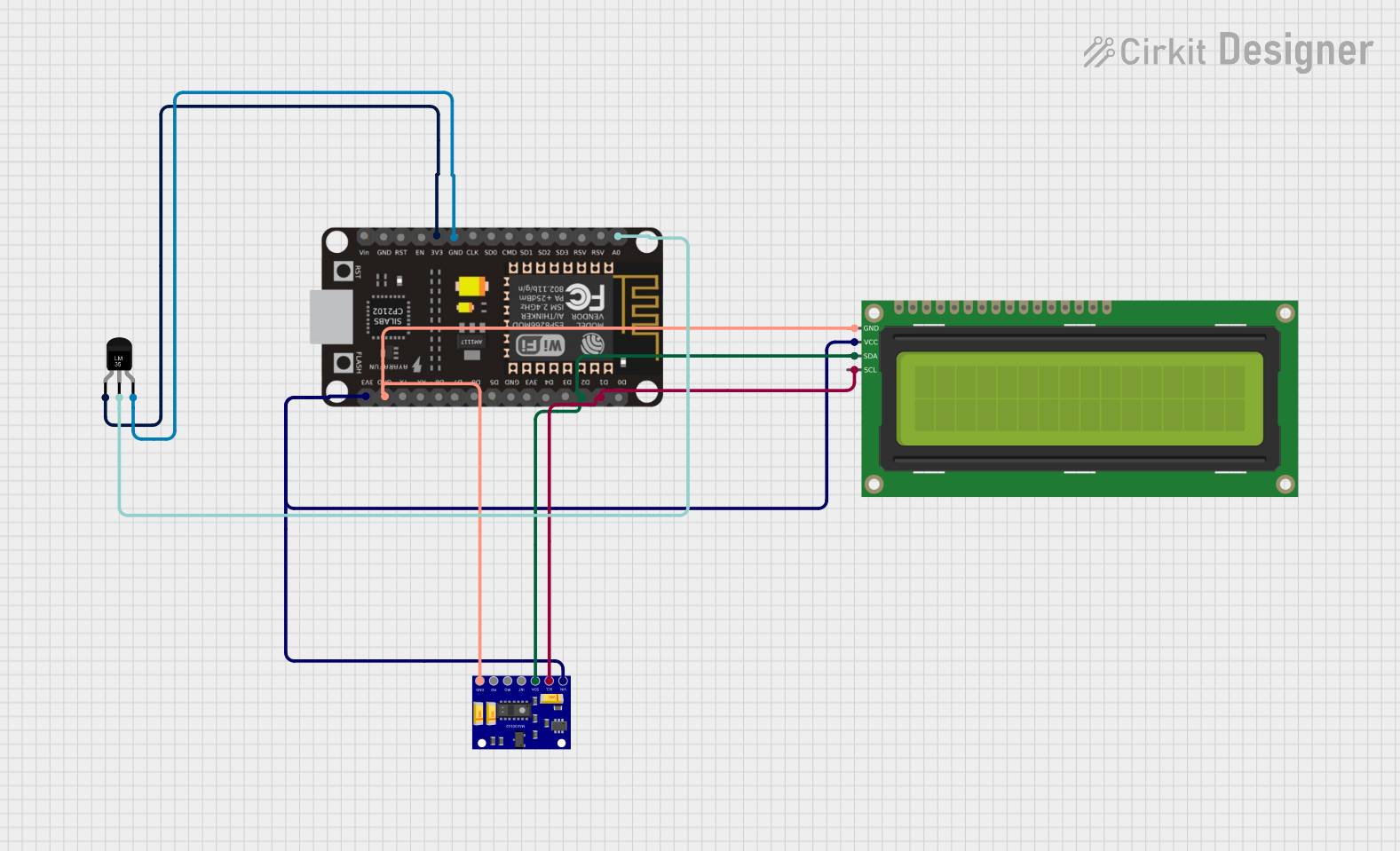
Circuit Documentation
Summary
This circuit is a Patient Health Monitoring System that reads temperature data from an LM35 sensor and heart rate and SpO2 data from a MAX30102 sensor. The data is displayed on a 16x2 I2C LCD and sent to the Blynk app for remote monitoring. The system is controlled by an ESP8266 NodeMCU microcontroller.
Component List
MAX30102 Heart Rate and Oxygen Sensor
- Description: A sensor module used to measure heart rate and blood oxygen levels (SpO2).
- Pins: VIN, SCL, SDA, INT, IRQ, RD, GND
ESP8266 NodeMCU
- Description: A low-cost Wi-Fi microcontroller with GPIO, ADC, and I2C capabilities.
- Pins: D0, D1, D2, D3, D4, 3V3, GND, D5, D6, D7, D8, RX, TX, A0, RSV, SD3, SD2, SD1, CMD, SD0, CLK, EN, RST, VIN
16x2 I2C LCD
- Description: A 16x2 character LCD display with I2C interface.
- Pins: GND, VCC, SDA, SCL
Temperature Sensor (LM35)
- Description: An analog temperature sensor that outputs a voltage proportional to the temperature.
- Pins: +Vs, Vout, GND
Wiring Details
MAX30102 Heart Rate and Oxygen Sensor
- VIN: Connected to 3V3 pin of ESP8266 NodeMCU
- SCL: Connected to D1 pin of ESP8266 NodeMCU
- SDA: Connected to D2 pin of ESP8266 NodeMCU
- GND: Connected to GND pin of ESP8266 NodeMCU
ESP8266 NodeMCU
- 3V3: Connected to VIN pin of MAX30102 and VCC pin of 16x2 I2C LCD
- D1: Connected to SCL pin of MAX30102 and 16x2 I2C LCD
- D2: Connected to SDA pin of MAX30102 and 16x2 I2C LCD
- GND: Connected to GND pin of MAX30102, 16x2 I2C LCD, and LM35
- A0: Connected to Vout pin of LM35
16x2 I2C LCD
- VCC: Connected to 3V3 pin of ESP8266 NodeMCU
- SCL: Connected to D1 pin of ESP8266 NodeMCU
- SDA: Connected to D2 pin of ESP8266 NodeMCU
- GND: Connected to GND pin of ESP8266 NodeMCU
Temperature Sensor (LM35)
- +Vs: Connected to 3V3 pin of ESP8266 NodeMCU
- Vout: Connected to A0 pin of ESP8266 NodeMCU
- GND: Connected to GND pin of ESP8266 NodeMCU
Documented Code
ESP8266 NodeMCU Code
void setup() {
  // put your setup code here, to run once:

}

void loop() {
  // put your main code here, to run repeatedly:

}
16x2 I2C LCD Code
void setup() {
  // put your setup code here, to run once:

}

void loop() {
  // put your main code here, to run repeatedly:

}
Patient Health Monitoring System Code
/*
 * Patient Health Monitoring System
 * This code reads temperature data from the LM35 sensor and heart rate and
 * SpO2 data from the MAX30102 sensor. It displays the data on a 16x2 I2C LCD
 * and sends it to the Blynk app for remote monitoring.
 */

#include <Wire.h>
#include <LiquidCrystal_I2C.h>
#include <Adafruit_Sensor.h>
#include <Adafruit_MAX30105.h>
#include <BlynkSimpleEsp8266.h>

// Blynk authentication token
char auth[] = "YourAuthToken";

// Define the pin for the LM35 temperature sensor
const int tempSensorPin = A0;

// Initialize the MAX30102 sensor
Adafruit_MAX30105 max30102;

// Initialize the I2C LCD (address 0x27, 16 columns, 2 rows)
LiquidCrystal_I2C lcd(0x27, 16, 2);

void setup() {
  // Initialize serial communication at 9600 baud rate
  Serial.begin(9600);

  // Initialize Blynk
  Blynk.begin(auth, "YourSSID", "YourPassword");

  // Initialize the MAX30102 sensor
  if (!max30102.begin(Wire, I2C_SPEED_FAST)) {
    Serial.println("MAX30102 not found. Please check wiring.");
    while (1);
  }

  // Initialize the I2C LCD
  lcd.begin();
  lcd.backlight();

  // Print initial message to LCD
  lcd.setCursor(0, 0);
  lcd.print("Health Monitor");
  lcd.setCursor(0, 1);
  lcd.print("Initializing...");
  delay(2000);
}

void loop() {
  // Read the analog value from the temperature sensor
  int sensorValue = analogRead(tempSensorPin);
  // Convert the analog value to temperature in Celsius
  float temperature = (sensorValue * 5.0 * 100.0) / 1024.0;

  // Read heart rate and SpO2 data from the MAX30102 sensor
  uint32_t irValue = max30102.getIR();
  uint32_t redValue = max30102.getRed();

  // Print the temperature value to the serial monitor
  Serial.print("Temperature: ");
  Serial.print(temperature);
  Serial.println(" °C");

  // Print heart rate and SpO2 data to the serial monitor
  Serial.print("IR: ");
  Serial.print(irValue);
  Serial.print(" Red: ");
  Serial.println(redValue);

  // Display the data on the I2C LCD
  lcd.clear();
  lcd.setCursor(0, 0);
  lcd.print("Temp: ");
  lcd.print(temperature);
  lcd.print(" C");
  lcd.setCursor(0, 1);
  lcd.print("HR: ");
  lcd.print(irValue);
  lcd.print(" SpO2: ");
  lcd.print(redValue);

  // Send the data to the Blynk app
  Blynk.virtualWrite(V1, temperature);
  Blynk.virtualWrite(V2, irValue);
  Blynk.virtualWrite(V3, redValue);

  // Run Blynk
  Blynk.run();

  // Wait for 1 second before taking another reading
  delay(1000);
}