
Circuit Documentation
Summary
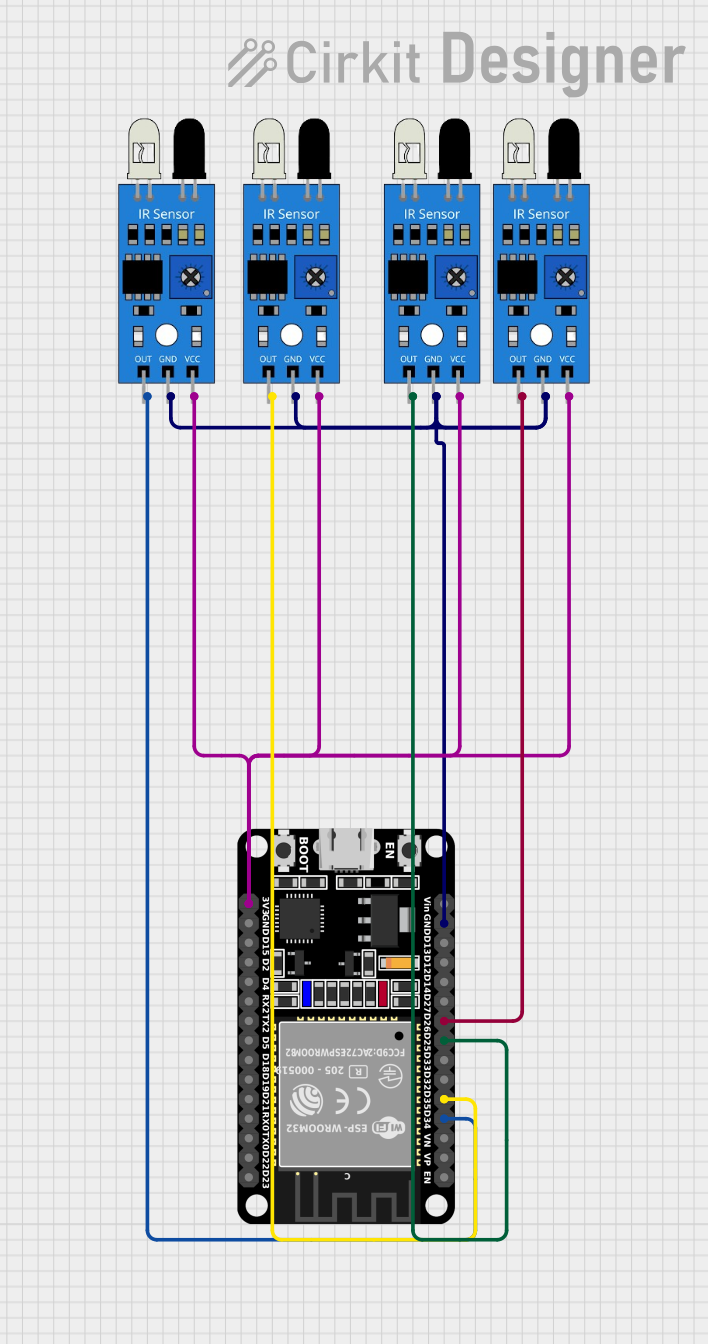
This circuit is designed to detect the presence of a car using four IR sensors connected to an ESP32 microcontroller. The IR sensors are used to detect obstacles, and their outputs are read by the ESP32, which processes the data and prints the sensor states to the Serial Monitor.
Component List
IR Sensor
- Description: Infrared sensor used to detect obstacles.
- Pins:
out,gnd,vcc
ESP32 (30 pin)
- Description: A powerful microcontroller with built-in Wi-Fi and Bluetooth capabilities.
- Pins:
EN,VP,VN,D34,D35,D32,D33,D25,D26,D27,D14,D12,D13,GND,Vin,D23,D22,TX0,RX0,D21,D19,D18,D5,TX2,RX2,D4,D2,D15,3V3
Wiring Details
IR Sensor 1
- Pins:
outconnected toD35of ESP32gndconnected toGNDof ESP32vccconnected to3V3of ESP32
IR Sensor 2
- Pins:
outconnected toD26of ESP32gndconnected toGNDof ESP32vccconnected to3V3of ESP32
IR Sensor 3
- Pins:
outconnected toD25of ESP32gndconnected toGNDof ESP32vccconnected to3V3of ESP32
IR Sensor 4
- Pins:
outconnected toD34of ESP32gndconnected toGNDof ESP32vccconnected to3V3of ESP32
Documented Code
ESP32 Code
/*
 * This Arduino Sketch is designed for an ESP32 microcontroller to detect the
 * presence of a car using four IR sensors. The sensors are connected to GPIO
 * pins 35, 34, 25, and 26. The code initializes the sensors, reads their
 * values, and prints the sensor states to the Serial Monitor.
 */

// Define the GPIO pins for the IR sensors
#define IR_SENSOR_1 35
#define IR_SENSOR_2 34
#define IR_SENSOR_3 25
#define IR_SENSOR_4 26

void setup() {
  // Initialize serial communication
  Serial.begin(115200);

  // Configure the GPIO pins as input
  pinMode(IR_SENSOR_1, INPUT);
  pinMode(IR_SENSOR_2, INPUT);
  pinMode(IR_SENSOR_3, INPUT);
  pinMode(IR_SENSOR_4, INPUT);

  Serial.println("IR Sensor System Initialized");
}

void loop() {
  // Read the values from the IR sensors
  int sensor1Value = digitalRead(IR_SENSOR_1);
  int sensor2Value = digitalRead(IR_SENSOR_2);
  int sensor3Value = digitalRead(IR_SENSOR_3);
  int sensor4Value = digitalRead(IR_SENSOR_4);

  // Print the values to the Serial Monitor
  Serial.print("Sensor 1: ");
  Serial.print(sensor1Value);
  Serial.print(" | Sensor 2: ");
  Serial.print(sensor2Value);
  Serial.print(" | Sensor 3: ");
  Serial.print(sensor3Value);
  Serial.print(" | Sensor 4: ");
  Serial.println(sensor4Value);

  // Add a small delay to stabilize readings
  delay(100);
}
IR Sensor Code
void setup() {
  // put your setup code here, to run once:

}

void loop() {
  // put your main code here, to run repeatedly:

}