
Arduino Nano-Controlled Smart Waste Sorting Bin with Servos and Sensors
View and Edit Project In Cirkit Designer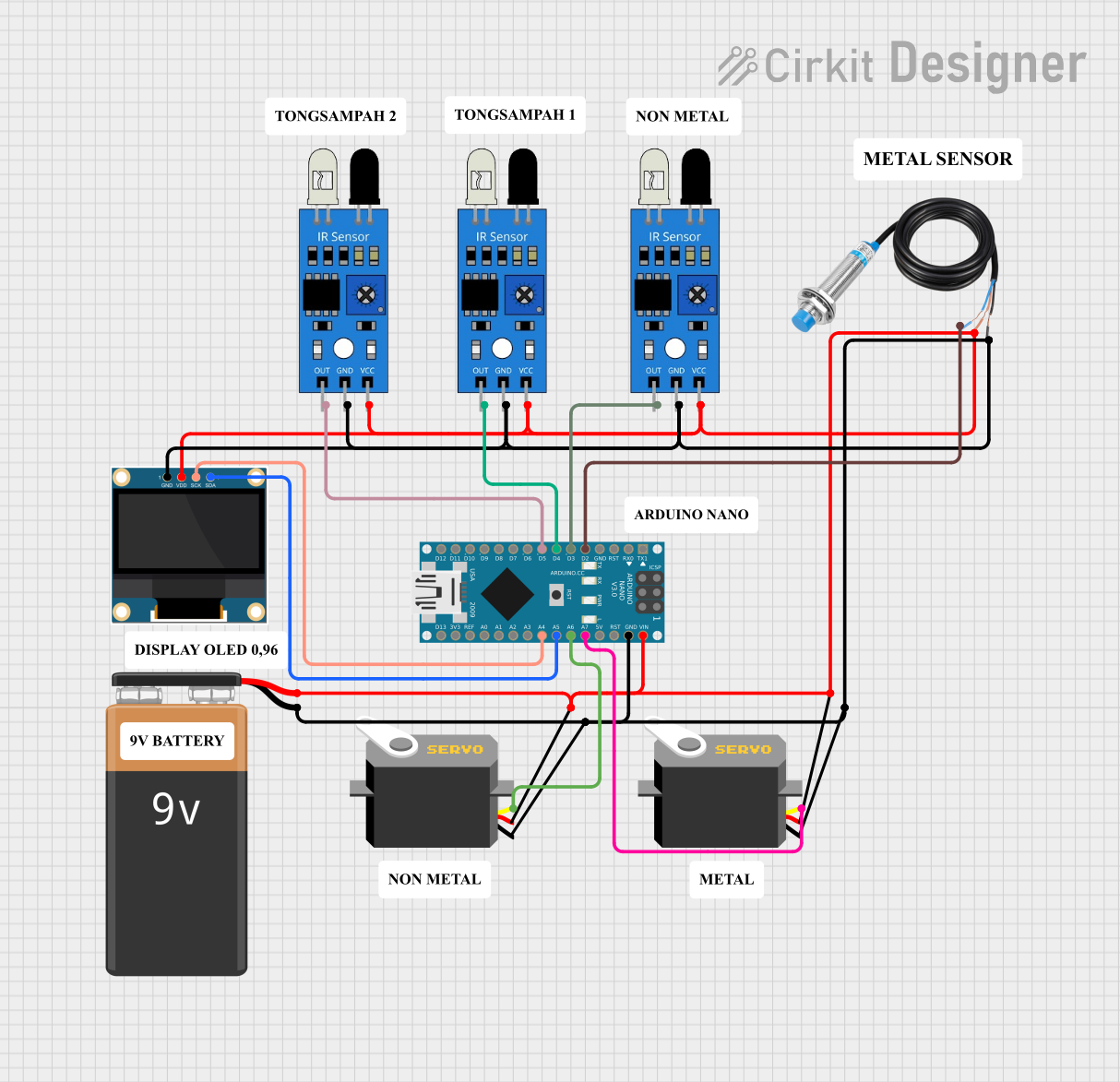
Smart Bin Circuit Documentation
Summary
The Smart Bin Circuit is designed to automate the process of sorting metal and non-metal waste using an array of sensors, servo motors, and a display unit. The system is controlled by an Arduino Nano microcontroller, which processes inputs from metal detection and infrared sensors to actuate two servo motors that direct waste into the appropriate bins. The circuit also includes a 0.96" OLED display to provide visual feedback and status information.
Component List
9V Battery
- Description: Provides power to the circuit.
Servo Motors
- Description: Two servo motors are used to control the opening of waste bins for metal and non-metal materials.
Arduino Nano
- Description: Acts as the central processing unit for the Smart Bin, reading sensor inputs and controlling the servo motors and OLED display.
Metal Detection Sensor
- Description: Detects the presence of metal in the waste item.
IR Sensors
- Description: Three infrared sensors are used to detect the presence of waste items and their type (metal or non-metal).
0.96" OLED Display
- Description: Displays information about the waste sorting status and the count of items sorted.
Comments
- Description: Placeholder components for additional notes or documentation.
Wiring Details
9V Battery
- Connections:
- Positive terminal connected to the VCC of all components.
- Negative terminal connected to the GND of all components.
Servo Motors
- Connections:
- Both servos have their GND connected to the common ground.
- Both servos have their VCC connected to the common power rail.
- Servo 1 pulse connected to Arduino Nano A7.
- Servo 2 pulse connected to Arduino Nano A6.
Arduino Nano
- Connections:
- GND to common ground.
- VIN to common power rail.
- A7 to Servo 1 pulse.
- A6 to Servo 2 pulse.
- D2 to Metal Detection Sensor OUT.
- D3 to IR Sensor 1 OUT.
- D4 to IR Sensor 2 OUT.
- D5 to IR Sensor 3 OUT.
- A5 to OLED SDA.
- A4 to OLED SCK.
Metal Detection Sensor
- Connections:
- POWER to common power rail.
- GND to common ground.
- OUT to Arduino Nano D2.
IR Sensors
- Connections:
- All IR sensors have their VCC connected to the common power rail.
- All IR sensors have their GND connected to the common ground.
- IR Sensor 1 OUT to Arduino Nano D3.
- IR Sensor 2 OUT to Arduino Nano D4.
- IR Sensor 3 OUT to Arduino Nano D5.
0.96" OLED Display
- Connections:
- VDD to common power rail.
- GND to common ground.
- SCK to Arduino Nano A4.
- SDA to Arduino Nano A5.
Documented Code
Arduino Nano Code
#include <Servo.h>
#include <Wire.h>
#include <Adafruit_GFX.h>
#include <Adafruit_SSD1306.h>

const int nonmetalPin = D3;
const int tongsampah1 = D4;
const int tongsampah2 = D5;
#define metalsensor D2

#define OLED_ADDR   0x3C
#define OLED_RESET  -1
Adafruit_SSD1306 display(128, 64, &Wire, OLED_RESET);

Servo myservo_nonmetal; // create servo object to control a servo on plastic bin
Servo myservo_metal; // create servo object to control a servo on metal bin

int nonmetal = 0; // default servo position of plastic bin
int metal = 0; // default servo position of metal bin

void setup() {
    Serial.begin(9600);
    myservo_nonmetal.attach(A6); // attaches the plastic bin servo on pin 6 to the servo object
    myservo_metal.attach(A7); // attaches the metal bin servo on pin 7 to the servo object
    pinMode(nonmetalPin, INPUT);
    pinMode(tongsampah1, INPUT);
    pinMode(tongsampah2, INPUT);
    pinMode(metalsensor, INPUT);
    if(!display.begin(OLED_ADDR, OLED_RESET)) {
        Serial.println(F("SSD1306 allocation failed"));
        for(;;);
    }
    display.display();
    delay(2000);
    display.clearDisplay();
    display.setTextSize(1);      // Normal 1:1 pixel scale
    display.setTextColor(SSD1306_WHITE); // Draw white text
    display.display();
}

void loop() {
    int sensor_read_nonmetal = digitalRead(nonmetalPin);
    int sensor_read_metal = digitalRead(metalsensor);
    int sensor_tongsampah1 = digitalRead(tongsampah1);
    int sensor_tongsampah2 = digitalRead(tongsampah2);

    Serial.println("nonmetal sensor");
    Serial.println(sensor_read_nonmetal);
    Serial.println("metal sensor");
    Serial.println(sensor_read_metal);
    Serial.println("tong sampah 1");
    Serial.println(sensor_tongsampah1);
    Serial.println("tong sampah 2");
    Serial.println(sensor_tongsampah2);

    display.setCursor(0, 0);     // Start at top-left corner
    display.println(F("----SMART BIN----"));
    display.display();

    if ((sensor_read_nonmetal == 1) && (sensor_read_metal != 1)) {
        display.setCursor(0, 10);
        display.print("Sampah non metal");
        myservo_nonmetal.write(90);
        delay(2500);
        myservo_nonmetal.write(0);
        delay(2500);
        if(sensor_tongsampah1 == 1){
            int jumlah_sampah = sensor_tongsampah1;
            jumlah_sampah++;
            display.setCursor(0, 20);
            display.print("jumlah_sampah");
            display.println(jumlah_sampah);
            display.display();
        }
    } else {
        // keep the door closed
        myservo_nonmetal.write(nonmetal);
    }

    if ((sensor_read_metal == 1) && (sensor_read_nonmetal != 1)) {
        display.setCursor(0, 30);
        display.print("Sampah metal");
        myservo_metal.write(90);
        delay(2500);
        myservo_metal.write(0);
        delay(2500);
        if(sensor_tongsampah2 == 1){
            int jumlah_sampah1 = sensor_tongsampah2;
            jumlah_sampah1++;
            display.setCursor(0, 40);
            display.print("jumlah_sampah");
            display.println(jumlah_sampah1);
            display.display();
        }
    } else {
        // keep the door closed
        myservo_metal.write(metal);
    }
}
This code controls the Smart Bin's operation, including reading sensor inputs, actuating servo motors, and updating the OLED display with the status of the waste sorting process.