
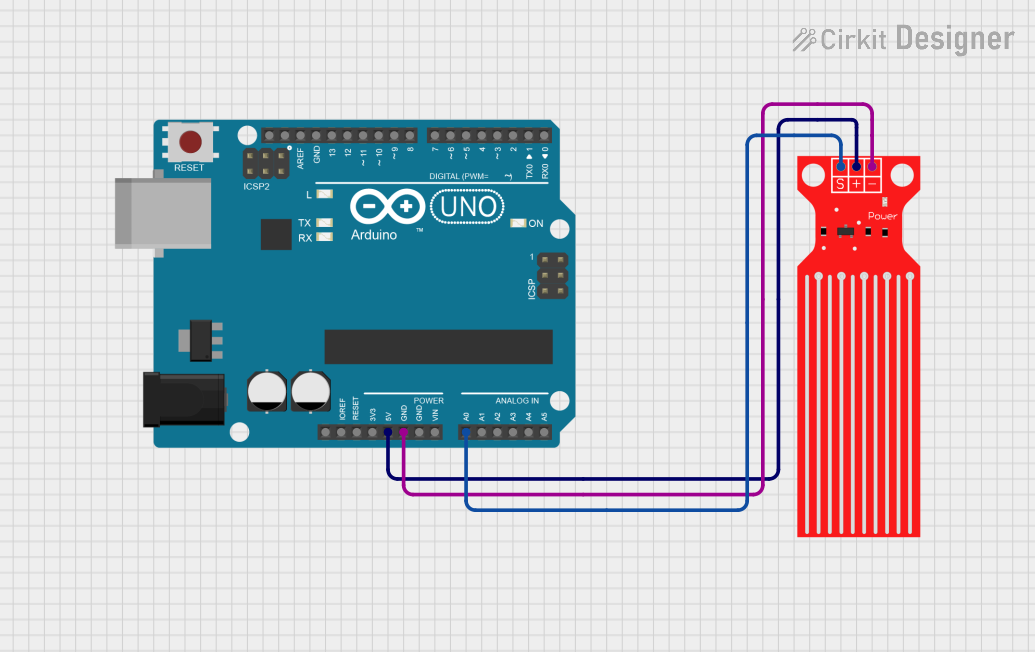
Circuit Documentation
Summary
This circuit is designed to monitor water levels using a Water Level Sensor connected to an Arduino UNO. The sensor outputs an analog signal that corresponds to the water level, which the Arduino reads and processes. The Arduino then outputs the raw sensor data, voltage, and percentage of water level to the Serial Monitor for easy monitoring.
Component List
Water Level Sensor
- Description: A sensor that detects the level of water and outputs an analog signal.
- Pins:
- SIG: Signal output pin that sends the water level data to the Arduino.
- VCC: Power supply pin that connects to the Arduino's 5V output.
- GND: Ground pin that connects to the Arduino's ground.
Arduino UNO
- Description: A microcontroller board based on the ATmega328P, used for programming and controlling the water level sensor.
- Pins:
- A0: Analog input pin connected to the SIG pin of the Water Level Sensor.
- 5V: Power output pin connected to the VCC pin of the Water Level Sensor.
- GND: Ground pin connected to the GND pin of the Water Level Sensor.
Wiring Details
Water Level Sensor
SIG pin is connected to A0 pin of the Arduino UNO.
VCC pin is connected to 5V pin of the Arduino UNO.
GND pin is connected to GND pin of the Arduino UNO.
Arduino UNO
A0 pin is connected to SIG pin of the Water Level Sensor.
5V pin is connected to VCC pin of the Water Level Sensor.
GND pin is connected to GND pin of the Water Level Sensor.
Documented Code
const int SIG_PIN = A0;

// For Arduino Uno (10-bit ADC, 0..1023) with default AREF = Vcc (5.0V)
const float VREF = 5.0;
const int   ADC_MAX = 1023;

// Optional: simple averaging for a steadier reading
const int NUM_SAMPLES = 16;

void setup() {
  Serial.begin(115200);
  // Give time for Serial Monitor to open
  delay(500);
  Serial.println("Water Level Sensor - Serial Monitor");
  Serial.println("Raw | Voltage (V) | Level (%)");
}

void loop() {
  // Take several samples and average
  long sum = 0;
  for (int i = 0; i < NUM_SAMPLES; i++) {
    sum += analogRead(SIG_PIN);
  }
  float raw = sum / float(NUM_SAMPLES);

  // Convert to voltage and percentage
  float voltage = (raw * VREF) / ADC_MAX;
  int percent = (int)round((raw * 100.0) / ADC_MAX);

  // Clamp just in case
  if (percent < 0) percent = 0;
  if (percent > 100) percent = 100;

  // Print nicely formatted
  Serial.print((int)raw);
  Serial.print(" | ");
  Serial.print(voltage, 3);
  Serial.print(" V | ");
  Serial.print(percent);
  Serial.println(" %");

  delay(250); // update ~4 times per second
}
This documentation provides a comprehensive overview of the circuit, detailing the components used, their connections, and the code that drives the functionality of the water level monitoring system.