
Arduino Nano and L298N Motor Driver Bluetooth-Controlled Robotic System
View and Edit Project In Cirkit Designer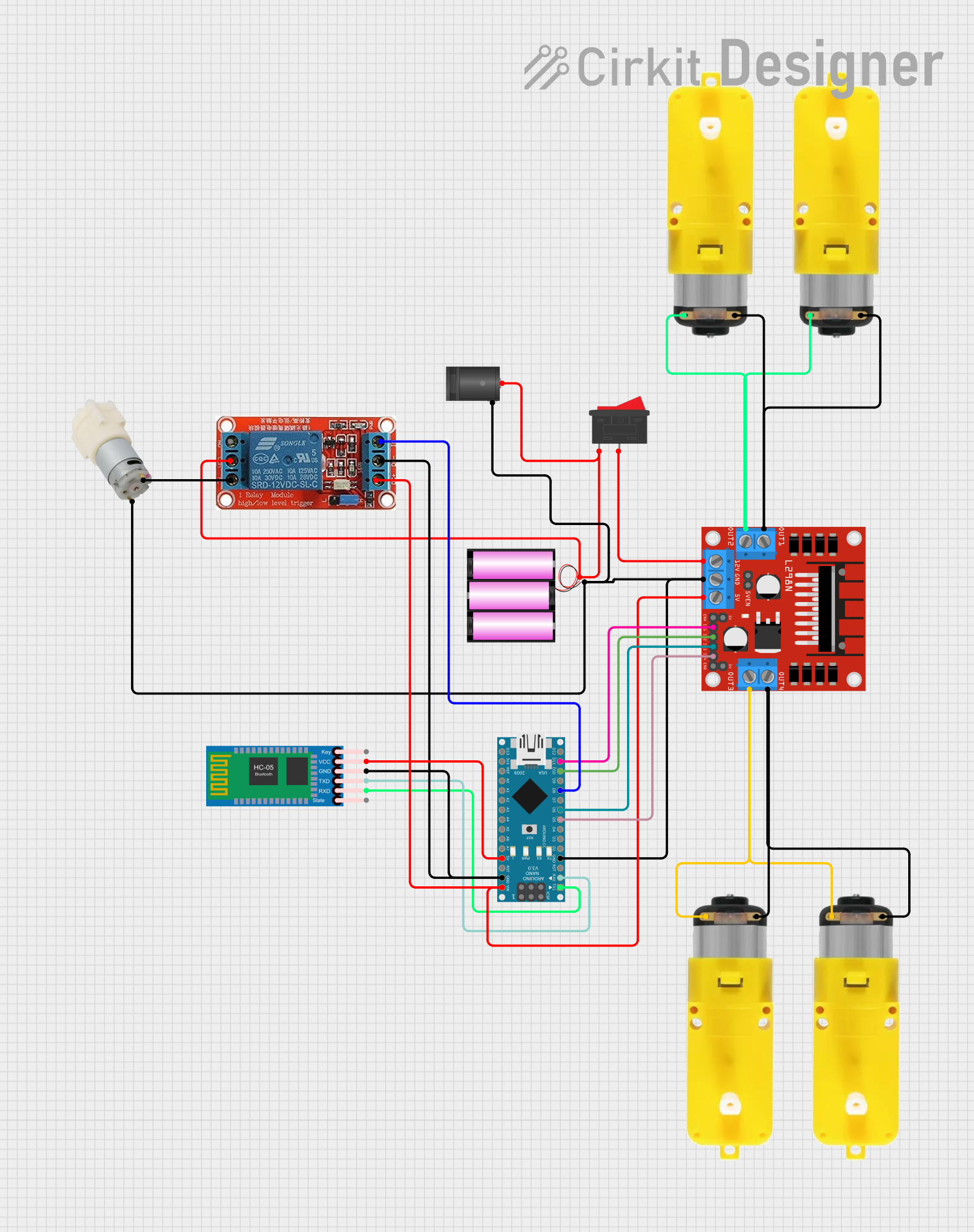
Circuit Documentation
Summary
This document provides a detailed overview of a circuit designed to control multiple motors and a water pump using an Arduino Nano microcontroller. The circuit includes a Bluetooth module for wireless communication, a motor driver for controlling the motors, a relay for switching the water pump, and a rocker switch for manual control. The circuit is powered by a 12V battery and includes a DC barrel jack for easy power connection.
Component List
L298N DC Motor Driver
- Description: Motor driver module used to control the direction and speed of DC motors.
- Pins: OUT1, OUT2, 12V, GND, 5V, OUT3, OUT4, 5V-ENA-JMP-I, 5V-ENA-JMP-O, +5V-J1, +5V-J2, ENA, IN1, IN2, IN3, IN4, ENB
Battery 12V
- Description: Power source for the circuit.
- Pins: +, -
Rocker Switch
- Description: Manual switch to control the power supply.
- Pins: 1, 2
HC-05 Bluetooth Module
- Description: Bluetooth module for wireless communication.
- Pins: Key, VCC, GND, TXD, RXD, State
Motor with Reducer
- Description: DC motor with a gear reducer for increased torque.
- Pins: 3 - 6 VCC, GND
Arduino Nano
- Description: Microcontroller used to control the circuit.
- Pins: D1/TX, D0/RX, RESET, GND, D2, D3, D4, D5, D6, D7, D8, D9, D10, D11/MOSI, D12/MISO, VIN, 5V, A7, A6, A5, A4, A3, A2, A1, A0, AREF, 3V3, D13/SCK
12V Relay
- Description: Relay module used to switch the water pump.
- Pins: NO, COM, NC, IN, DC-, DC+
Water Pump 12V
- Description: Water pump powered by 12V.
- Pins: +, -
2.1mm DC Barrel Jack
- Description: DC barrel jack for easy power connection.
- Pins: switch, sleeve, center
Wiring Details
L298N DC Motor Driver
- 12V connected to Rocker Switch pin 2
- GND connected to Arduino Nano GND, Water Pump 12V -, 2.1mm DC Barrel Jack sleeve, Battery 12V -, HC-05 Bluetooth Module GND, 12V Relay DC-
- 5V connected to Arduino Nano VIN, 12V Relay DC+
- IN1 connected to Arduino Nano D11/MOSI
- IN2 connected to Arduino Nano D10
- IN3 connected to Arduino Nano D6
- IN4 connected to Arduino Nano D5
- OUT1 connected to Motor with Reducer 3 - 6 VCC (two motors)
- OUT2 connected to Motor with Reducer GND (two motors)
- OUT3 connected to Motor with Reducer 3 - 6 VCC (two motors)
- OUT4 connected to Motor with Reducer GND (two motors)
Battery 12V
- + connected to 2.1mm DC Barrel Jack center, Rocker Switch pin 1
Rocker Switch
- 1 connected to Battery 12V +
- 2 connected to L298N DC Motor Driver 12V
HC-05 Bluetooth Module
- RXD connected to Arduino Nano D1/TX
- TXD connected to Arduino Nano D0/RX
- VCC connected to Arduino Nano 5V
- GND connected to Arduino Nano GND, 12V Relay DC-
Motor with Reducer
- 3 - 6 VCC connected to L298N DC Motor Driver OUT1 (two motors), OUT3 (two motors)
- GND connected to L298N DC Motor Driver OUT2 (two motors), OUT4 (two motors)
Arduino Nano
- D1/TX connected to HC-05 Bluetooth Module RXD
- D0/RX connected to HC-05 Bluetooth Module TXD
- GND connected to L298N DC Motor Driver GND, Water Pump 12V -, 2.1mm DC Barrel Jack sleeve, Battery 12V -, HC-05 Bluetooth Module GND, 12V Relay DC-
- D5 connected to L298N DC Motor Driver IN4
- D6 connected to L298N DC Motor Driver IN3
- D8 connected to 12V Relay IN
- D10 connected to L298N DC Motor Driver IN2
- D11/MOSI connected to L298N DC Motor Driver IN1
- VIN connected to 12V Relay DC+
- 5V connected to HC-05 Bluetooth Module VCC
12V Relay
- IN connected to Arduino Nano D8
- DC+ connected to Arduino Nano VIN, L298N DC Motor Driver 5V
- DC- connected to Arduino Nano GND, HC-05 Bluetooth Module GND
- COM connected to 2.1mm DC Barrel Jack center, Rocker Switch pin 1, Battery 12V +
- NC connected to Water Pump 12V +
Water Pump 12V
- + connected to 12V Relay NC
- - connected to Arduino Nano GND, 2.1mm DC Barrel Jack sleeve, Battery 12V -, L298N DC Motor Driver GND
2.1mm DC Barrel Jack
- switch not connected
- sleeve connected to Arduino Nano GND, Water Pump 12V -, Battery 12V -, L298N DC Motor Driver GND
- center connected to 12V Relay COM, Rocker Switch pin 1, Battery 12V +
Documented Code
Arduino Nano Code (sketch.ino)
void setup() {
  // put your setup code here, to run once:

}

void loop() {
  // put your main code here, to run repeatedly:

}
This code is a basic template for the Arduino Nano. The setup function is used to initialize any settings or configurations, and the loop function contains the main code that runs repeatedly.