
Arduino UNO-Based Lung Cancer Detector with Multiple Gas Sensors and LCD Display
View and Edit Project In Cirkit Designer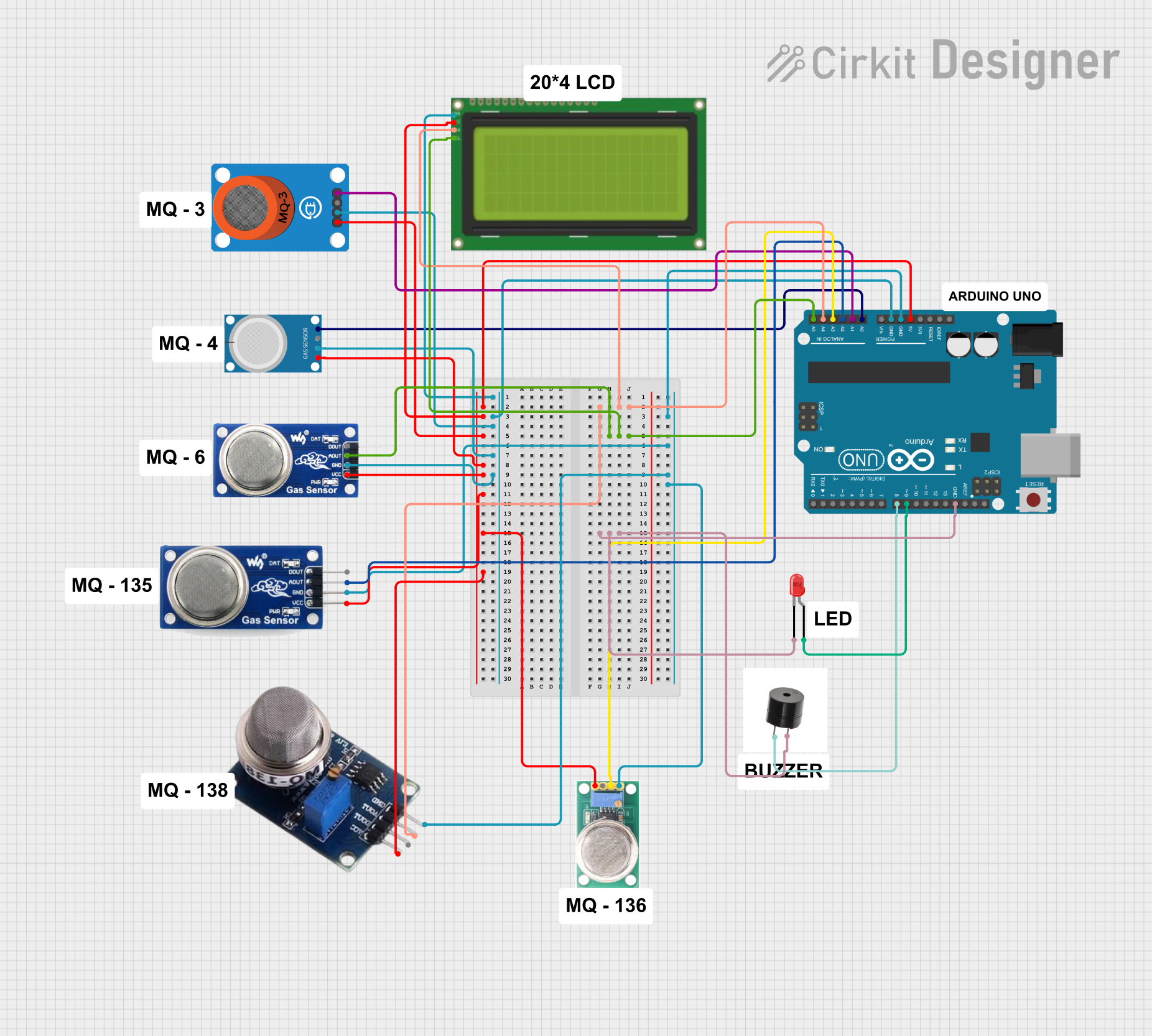
Circuit Documentation
Summary
This circuit is a Lung Cancer Detector using six gas sensors connected to an Arduino UNO. The sensor values are read and displayed on a 20x4 LCD display and the serial monitor. Additionally, a buzzer and an LED are activated if any sensor value exceeds a predefined threshold.
Component List
Arduino UNO
- Description: Microcontroller board based on the ATmega328P.
- Pins: UNUSED, IOREF, Reset, 3.3V, 5V, GND, Vin, A0, A1, A2, A3, A4, A5, SCL, SDA, AREF, D13, D12, D11, D10, D9, D8, D7, D6, D5, D4, D3, D2, D1, D0
Buzzer
- Description: An electronic device that produces a sound when a voltage is applied.
- Pins: +, GND
Lcd 20x4 i2c
- Description: 20x4 character LCD display with I2C interface.
- Pins: GND, 5v, SCA, SCL
LED: Two Pin (red)
- Description: A red LED with two pins.
- Pins: cathode, anode
MQ 135
- Description: Gas sensor for detecting air quality.
- Pins: D OUT, A OUT, GND, VCC
MQ-4
- Description: Gas sensor for detecting methane.
- Pins: A0, D0, GND, VCC
MQ6
- Description: Gas sensor for detecting LPG.
- Pins: VCC, GND, A0, DO
MQ-3 Breakout
- Description: Gas sensor for detecting alcohol.
- Pins: VCC, GND, DO, AO
MQ-136
- Description: Gas sensor for detecting hydrogen sulfide.
- Pins: GND, OUT1, OUT2, VCC
MQ 138
- Description: Gas sensor for detecting various gases.
- Pins: gnd, AOUT, DOUT, VCC
Wiring Details
Arduino UNO
- A0: Connected to MQ-4 (A0)
- A1: Connected to MQ-3 Breakout (AO)
- A2: Connected to MQ 135 (A OUT)
- A3: Connected to MQ-136 (OUT1)
- A4: Connected to MQ 138 (AOUT) and Lcd 20x4 i2c (SCA)
- A5: Connected to Lcd 20x4 i2c (SCL) and MQ6 (A0)
- D8: Connected to Buzzer (+)
- D9: Connected to LED: Two Pin (red) (anode)
- 5V: Connected to Lcd 20x4 i2c (5v), MQ-3 Breakout (VCC), MQ-4 (VCC), MQ6 (VCC), MQ 135 (VCC), MQ-136 (VCC), MQ 138 (VCC)
- GND: Connected to LED: Two Pin (red) (cathode), Buzzer (GND), Lcd 20x4 i2c (GND), MQ-3 Breakout (GND), MQ-4 (GND), MQ6 (GND), MQ 135 (GND), MQ 138 (gnd), MQ-136 (GND)
Buzzer
- +: Connected to Arduino UNO (D8)
- GND: Connected to Arduino UNO (GND)
Lcd 20x4 i2c
- GND: Connected to Arduino UNO (GND)
- 5v: Connected to Arduino UNO (5V)
- SCA: Connected to Arduino UNO (A4)
- SCL: Connected to Arduino UNO (A5)
LED: Two Pin (red)
- cathode: Connected to Arduino UNO (GND)
- anode: Connected to Arduino UNO (D9)
MQ 135
- A OUT: Connected to Arduino UNO (A2)
- GND: Connected to Arduino UNO (GND)
- VCC: Connected to Arduino UNO (5V)
MQ-4
- A0: Connected to Arduino UNO (A0)
- GND: Connected to Arduino UNO (GND)
- VCC: Connected to Arduino UNO (5V)
MQ6
- A0: Connected to Arduino UNO (A5)
- GND: Connected to Arduino UNO (GND)
- VCC: Connected to Arduino UNO (5V)
MQ-3 Breakout
- AO: Connected to Arduino UNO (A1)
- GND: Connected to Arduino UNO (GND)
- VCC: Connected to Arduino UNO (5V)
MQ-136
- OUT1: Connected to Arduino UNO (A3)
- GND: Connected to Arduino UNO (GND)
- VCC: Connected to Arduino UNO (5V)
MQ 138
- AOUT: Connected to Arduino UNO (A4)
- gnd: Connected to Arduino UNO (GND)
- VCC: Connected to Arduino UNO (5V)
Code Documentation
/*
 * Lung Cancer Detector using 6 Gas Sensors
 * This code reads values from 6 gas sensors connected to the Arduino UNO
 * and displays the values on a 20x4 LCD display and the serial monitor
 * in the format: S1 S2 S3 S4 S5 S6. Additionally, it activates a buzzer
 * and an LED if any sensor value exceeds a predefined threshold.
 */

#include <Wire.h>
#include <LiquidCrystal_I2C.h>

// Initialize the LCD with the I2C address 0x27
LiquidCrystal_I2C lcd(0x27, 20, 4);

// Define pin connections
const int buzzerPin = 8;
const int ledPin = 9;

// Define sensor thresholds
const int threshold = 500;

void setup() {
  // Initialize serial communication at 9600 baud rate
  Serial.begin(9600);

  // Initialize the LCD
  lcd.begin();
  lcd.backlight();

  // Initialize buzzer and LED pins
  pinMode(buzzerPin, OUTPUT);
  pinMode(ledPin, OUTPUT);

  // Print a message to the serial monitor and LCD
  Serial.println("Lung Cancer Detector Initialized");
  lcd.setCursor(0, 0);
  lcd.print("Lung Cancer Detector");
  lcd.setCursor(0, 1);
  lcd.print("Initialized");
  delay(2000);
  lcd.clear();
}

void loop() {
  // Read values from the gas sensors
  int mq4Value = analogRead(A0); // MQ-4 sensor
  int mq3Value = analogRead(A1); // MQ-3 sensor
  int mq135Value = analogRead(A2); // MQ-135 sensor
  int mq136Value = analogRead(A3); // MQ-136 sensor
  int me3H2SValue = analogRead(A4); // ME3-H2S sensor
  int mq6Value = analogRead(A5); // MQ-6 sensor

  // Print the sensor values to the serial monitor in the format: S1 S2 S3 S4 S5 S6
  Serial.print("S1: ");
  Serial.print(mq4Value);
  Serial.print("\tS2: ");
  Serial.print(mq3Value);
  Serial.print("\tS3: ");
  Serial.print(mq135Value);
  Serial.print("\tS4: ");
  Serial.print(mq136Value);
  Serial.print("\tS5: ");
  Serial.print(me3H2SValue);
  Serial.print("\tS6: ");
  Serial.println(mq6Value);

  // Display the sensor values on the LCD
  lcd.setCursor(0, 0);
  lcd.print("S1:");
  lcd.print(mq4Value);
  lcd.setCursor(10, 0);
  lcd.print("S2:");
  lcd.print(mq3Value);
  lcd.setCursor(0, 1);
  lcd.print("S3:");
  lcd.print(mq135Value);
  lcd.setCursor(10, 1);
  lcd.print("S4:");
  lcd.print(mq136Value);
  lcd.setCursor(0, 2);
  lcd.print("S5:");
  lcd.print(me3H2SValue);
  lcd.setCursor(10, 2);
  lcd.print("S6:");
  lcd.print(mq6Value);

  // Check if any sensor value exceeds the threshold
  if (mq4Value > threshold || mq3Value > threshold || mq135Value > threshold ||
      mq136Value > threshold || me3H2SValue > threshold || mq6Value > threshold) {
    digitalWrite(buzzerPin, HIGH); // Activate buzzer