
Arduino UNO-Based Automated Rain-Sensing Motor Control System
View and Edit Project In Cirkit Designer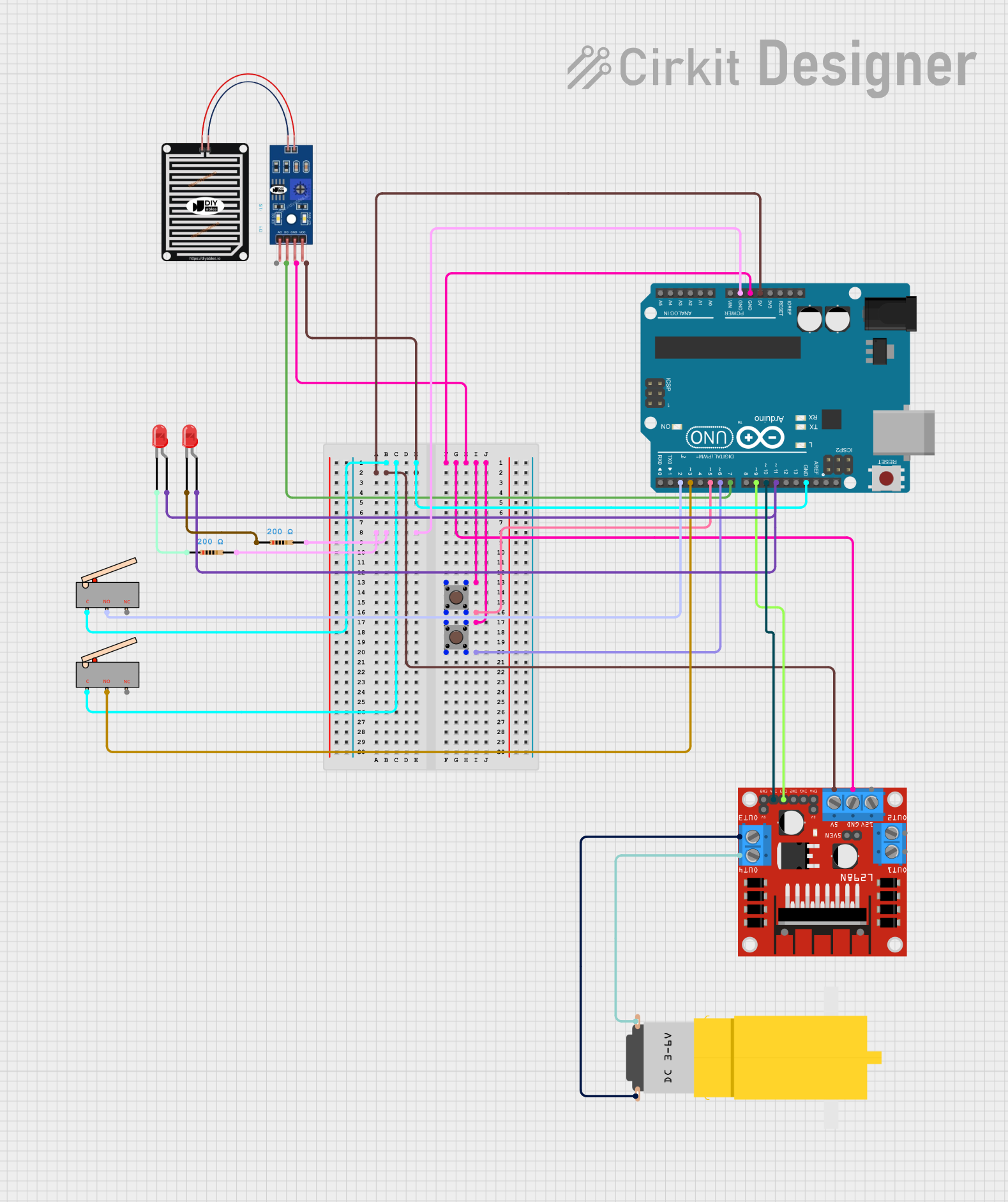
Circuit Documentation
Summary
This document provides a detailed overview of a circuit that includes an Arduino UNO microcontroller, an L298N DC motor driver, a hobby motor, a rain sensor, two red LEDs, two limit switches, two pushbuttons, and two resistors. The circuit is designed to control a motor and respond to environmental inputs such as rain and button presses.
Component List
Arduino UNO
- Description: A microcontroller board based on the ATmega328P.
- Pins: UNUSED, IOREF, Reset, 3.3V, 5V, GND, Vin, A0, A1, A2, A3, A4, A5, SCL, SDA, AREF, D13, D12, D11, D10, D9, D8, D7, D6, D5, D4, D3, D2, D1, D0
L298N DC Motor Driver
- Description: A dual H-bridge motor driver that allows control of the speed and direction of two DC motors.
- Pins: OUT1, OUT2, 12V, GND, 5V, OUT3, OUT4, 5V-ENA-JMP-I, 5V-ENA-JMP-O, +5V-J1, +5V-J2, ENA, IN1, IN2, IN3, IN4, ENB
Motor (Hobby Gear Motor)
- Description: A small DC motor with a gearbox for increased torque.
- Pins: vcc, GND
Rain Sensor
- Description: A sensor that detects the presence of water.
- Pins: AO, DO, GRD, VCC
LED: Two Pin (Red)
- Description: A standard red LED.
- Pins: cathode, anode
Limit Switch
- Description: A mechanical switch that can be used to detect the presence or absence of an object.
- Pins: C, NO, NC
Pushbutton
- Description: A simple pushbutton switch.
- Pins: Pin 3 (out), Pin 4 (out), Pin 1 (in), Pin 2 (in)
Resistor
- Description: A 200 Ohm resistor.
- Pins: pin1, pin2
- Properties: Resistance: 200 Ohms
Wiring Details
Arduino UNO
- GND: Connected to the common ground with the limit switches, pushbuttons, rain sensor, L298N motor driver, and resistors.
- 5V: Connected to the VCC of the rain sensor and the 5V pin of the L298N motor driver.
- D2: Connected to the NO pin of the second limit switch.
- D3: Connected to the NO pin of the first limit switch.
- D5: Connected to Pin 2 (in) of the first pushbutton.
- D6: Connected to Pin 2 (in) of the second pushbutton.
- D7: Connected to the DO pin of the rain sensor.
- D9: Connected to the IN3 pin of the L298N motor driver.
- D10: Connected to the IN4 pin of the L298N motor driver.
- D11: Connected to the anode pins of both red LEDs.
L298N DC Motor Driver
- GND: Connected to the common ground with the Arduino UNO, pushbuttons, and rain sensor.
- 5V: Connected to the 5V pin of the Arduino UNO.
- OUT3: Connected to the GND pin of the hobby motor.
- OUT4: Connected to the vcc pin of the hobby motor.
- IN3: Connected to the D9 pin of the Arduino UNO.
- IN4: Connected to the D10 pin of the Arduino UNO.
Motor (Hobby Gear Motor)
- vcc: Connected to the OUT4 pin of the L298N motor driver.
- GND: Connected to the OUT3 pin of the L298N motor driver.
Rain Sensor
- GRD: Connected to the common ground with the Arduino UNO, pushbuttons, and L298N motor driver.
- VCC: Connected to the 5V pin of the Arduino UNO.
- DO: Connected to the D7 pin of the Arduino UNO.
LED: Two Pin (Red)
- anode: Connected to the D11 pin of the Arduino UNO.
- cathode: Connected to pin1 of the resistors.
Limit Switch
- C: Connected to the common ground with the Arduino UNO.
- NO:
- First limit switch: Connected to the D3 pin of the Arduino UNO.
- Second limit switch: Connected to the D2 pin of the Arduino UNO.
Pushbutton
- Pin 3 (out): Connected to Pin 1 (in) of the same pushbutton.
- Pin 4 (out):
- First pushbutton: Connected to Pin 2 (in) of the same pushbutton and D5 pin of the Arduino UNO.
- Second pushbutton: Connected to Pin 2 (in) of the same pushbutton and D6 pin of the Arduino UNO.
Resistor
- pin1: Connected to the cathode pins of the red LEDs.
- pin2: Connected to the common ground with the Arduino UNO.
Documented Code
Arduino UNO Code (sketch.ino)
void setup() {
  // put your setup code here, to run once:

}

void loop() {
  // put your main code here, to run repeatedly:

}
Documentation (documentation.txt)
This document provides a comprehensive overview of the circuit, including the components used, their wiring details, and the code for the Arduino UNO microcontroller.