
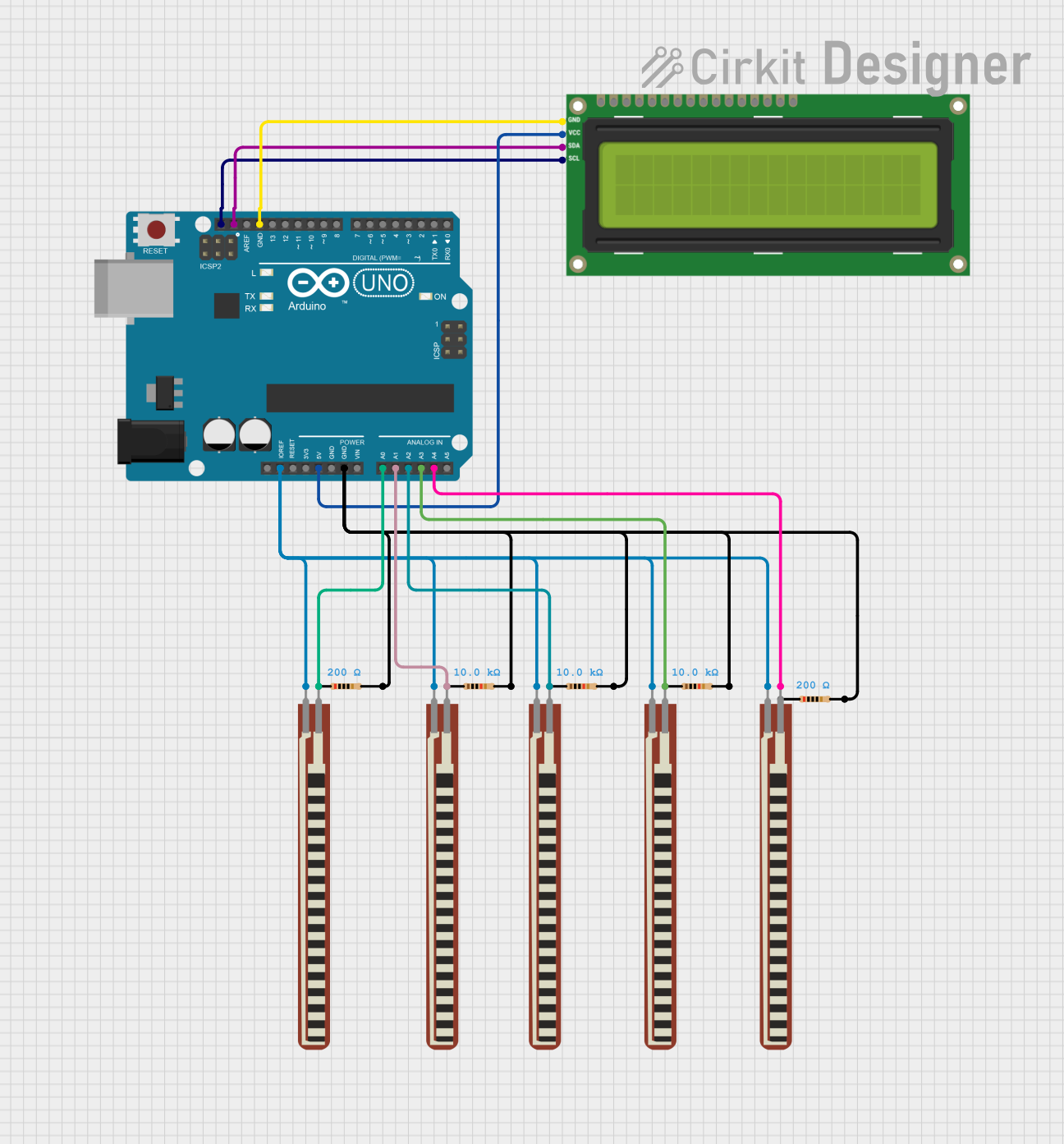
Circuit Documentation
Summary
The circuit in question is designed around an Arduino UNO microcontroller and includes an I2C LCD 16x2 screen, multiple flex resistors, and several fixed-value resistors. The Arduino UNO reads analog values from the flex resistors and displays messages on the LCD screen based on the readings. The fixed-value resistors are likely used for pull-up/pull-down configurations or to limit current.
Component List
Arduino UNO
- Microcontroller board based on the ATmega328P
- It has 14 digital input/output pins, 6 analog inputs, a 16 MHz quartz crystal, a USB connection, a power jack, an ICSP header, and a reset button.
I2C LCD 16x2 Screen
- A liquid crystal display capable of displaying 16 characters per line, with 2 lines.
- It uses the I2C communication protocol for interfacing with the Arduino.
2.2 inch Basic Flex Resistors
- Flexible resistive sensors that change resistance when bent.
- Used to detect bending or flexing.
Fixed-value Resistors
- Passive components used to create resistance in the flow of electric current.
- Values: 10,000 Ohms (10kΩ) and 200 Ohms (200Ω).
Wiring Details
Arduino UNO
- IOREF connected to flex resistors (common power reference voltage).
- 5V connected to the VCC of the I2C LCD screen.
- GND connected to one side of each fixed-value resistor and the GND of the I2C LCD screen.
- A0 - A4 connected to the other side of the flex resistors to read analog values.
- SCL connected to the SCL pin of the I2C LCD screen for clock signal in I2C communication.
- SDA connected to the SDA pin of the I2C LCD screen for data signal in I2C communication.
I2C LCD 16x2 Screen
- SCL connected to the SCL pin of the Arduino UNO.
- SDA connected to the SDA pin of the Arduino UNO.
- VCC (5V) connected to the 5V output of the Arduino UNO.
- GND connected to the ground of the Arduino UNO.
2.2 inch Basic Flex Resistors
- One side connected to the IOREF of the Arduino UNO.
- The other side connected to the analog inputs (A0 - A4) of the Arduino UNO.
Fixed-value Resistors
- One side connected to the GND of the Arduino UNO.
- The other side connected to the analog inputs (A0 - A4) of the Arduino UNO (specifically, one 200 Ohm resistor to A0).
Documented Code
int thumb;
int first_finger;
int second_finger;
int third_finger;
int fourth_finger;
#include <LiquidCrystal_I2C.h>
LiquidCrystal_I2C lcd(0x3F, 16, 2);

void setup() {
  // Initialize each pin as an input
  pinMode(A0, INPUT);
  pinMode(A1, INPUT);
  pinMode(A2, INPUT);
  pinMode(A3, INPUT);
  pinMode(A4, INPUT);

  // Start the serial communication
  Serial.begin(9600);

  // Initialize the LCD screen
  lcd.init();
}

void loop() {
  // Read the analog values from the flex sensors
  thumb = analogRead(A0);
  first_finger = analogRead(A1);
  second_finger = analogRead(A2);
  third_finger = analogRead(A3);
  fourth_finger = analogRead(A4);

  // Print the values to the serial monitor
  Serial.print(thumb);
  Serial.print("\t");
  Serial.print(first_finger);
  Serial.print("\t");
  Serial.print(second_finger);
  Serial.print("\t");
  Serial.print(third_finger);
  Serial.print("\t");
  Serial.println(fourth_finger);
  Serial.print("\t");

  // Display messages on the LCD based on the sensor readings
  if(thumb >= 20) {
    lcd.clear();
    lcd.setCursor(1,0);
    lcd.print("I NEED WATER");
    delay(500);
  } else if(first_finger >= 20) {
    lcd.clear();
    lcd.setCursor(1,0);
    lcd.print("I NEED FOOD");
    delay(500);
  } else if(second_finger >= 20) {
    lcd.clear();
    lcd.setCursor(1,0);
    lcd.print("RESTROOM");
    delay(500);
  } else if(third_finger >= 20) {
    lcd.clear();
    lcd.setCursor(1,0);
    lcd.print("MY NAME IS HELP");
    delay(500);
  } else if(fourth_finger >= 20) {
    lcd.clear();
    lcd.setCursor(1,0);
    lcd.print("I AM FROM HR");
    delay(500);
  } else {
    lcd.clear();
    lcd.setCursor(1,0);
    lcd.print("NOTHING");
  }
}
This code is designed to read the analog values from the flex sensors and display a message on the LCD screen depending on which sensor is activated. The messages correspond to different needs or statements, and the display is cleared before showing a new message. The serial print statements are used for debugging purposes to monitor the sensor values.