
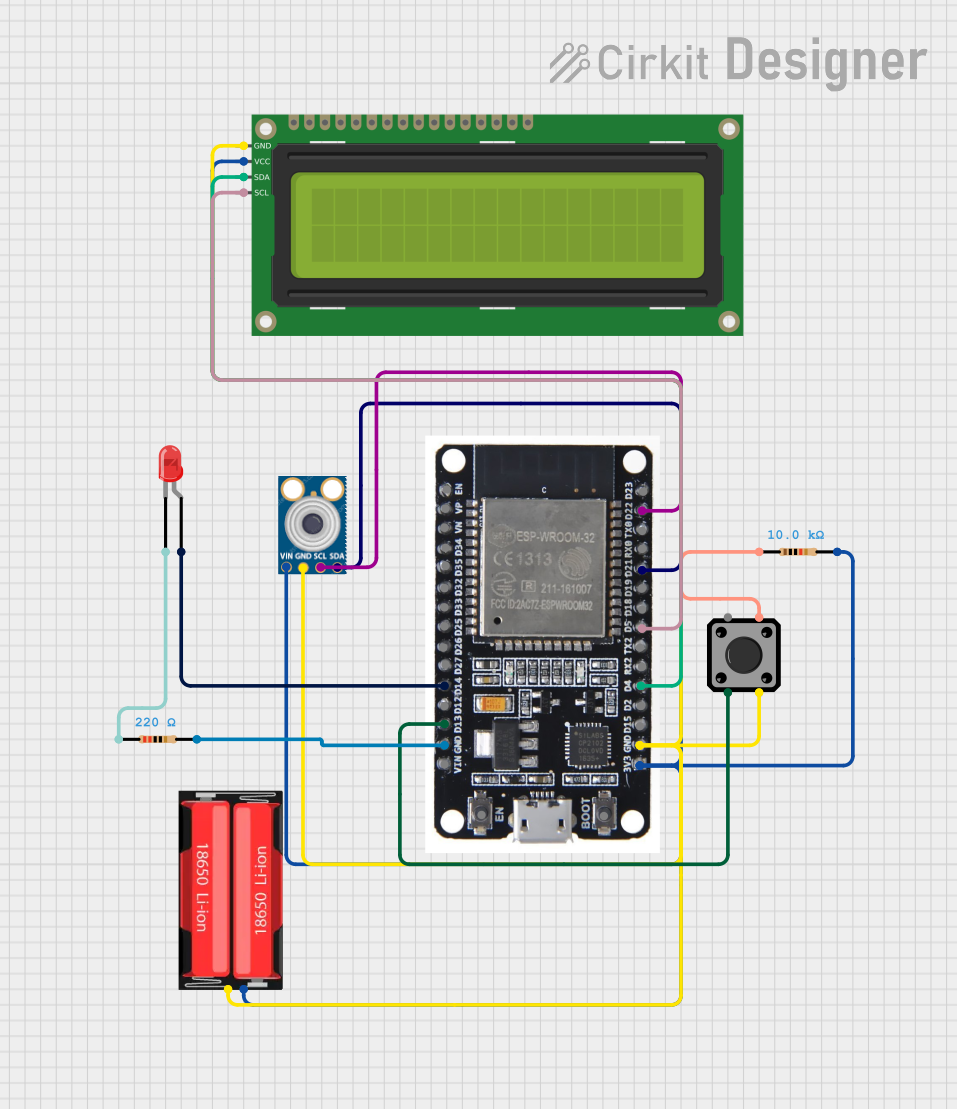
Circuit Documentation
Summary
This circuit is designed around the ESP32 microcontroller and includes a variety of components to demonstrate a simple infrared thermometer with an LCD display. The ESP32 reads temperature data from an MLX90614 infrared temperature sensor and displays the temperature on a 16x2 I2C LCD. A tactile switch is used to trigger the temperature measurement, and an LED indicates when the measurement is taking place. The circuit is powered by an 18650 Li-Ion battery, and resistors are used for LED current limiting and pull-up for the tactile switch.
Component List
ESP32
- Description: A powerful microcontroller with Wi-Fi and Bluetooth capabilities.
- Pins: EN, VP, VN, D34, D35, D32, D33, D25, D26, D27, D14, D12, D13, GND, VIN, 3V3, D15, D2, D4, RX2, TX2, D5, D18, D19, D21, RX0, TX0, D22, D23, BOOT
MLX90614 Infrared Temperature Sensor
- Description: An infrared sensor for non-contact temperature measurements.
- Pins: SDA, SCL, GND, VIN
18650 Li-Ion Battery
- Description: A rechargeable battery providing power to the circuit.
- Pins: Positive, Negative
Resistor (10k Ohms)
- Description: A resistor with a resistance of 10k Ohms.
- Pins: pin1, pin2
Tactile Switch Buttons - 12mm Square
- Description: A pushbutton switch for user input.
- Pins: 3, 1, 4, 2
LED: Two Pin (Red)
- Description: A red LED used as an indicator.
- Pins: cathode, anode
Resistor (220 Ohms)
- Description: A resistor with a resistance of 220 Ohms for LED current limiting.
- Pins: pin1, pin2
16x2 I2C LCD
- Description: A liquid crystal display for showing information.
- Pins: GND, VCC, SDA, SCL
Wiring Details
ESP32
- D14 connected to LED (anode)
- D13 connected to Tactile Switch (pin 3)
- GND connected to 18650 Li-Ion Battery (Negative), MLX90614 (GND), 16x2 I2C LCD (GND), Tactile Switch (pin 4)
- 3V3 connected to 18650 Li-Ion Battery (Positive), Resistor (10k Ohms, pin2), MLX90614 (VIN), 16x2 I2C LCD (VCC)
- D4 connected to 16x2 I2C LCD (SDA)
- D5 connected to 16x2 I2C LCD (SCL)
- D21 connected to MLX90614 (SDA)
- D22 connected to MLX90614 (SCL)
MLX90614 Infrared Temperature Sensor
- SDA connected to ESP32 (D21)
- SCL connected to ESP32 (D22)
- GND connected to ESP32 (GND)
- VIN connected to ESP32 (3V3)
18650 Li-Ion Battery
- Positive connected to ESP32 (3V3)
- Negative connected to ESP32 (GND)
Resistor (10k Ohms)
- pin1 connected to Tactile Switch (pin 2)
- pin2 connected to ESP32 (3V3)
Tactile Switch Buttons - 12mm Square
- pin 3 connected to ESP32 (D13)
- pin 4 connected to ESP32 (GND)
- pin 2 connected to Resistor (10k Ohms, pin1)
LED: Two Pin (Red)
- anode connected to ESP32 (D14)
- cathode connected to Resistor (220 Ohms, pin1)
Resistor (220 Ohms)
- pin1 connected to LED (cathode)
- pin2 connected to ESP32 (GND)
16x2 I2C LCD
- SDA connected to ESP32 (D4)
- SCL connected to ESP32 (D5)
- GND connected to ESP32 (GND)
- VCC connected to ESP32 (3V3)
Documented Code
#include <Wire.h>
#include <Adafruit_MLX90614.h>
#include <LiquidCrystal_I2C.h>

// Pin Definitions
#define BUTTON_PIN 13    // Pin where the button is connected
#define LED_PIN 14       // Pin where the LED is connected

// Create an instance of the MLX90614 sensor
Adafruit_MLX90614 mlx = Adafruit_MLX90614();

// Create an instance of the LCD with new SDA and SCL pins
LiquidCrystal_I2C lcd(0x27, 16, 2);  // LCD address 0x27, 16x2 display

void setup() {
  Serial.begin(115200);

  // Initialize button pin
  pinMode(BUTTON_PIN, INPUT_PULLUP);  // Button connected to GND

  // Initialize LED pin
  pinMode(LED_PIN, OUTPUT);

  // Initialize the MLX90614 sensor
  if (!mlx.begin()) {
    Serial.println("Error: MLX90614 not found.");
    while (1);  // Halt the program if sensor is not found
  }

  // Initialize the LCD with custom SDA and SCL pins
  Wire.begin(4, 5);  // SDA on GPIO 4, SCL on GPIO 5
  lcd.begin();
  lcd.backlight();  // Turn on the backlight of the LCD
  lcd.clear();
  lcd.setCursor(0, 0);
  lcd.print("Infrared Thermometer");
  delay(2000);  // Show the message for 2 seconds
}

void loop() {
  // Check if the button is pressed
  if (digitalRead(BUTTON_PIN) == LOW) {
    // Turn on the LED to indicate measurement is happening
    digitalWrite(LED_PIN, HIGH);

    // Read the temperature from the MLX90614 sensor
    double temp = mlx.readObjectTempC(); // Get object temperature in Celsius

    // Print the temperature to Serial Monitor
    Serial.print("Temperature: ");
    Serial.print(temp);
    Serial.println(" °C");

    // Display temperature on the LCD
    lcd.clear();
    lcd.setCursor(0, 0);
    lcd.print("Temp: ");
    lcd.print(temp);
    lcd.print(" C");

    delay(1000);  // Wait 1 second between measurements

    // Turn off the LED once the measurement is done
    digitalWrite(LED_PIN, LOW);
  }
}
This code is designed to run on the ESP32 microcontroller. It initializes the MLX90614 sensor and the 16x2 I2C LCD, reads the temperature when the button is pressed, and displays it both on the Serial Monitor and the LCD. The LED is turned on during the measurement to indicate activity.