
Arduino UNO WiFi-Based Smart Weather Station with Rain and Light Sensors
View and Edit Project In Cirkit Designer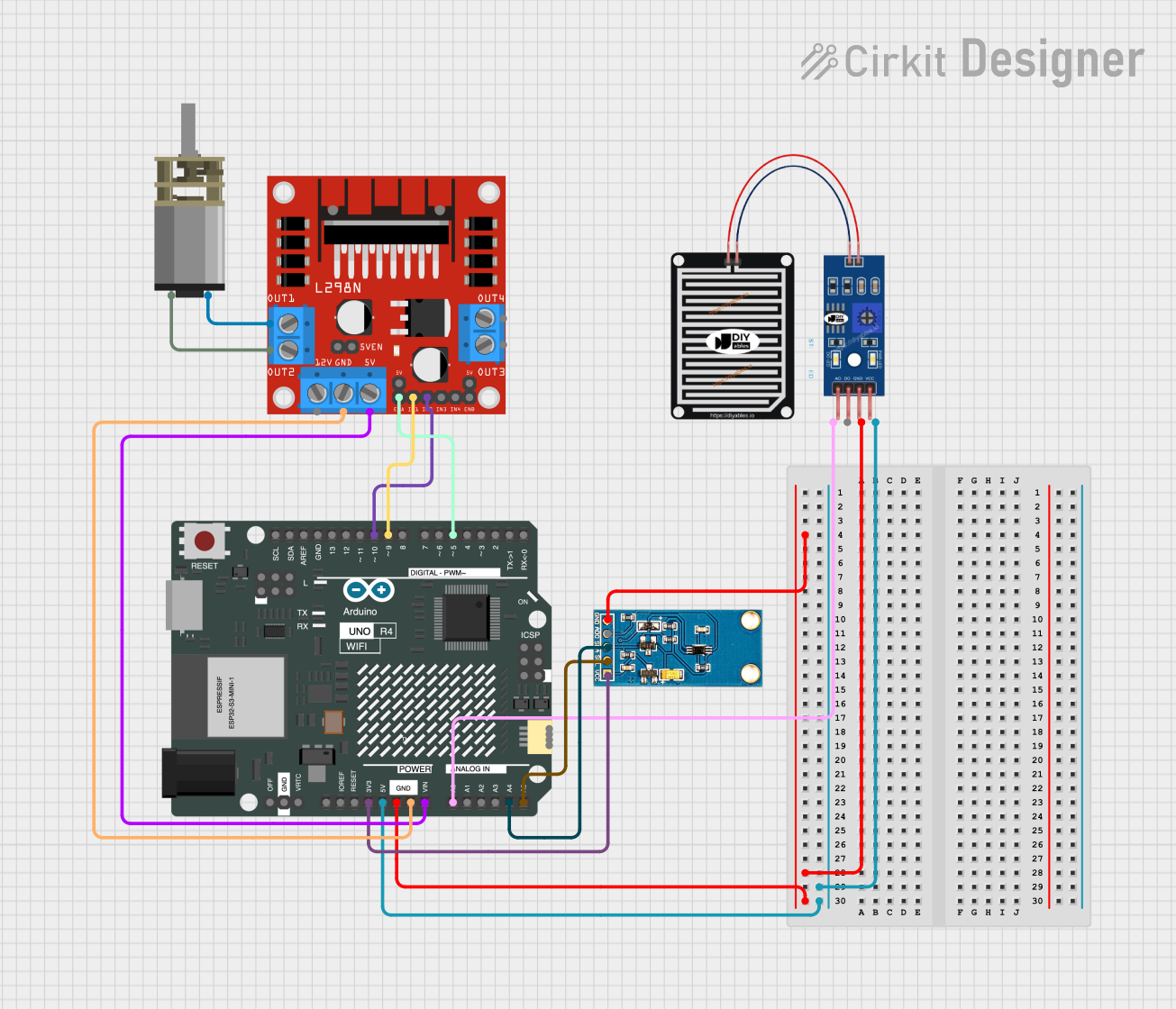
Circuit Documentation
Summary
This document provides a detailed overview of a circuit that includes a rain sensor, a light sensor, a DC motor driver, a DC mini metal gear motor, and an Arduino UNO R4 WiFi microcontroller. The circuit is designed to sense environmental conditions and control a motor based on the sensor inputs.
Component List
RAIN SENSOR
- Description: A sensor used to detect the presence of rain.
- Pins: AO, DO, GRD, VCC
L298N DC Motor Driver
- Description: A dual H-Bridge motor driver that allows control of the speed and direction of two DC motors.
- Pins: OUT1, OUT2, 12V, GND, 5V, OUT3, OUT4, 5V-ENA-JMP-I, 5V-ENA-JMP-O, +5V-J1, +5V-J2, ENA, IN1, IN2, IN3, IN4, ENB
DC Mini Metal Gear Motor
- Description: A small DC motor with metal gears for increased torque.
- Pins: IN1, IN2
Light Sensor
- Description: A sensor used to measure the intensity of light.
- Pins: VCC, SCL, SDA, ADD, GND
Arduino UNO R4 WiFi
- Description: A microcontroller board based on the ATmega328P, with built-in WiFi capabilities.
- Pins: OFF, GND, VRTC, IIC0_SCL, IIC0_SDA, 3V3, GPIO 41, GPIO 0, GPIO 42, GPIO 43, GPIO 44, BOOT, IOREF, RESET, 5V, VIN, A0, A1, A2, A3, A4, A5, RSPCKA, CIPO, COPI, D0/RX, D1/TX, D2, D3, D4, D5, D6, D7, D8, D9, D10, D11, D12, D13, AREF, SDA, SCL
Wiring Details
RAIN SENSOR
- GRD connected to GND of Arduino UNO R4 WiFi
- VCC connected to 5V of Arduino UNO R4 WiFi
- AO connected to A0 of Arduino UNO R4 WiFi
L298N DC Motor Driver
- OUT1 connected to IN2 of DC Mini Metal Gear Motor
- OUT2 connected to IN1 of DC Mini Metal Gear Motor
- GND connected to GND of Arduino UNO R4 WiFi
- 5V connected to VIN of Arduino UNO R4 WiFi
- ENA connected to D5 of Arduino UNO R4 WiFi
- IN1 connected to D9 of Arduino UNO R4 WiFi
- IN2 connected to D10 of Arduino UNO R4 WiFi
DC Mini Metal Gear Motor
- IN1 connected to OUT2 of L298N DC Motor Driver
- IN2 connected to OUT1 of L298N DC Motor Driver
Light Sensor
- GND connected to GND of Arduino UNO R4 WiFi
- VCC connected to 3V3 of Arduino UNO R4 WiFi
- SCL connected to A5 of Arduino UNO R4 WiFi
- SDA connected to A4 of Arduino UNO R4 WiFi
Documented Code
Arduino UNO R4 WiFi Code
void setup() {
  // put your setup code here, to run once:

}

void loop() {
  // put your main code here, to run repeatedly:

}
This code is a basic template for the Arduino UNO R4 WiFi. The setup() function is where you initialize your components and settings, and the loop() function is where you place the main logic that runs repeatedly.