
Arduino UNO RFID-Based Parking Access Control with IR Sensors and Servo Gate
View and Edit Project In Cirkit Designer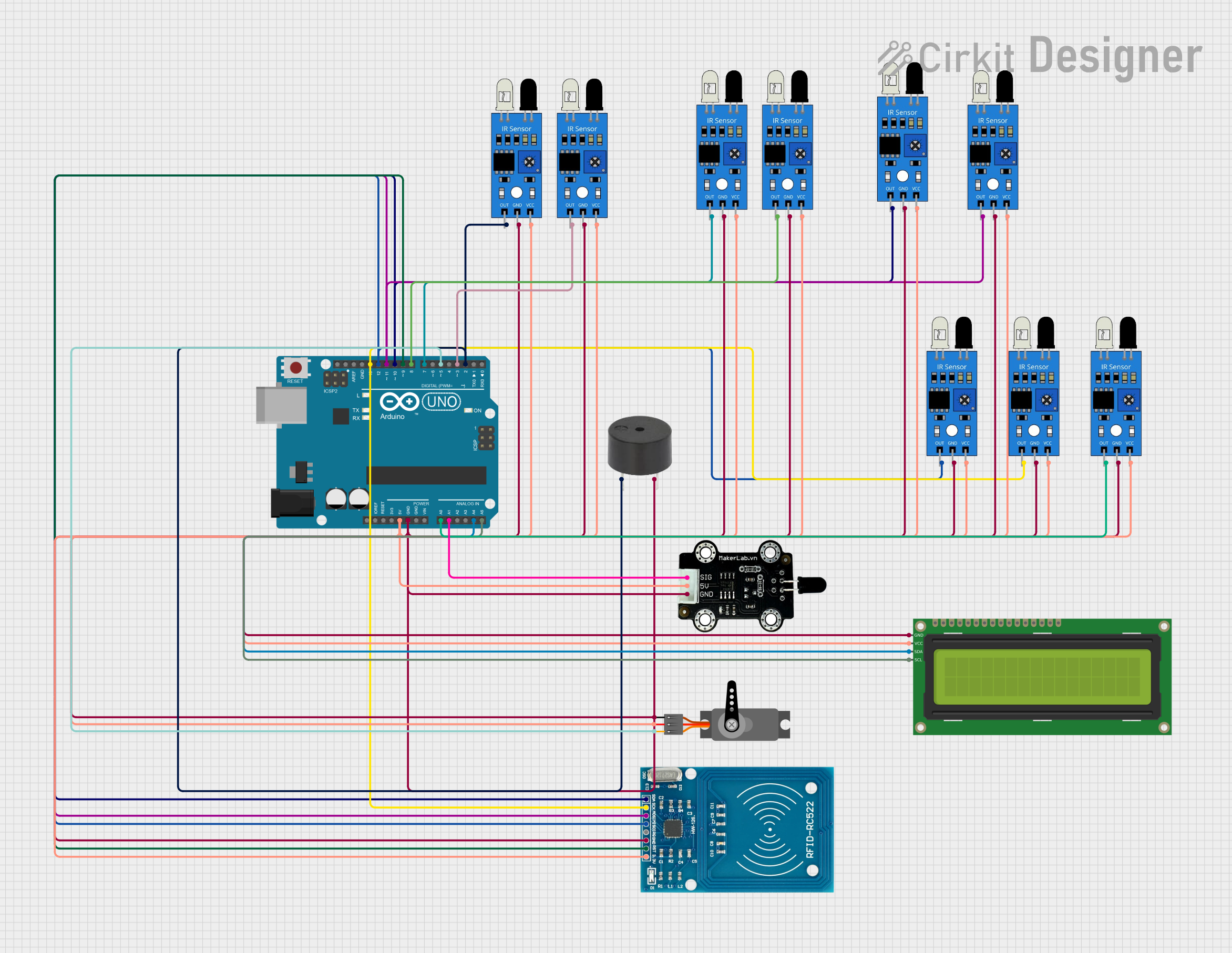
Circuit Documentation
Summary of the Circuit
This circuit is designed to manage a parking system with an RFID-based entry control, vehicle type detection, and parking space monitoring. It uses an Arduino UNO as the central microcontroller to interface with various sensors and peripherals, including IR sensors for vehicle detection, an RFID reader for access control, a servo motor to operate a gate, a buzzer for audible alerts, and an I2C LCD for displaying information.
Component List
Arduino UNO
- Microcontroller board based on the ATmega328P
- It has 14 digital input/output pins, 6 analog inputs, a 16 MHz quartz crystal, a USB connection, a power jack, an ICSP header, and a reset button.
RFID-RC522
- A radio frequency identification (RFID) reader module that operates at 13.56 MHz.
- It is used for contactless communication and can read and write to RFID tags.
IR Sensors
- Infrared sensors used for detecting the presence of a vehicle.
- Each sensor has an output pin that goes high when an object is detected.
Servo
- A motor capable of precise control of angular position.
- It is used to operate the gate in the parking system.
16x2 I2C LCD
- A liquid crystal display that can show 16 characters per line with 2 lines.
- It uses the I2C communication protocol for interfacing with the Arduino.
MKE-S04 IR Infrared Flame Sensor
- An infrared sensor designed to detect flames.
- In this circuit, it may be repurposed for vehicle detection or similar applications.
Buzzer
- An electronic buzzer that can produce a tone when powered.
- It is used for audible alerts in the parking system.
Wiring Details
Arduino UNO
5VandGNDpins are used to power the IR sensors, servo, LCD, and RFID-RC522 module.- Digital pins
D2toD13and analog pinsA0toA5are used to interface with the IR sensors, servo, RFID-RC522 module, and LCD.
RFID-RC522
VCC (3.3V)connected to the 3.3V output of the Arduino UNO.RSTconnected to digital pinD9of the Arduino UNO.GNDconnected to the ground of the Arduino UNO.IRQis not used in this circuit.MISO,MOSI,SCK,SDAconnected to digital pinsD12,D11,D13,D10respectively of the Arduino UNO.
IR Sensors
vccconnected to the 5V output of the Arduino UNO.gndconnected to the ground of the Arduino UNO.outconnected to various digital pins on the Arduino UNO for vehicle detection.
Servo
VCCconnected to the 5V output of the Arduino UNO.GNDconnected to the ground of the Arduino UNO.PWMconnected to digital pinD5of the Arduino UNO.
16x2 I2C LCD
VCCconnected to the 5V output of the Arduino UNO.GNDconnected to the ground of the Arduino UNO.SDAandSCLconnected to analog pinsA4andA5respectively of the Arduino UNO.
MKE-S04 IR Infrared Flame Sensor
5Vconnected to the 5V output of the Arduino UNO.GNDconnected to the ground of the Arduino UNO.SIGconnected to analog pinA1of the Arduino UNO.
Buzzer
PINconnected to digital pinD2of the Arduino UNO.GNDconnected to the ground of the Arduino UNO.
Documented Code
#include <Servo.h>
#include <Wire.h>
#include <LiquidCrystal_I2C.h>
#include <SPI.h>
#include <MFRC522.h>

// Pin Definitions
#define RST_PIN 9 // Reset Pin for RFID
#define SS_PIN 10 // Slave Select Pin for RFID
#define BUZZER_PIN 3 // Buzzer Pin
#define SERVO_PIN 5 // Servo Motor Pin for Gate
#define LED_PIN 6 // LED for indication

// IR Sensor Pins (5 for 2-wheelers, 3 for 3-wheelers, 2 for 4-wheelers)
int IR_SENSOR_PINS[] = {2, 3, 4, 5, 6, 7, 8, 9, 10, 11};
int laneIRSensorPins[] = {12, 13, A0}; // IR sensors in the dedicated lane

int parkingSpots[3] = {5, 3, 2}; // Available parking spots for 2W, 3W, 4W

// RFID Setup
MFRC522 rfid(SS_PIN, RST_PIN); // Create MFRC522 instance

// LCD Setup
LiquidCrystal_I2C lcd(0x27, 16, 2); // LCD with I2C address 0x27

// Servo Setup
Servo gateServo;

// Variables for traffic monitoring
int vehicleCountLane = 0; // Vehicle count in the lane
int trafficDensity = 0; // Traffic density (0: low, 1: medium, 2: high)
unsigned long lastTimeChecked = 0;
unsigned long trafficCheckInterval = 5000; // Interval to check traffic density (5 seconds)

// Define valid RFID tags
String validRFIDTag[] = {"123456789", "987654321", "112233445"};  // Example valid RFID tags

void setup() {
  // Initialize LCD
  lcd.begin(16, 2);  // 16 columns, 2 rows (standard for most LCDs)
  lcd.backlight();

  // Initialize RFID
  SPI.begin();
  rfid.PCD_Init();

  // Initialize Buzzer
  pinMode(BUZZER_PIN, OUTPUT);

  // Initialize IR sensor pins
  for (int i = 0; i < sizeof(IR_SENSOR_PINS) / sizeof(IR_SENSOR_PINS[0]); i++) {
    pinMode(IR_SENSOR_PINS[i], INPUT);
  }

  // Initialize Lane IR sensor pins
  for (int i = 0; i < sizeof(laneIRSensorPins) / sizeof(laneIRSensorPins[0]); i++) {
    pinMode(laneIRSensorPins[i], INPUT);
  }

  // Initialize Servo
  gateServo.attach(SERVO_PIN);
  gateServo.write(0); // Close gate initially

  // Start with displaying welcome message
  lcd.setCursor(0, 0);
  lcd.print("Welcome to Parking");
  delay(2000);
  lcd.clear();
}

void loop() {
  // Check for RFID tag
  if (rfid.PICC_IsNewCardPresent()) {
    if (rfid.PICC_ReadCardSerial()) {
      String rfidTag = "";
      for (byte i = 0; i < rfid.uid.size; i++) {
        rfidTag += String(rfid.uid.uidByte[i], HEX);
      }
      rfidTag.toUpperCase();

      // Validate RFID tag
      if (isValidRFID(rfidTag)) {
        // Identify vehicle type and guide to parking
        int vehicleType = getVehicleType(rfidTag); // 1=2-wheeler, 2=3-wheeler, 3=4-wheeler
        guideToParking(vehicleType);

        // Control gate
        gateServo.write(90); // Open gate
        delay(5000); // Give time to pass
        gateServo.write(0); // Close gate

      } else {
        // Invalid RFID
        triggerBuzzer();
      }
    }
  }

  // Detect parking space occupancy (check IR sensor status)
  checkParkingStatus();

  // Monitor traffic flow in the lane and update traffic density
  monitorTrafficFlow();

  // Wait for next RFID scan
  delay(1000);
}

bool isValidRFID(String tag) {
  for (int i = 0; i < sizeof(validRFIDTag) / sizeof(validRFIDTag[0]); i++) {
    if (validRFIDTag[i] == tag) {
      return true;
    }
  }
  return false;
}

int getVehicleType(String rfidTag) {
  // Logic to determine vehicle type based on RFID tag (could be from database)
  if (rfidTag == "123456789") return 1; // 2-wheeler
  if (rfidTag == "987654321") return 2; // 3-wheeler
  return 3; // 4-wheeler
}

void guideToParking(int vehicleType) {
  // Display parking guidance on LCD
  lcd.clear();
  if (vehicleType == 1) {
    lcd.print("2-Wheeler Park A");
    if (parkingSpots[0] > 0) {
      parkingSpots[0]--;
    }
  } else if (vehicleType == 2) {
    lcd.print("3