
Wi-Fi Enabled Object Detection System using ESP8266 and IR Sensor
View and Edit Project In Cirkit Designer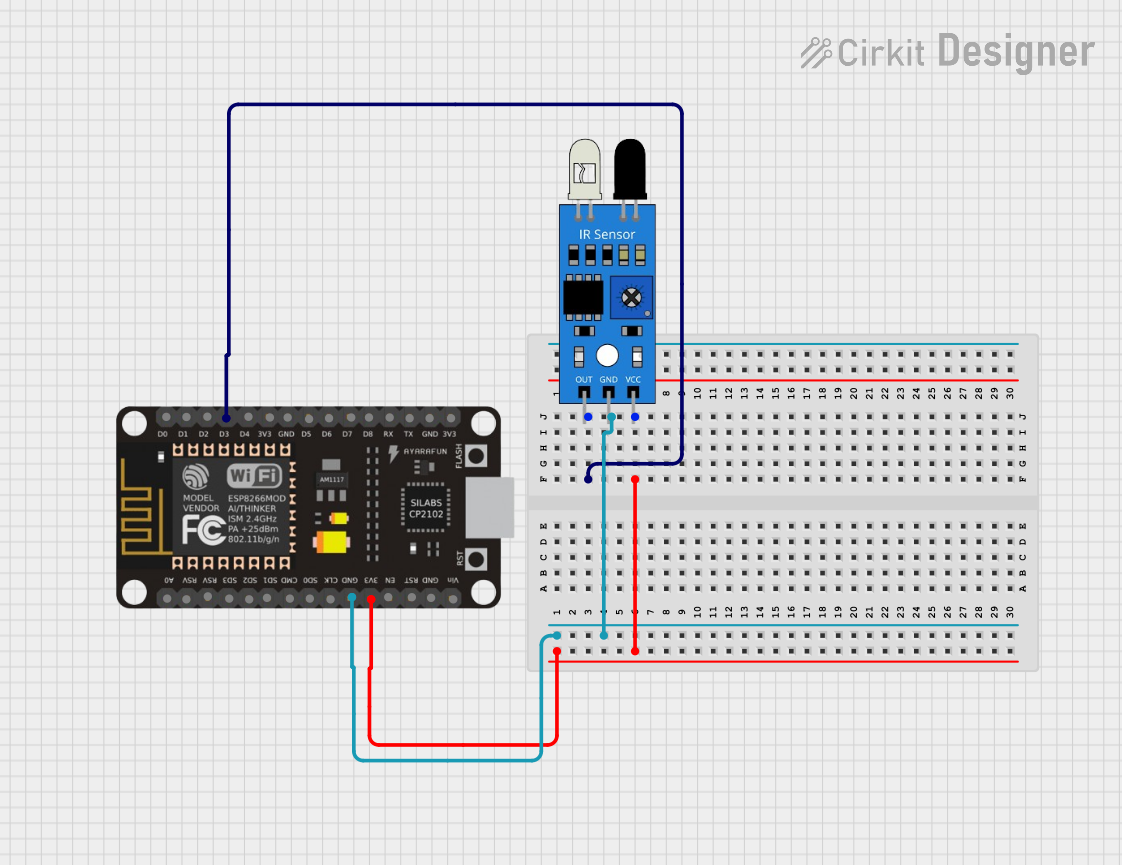
Circuit Documentation
Summary
This circuit consists of an ESP8266 NodeMCU microcontroller and an IR sensor. The ESP8266 NodeMCU is used to read data from the IR sensor and print the status to the serial monitor. The IR sensor detects the presence of an object and sends a signal to the ESP8266 NodeMCU.
Component List
ESP8266 NodeMCU
- Description: A low-cost Wi-Fi microcontroller with GPIO, PWM, ADC, I2C, and 1-Wire capabilities.
- Pins: D0, D1, D2, D3, D4, 3V3, GND, D5, D6, D7, D8, RX, TX, A0, RSV, SD3, SD2, SD1, CMD, SD0, CLK, EN, RST, VIN
IR Sensor
- Description: An infrared sensor used to detect objects.
- Pins: out, gnd, vcc
Wiring Details
ESP8266 NodeMCU
- 3V3: Connected to vcc of the IR sensor
- GND: Connected to gnd of the IR sensor
- D3: Connected to out of the IR sensor
IR Sensor
- vcc: Connected to 3V3 of the ESP8266 NodeMCU
- gnd: Connected to GND of the ESP8266 NodeMCU
- out: Connected to D3 of the ESP8266 NodeMCU
Code Documentation
Code for ESP8266 NodeMCU
#include <ESP8266WiFi.h>

const char* ssid = "H206_4G_EXT";
const char* password = "12345678";
int IRSensor = D3;

void setup() {
  pinMode(IRSensor, INPUT);
  Serial.begin(9600);
  delay(10);

  // Connect to Wi-Fi network
  Serial.println();
  Serial.print("Connecting to ");
  Serial.println(ssid);

  WiFi.begin(ssid, password);

  while (WiFi.status() != WL_CONNECTED) {
    delay(500);
    Serial.print(".");
  }

  Serial.println("");
  Serial.println("WiFi connected");
  Serial.println("IP address: ");
  Serial.println(WiFi.localIP());
}

void loop() {
  int sensorData = digitalRead(IRSensor); // Set the GPIO as Input
  if (sensorData == 1) // Check if the pin high or not
  {
    Serial.println("No Object");
    delay(1000);
  }
  else  {
    Serial.println("Object Detected");
    delay(1000);
  }
}
This code initializes the ESP8266 NodeMCU, connects it to a Wi-Fi network, and continuously reads data from the IR sensor. If an object is detected, it prints "Object Detected" to the serial monitor; otherwise, it prints "No Object".