
Arduino UNO Controlled Gas Detection System with Visual and Audible Alerts
View and Edit Project In Cirkit Designer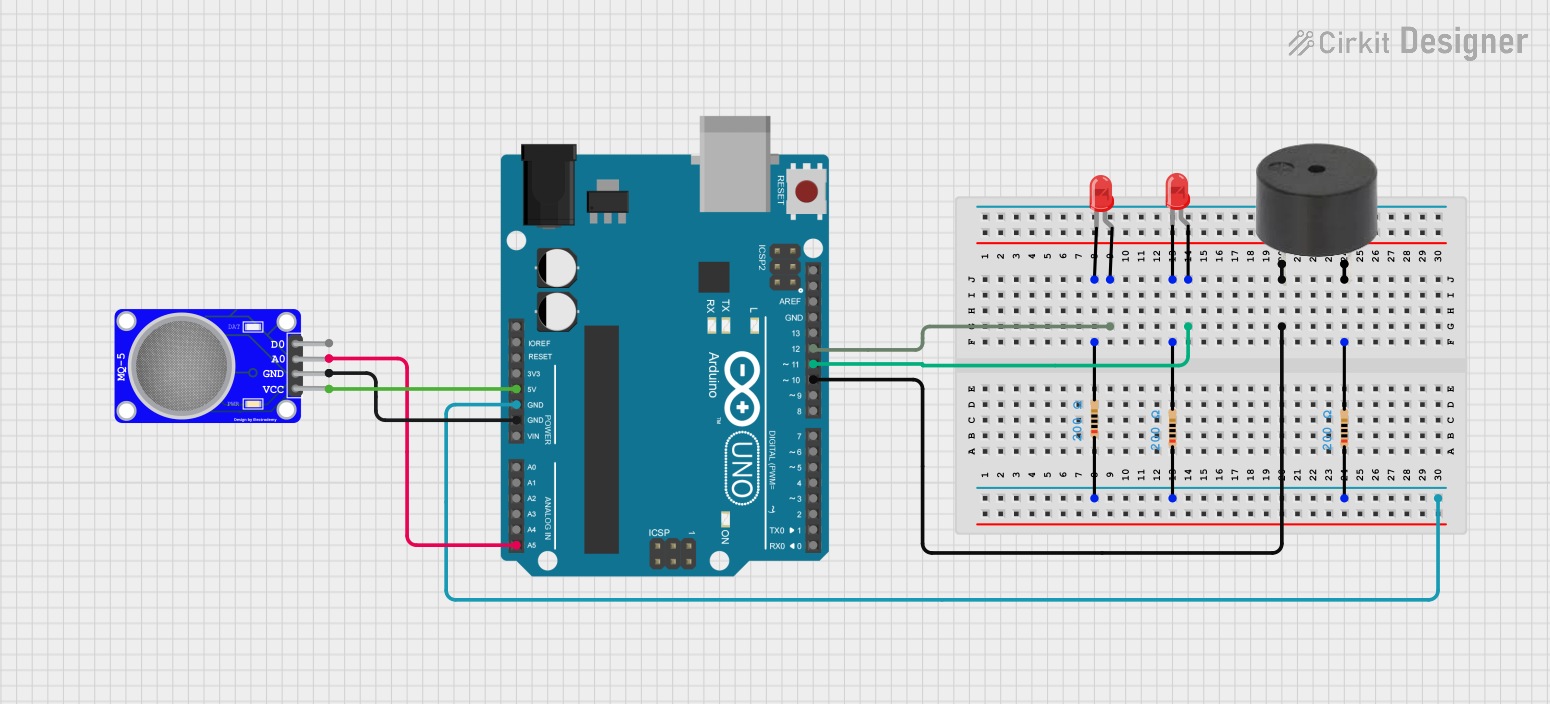
Circuit Documentation
Summary of the Circuit
This circuit is designed around an Arduino UNO microcontroller, which serves as the central processing unit for controlling various peripherals including LEDs, a buzzer, and an MQ-5 gas sensor. The circuit includes three resistors that are used to limit current to the LEDs and to interface with the buzzer. The LEDs are used as indicators, and the buzzer can provide audible alerts. The MQ-5 sensor is used to detect the presence of natural gases in the environment.
Component List
Arduino UNO
- Description: A microcontroller board based on the ATmega328P.
- Pins: UNUSED, IOREF, Reset, 3.3V, 5V, GND, Vin, A0-A5, SCL, SDA, AREF, D0-D13
Resistor (200 Ohms)
- Description: A passive two-terminal electrical component that implements electrical resistance as a circuit element.
- Resistance: 200 Ohms
LED: Two Pin (red)
- Description: A red light-emitting diode used as an indicator.
- Pins: anode, cathode
Buzzer
- Description: An electromechanical component that produces sound.
- Pins: PIN, GND
MQ-5 SENSOR NATURAL GAS
- Description: A gas sensor used for detecting natural gases.
- Pins: VCC, GND, A0, D0
Wiring Details
Arduino UNO
- D12 connected to LED (red) anode
- D11 connected to another LED (red) anode
- D10 connected to buzzer PIN
- GND connected to one terminal of each resistor and MQ-5 SENSOR NATURAL GAS GND
- 5V connected to MQ-5 SENSOR NATURAL GAS VCC
- A5 connected to MQ-5 SENSOR NATURAL GAS A0
Resistor (200 Ohms)
- One terminal (pin2) connected to LED (red) cathode
- Other terminal (pin1) connected to Arduino UNO GND
LED: Two Pin (red)
- Anode connected to Arduino UNO D12 or D11
- Cathode connected to one terminal of a 200 Ohms resistor
Buzzer
- PIN connected to Arduino UNO D10
- GND connected to one terminal of a 200 Ohms resistor
MQ-5 SENSOR NATURAL GAS
- VCC connected to Arduino UNO 5V
- GND connected to Arduino UNO GND
- A0 connected to Arduino UNO A5
Documented Code
Arduino UNO Code (sketch.ino)
void setup() {
  // put your setup code here, to run once:

}

void loop() {
  // put your main code here, to run repeatedly:

}
Additional Notes (documentation.txt)
No additional code documentation provided.