
Arduino UNO R4 WiFi Capacitive Touch MIDI Controller with Visual Feedback and Sound Playback
View and Edit Project In Cirkit Designer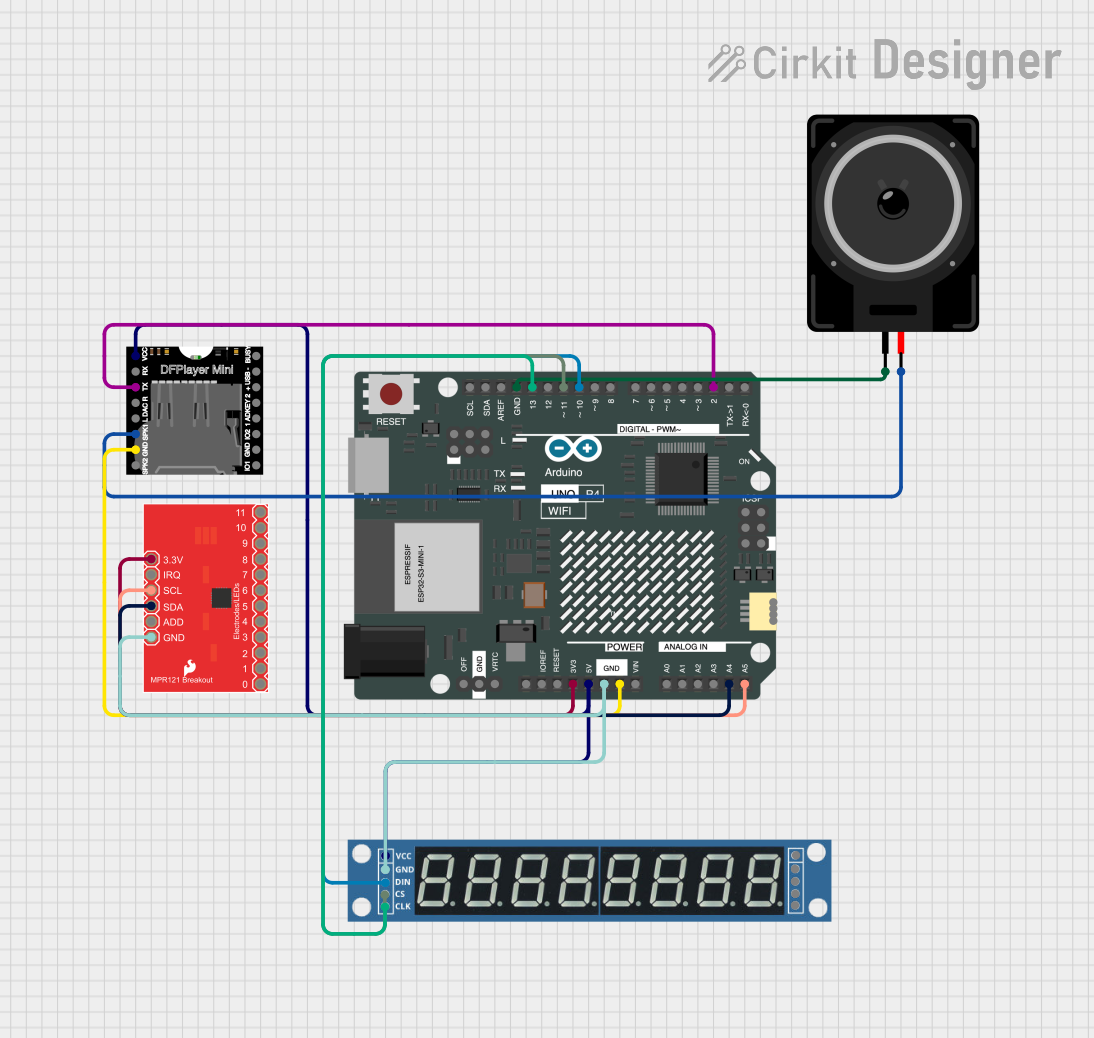
Circuit Documentation
Summary
This circuit integrates an Arduino UNO R4 WiFi microcontroller with several peripheral components including an MPR121 Capacitive Touch Sensor, a MAX7219 8-Digit 7-Segment Display, a DFPlayer MINI MP3 player, and a Loudspeaker. The circuit is designed to detect touch inputs, display visual feedback, play corresponding sounds, and send MIDI notes.
Component List
Arduino UNO R4 WiFi
- Description: A microcontroller board based on the ATmega4809, featuring built-in WiFi capabilities.
- Pins: OFF, GND, VRTC, IIC0_SCL, IIC0_SDA, 3V3, GPIO 41, GPIO 0, GPIO 42, GPIO 43, GPIO 44, BOOT, IOREF, RESET, 5V, VIN, A0, A1, A2, A3, A4, A5, RSPCKA, CIPO, COPI, D0/RX, D1/TX, D2, D3, D4, D5, D6, D7, D8, D9, D10, D11, D12, D13, AREF, SDA, SCL
MPR121 Capacitive Touch Sensor Breakout Board
- Description: A capacitive touch sensor controller that can handle up to 12 touch inputs.
- Pins: ADD, IRQ, 6, GND, 10, 2, SDA, 8, 4, 0, SCL, 11, 9, 7, 5, 3, 1, 3.3V
MAX7219 8-Digit 7-Segment Display
- Description: A display driver IC that can control up to 8 digits of 7-segment displays.
- Pins: VCC, GND, DIN, CS, CLK, DOUT, LOAD
DFPlayer MINI
- Description: A small MP3 player module that can be controlled via serial communication.
- Pins: VCC, BUSY, RX, USB -, TX, USB +, DAC_R, K2/ADC_KEY, DAC_L, K1/ADC_KEY, SPK1, IO 2, GND, SPK2, IO 1
Loudspeaker
- Description: A basic loudspeaker for audio output.
- Pins: pin1, pin2
Wiring Details
Arduino UNO R4 WiFi
- 3V3: Connected to MPR121 Capacitive Touch Sensor Breakout Board (3.3V)
- 5V: Connected to DFPlayer MINI (VCC) and MAX7219 8-Digit 7-Segment Display (VCC)
- GND: Connected to MPR121 Capacitive Touch Sensor Breakout Board (GND), MAX7219 8-Digit 7-Segment Display (GND), DFPlayer MINI (GND), and Loudspeaker (pin1)
- A4: Connected to MPR121 Capacitive Touch Sensor Breakout Board (SDA)
- A5: Connected to MPR121 Capacitive Touch Sensor Breakout Board (SCL)
- D2: Connected to DFPlayer MINI (TX)
- D10: Connected to MAX7219 8-Digit 7-Segment Display (DIN)
- D11: Connected to MAX7219 8-Digit 7-Segment Display (CS)
- D13: Connected to MAX7219 8-Digit 7-Segment Display (CLK)
MPR121 Capacitive Touch Sensor Breakout Board
- 3.3V: Connected to Arduino UNO R4 WiFi (3V3)
- GND: Connected to Arduino UNO R4 WiFi (GND)
- SDA: Connected to Arduino UNO R4 WiFi (A4)
- SCL: Connected to Arduino UNO R4 WiFi (A5)
MAX7219 8-Digit 7-Segment Display
- VCC: Connected to Arduino UNO R4 WiFi (5V)
- GND: Connected to Arduino UNO R4 WiFi (GND)
- DIN: Connected to Arduino UNO R4 WiFi (D10)
- CS: Connected to Arduino UNO R4 WiFi (D11)
- CLK: Connected to Arduino UNO R4 WiFi (D13)
DFPlayer MINI
- VCC: Connected to Arduino UNO R4 WiFi (5V)
- GND: Connected to Arduino UNO R4 WiFi (GND)
- TX: Connected to Arduino UNO R4 WiFi (D2)
- SPK1: Connected to Loudspeaker (pin2)
Loudspeaker
- pin1: Connected to Arduino UNO R4 WiFi (GND)
- pin2: Connected to DFPlayer MINI (SPK1)
Code Documentation
sketch.ino
#include <Wire.h>
#include <Adafruit_MPR121.h>
#include <MD_MAX72XX.h>
#include <SoftwareSerial.h>
#include <MIDI.h>

// MPR121 setup
Adafruit_MPR121 cap = Adafruit_MPR121();

// MAX7219 setup
#define MAX_DEVICES 1
#define DATA_PIN 11
#define CS_PIN 10
#define CLK_PIN 13
MD_MAX72XX mx = MD_MAX72XX(CS_PIN, MAX_DEVICES);

// MP3-TF module setup
SoftwareSerial mp3Serial(2, 3); // RX, TX for MP3 module

// MIDI setup
MIDI_CREATE_DEFAULT_INSTANCE();

void setup() {
    Serial.begin(115200);
    mp3Serial.begin(9600);

    // Initialize MPR121
    if (!cap.begin(0x5A)) {
        Serial.println("MPR121 not found, check wiring!");
        while (1);
    }

    // Initialize MAX7219
    mx.begin();
    mx.clear();

    // Initialize MIDI
    MIDI.begin(MIDI_CHANNEL_OMNI);

    // Test MP3 module
    mp3Serial.write(0x7E); // Send play command, as an example
}

void loop() {
    // Check touch input
    uint16_t touched = cap.touched();
    for (uint8_t i = 0; i < 12; i++) {
        if (touched & (1 << i)) {
            mx.clear();
            mx.setPoint(0, i, true); // Visual feedback
            playSound(i); // Play sound corresponding to touch pad
            sendMIDI(i); // Send MIDI note
        }
    }
}

// Function to play sound based on touch input
void playSound(uint8_t index) {
    // Simple command to play track, depends on MP3-TF module command set
    mp3Serial.write(0x7E); // Replace with specific play commands
}

// Function to send MIDI note based on touch input
void sendMIDI(uint8_t note) {
    MIDI.sendNoteOn(note + 60, 127, 1); // Note On, velocity 127, channel 1
    delay(100);
    MIDI.sendNoteOff(note + 60, 127, 1); // Note Off
}
documentation.txt
#include <Wire.h>
#include <Adafruit_MPR121.h>
#include <MD_MAX72XX.h>
#include <SoftwareSerial.h>
#include <MIDI.h>

// MPR121 setup
Adafruit_MPR121 cap = Adafruit_MPR121();

// MAX7219 setup
#define MAX_DEVICES 1
#define DATA_PIN 11
#define CS_PIN 10
#define CLK_PIN 13
MD_MAX72XX mx = MD_MAX72XX(CS_PIN, MAX_DEVICES);

// MP3-TF module setup
SoftwareSerial mp3Serial(2, 3); // RX, TX for MP3 module

// MIDI setup
MIDI_CREATE_DEFAULT_INSTANCE();

void setup() {
    Serial.begin(115200);
    mp3Serial.begin(9600);

    // Initialize MPR121
    if (!cap.begin(0x5A)) {
        Serial.println("MPR121 not found, check wiring!");
        while (1);
    }

    // Initialize MAX7219
    mx.begin();
    mx.clear();

    // Initialize MIDI
    MIDI.begin(MIDI_CHANNEL_OMNI);

    // Test MP3 module
    mp3Serial.write(0x7E); // Send play command, as an example
}

void loop() {
    // Check touch input
    uint16_t touched = cap.touched();
    for (uint8_t i = 0; i < 12; i++) {
        if (touched & (1 << i)) {
            mx.clear();
            mx.setPoint(0, i, true); // Visual feedback
            playSound(i); // Play sound corresponding to touch pad
            sendMIDI(i); // Send MIDI note
        }
    }
}

// Function to play sound based on touch input
void playSound(uint8_t index) {
    // Simple command to play track, depends on MP3-TF module command set
    mp3Serial.write(0x7E); // Replace with specific play commands
}

// Function to send MIDI note based on touch input
void sendMIDI(uint8_t note) {
    MIDI.sendNoteOn(note + 60, 127, 1); // Note On, velocity 127, channel 1
    delay