
Arduino UNO and ESP8266-Based Air Quality Monitoring System with Wi-Fi Connectivity
View and Edit Project In Cirkit Designer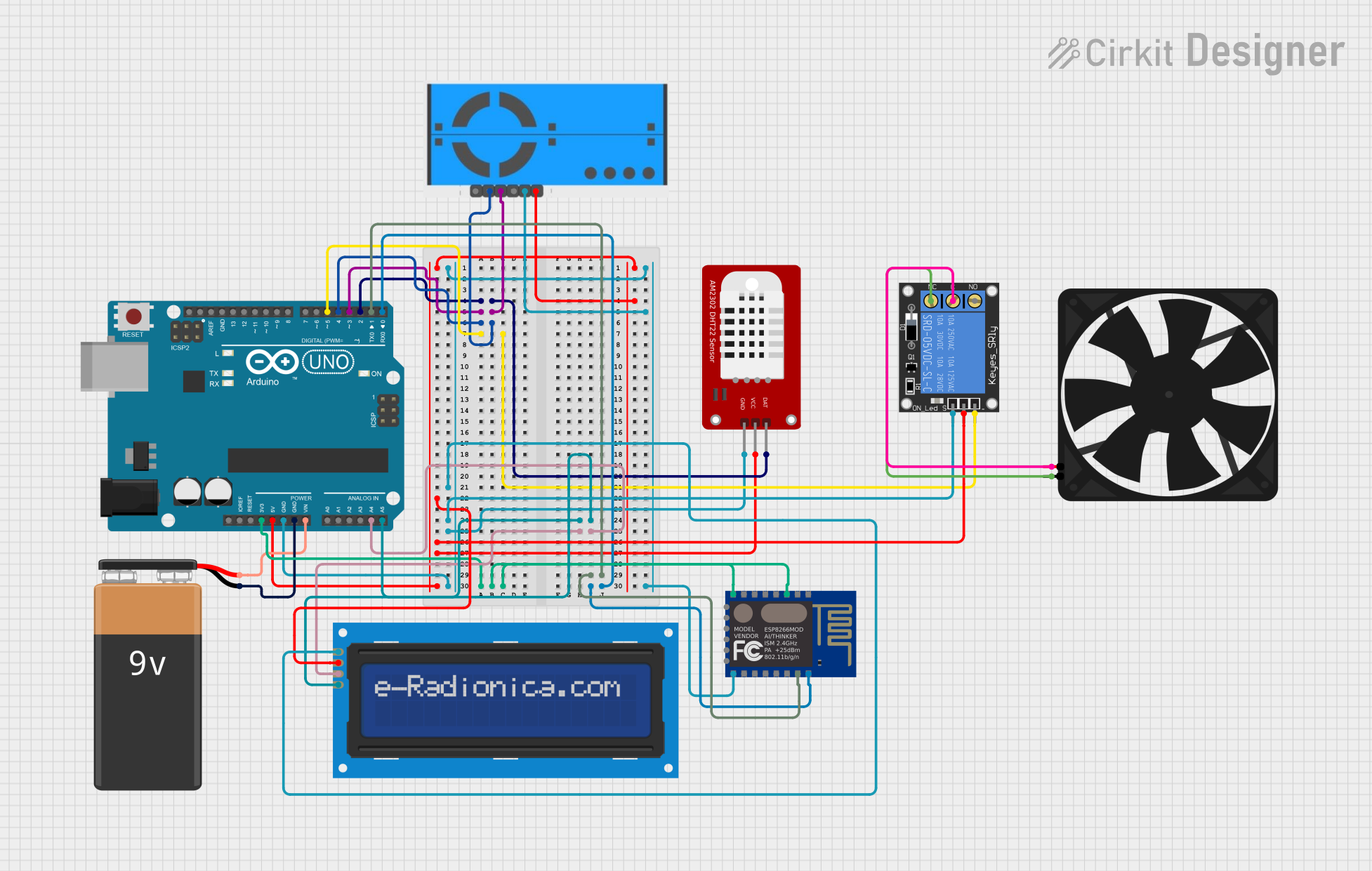
Circuit Documentation
Summary
This circuit is designed to monitor air quality and control a fan based on the readings. It utilizes an Arduino UNO as the main microcontroller, interfacing with various sensors and modules including a DHT22 temperature and humidity sensor, a PM2.5 air quality sensor, an ESP8266 WiFi module, an LCD screen, and a relay to control the fan.
Component List
Arduino UNO
- Description: Main microcontroller
- Pins: UNUSED, IOREF, Reset, 3.3V, 5V, GND, Vin, A0, A1, A2, A3, A4, A5, SCL, SDA, AREF, D13, D12, D11, D10, D9, D8, D7, D6, D5, D4, D3, D2, D1, D0
Fan
- Description: Fan controlled by the relay
- Pins: GND, 5V
DHT22
- Description: Temperature and humidity sensor
- Pins: GND, VCC, DAT
PM2.5 Air Quality Sensor and Breadboard Adapter Kit - PMS5003
- Description: Air quality sensor
- Pins: VCC, GND, SET, RX, TX, RST
ESP8266 ESP-12E WiFi Module
- Description: WiFi module for network connectivity
- Pins: GND, GPIO_15, GPIO_2, GPIO_0, GPIO_4, GPIO_5, RXD, TXD, REST, ADC_0, CH_PD, GPIO_16, GPIO_14, GPIO_12, GPIO_13, VCC, SCLK, MOSI, GPIO_10, GPIO_9, MISO, CS0
9V Battery
- Description: Power source
- Pins: -, +
LCD screen 16x2 I2C
- Description: Display module
- Pins: SCL, SDA, VCC, GND
1-Channel Relay (5V 10A)
- Description: Relay to control the fan
- Pins: NC, signal, C, power, NO, ground
Wiring Details
Arduino UNO
- D2: Connected to DAT of DHT22
- D3: Connected to RX of PM2.5 Air Quality Sensor
- D4: Connected to TX of PM2.5 Air Quality Sensor
- D5: Connected to ground of 1-Channel Relay
- A5: Connected to SCL of LCD screen
- A4: Connected to SDA of LCD screen
- D1: Connected to RXD of ESP8266
- 3.3V: Connected to CH_PD and VCC of ESP8266
- D0: Connected to TXD of ESP8266
- 5V: Connected to VCC of PM2.5 Air Quality Sensor, LCD screen, 1-Channel Relay, and DHT22
- GND: Connected to GND of PM2.5 Air Quality Sensor, LCD screen, 1-Channel Relay, DHT22, and ESP8266
- GND: Connected to - of 9V Battery
- Vin: Connected to + of 9V Battery
Fan
- GND: Connected to NC of 1-Channel Relay
- 5V: Connected to C of 1-Channel Relay
DHT22
- DAT: Connected to D2 of Arduino UNO
- VCC: Connected to 5V of Arduino UNO
- GND: Connected to GND of Arduino UNO
PM2.5 Air Quality Sensor and Breadboard Adapter Kit - PMS5003
- RX: Connected to D3 of Arduino UNO
- TX: Connected to D4 of Arduino UNO
- VCC: Connected to 5V of Arduino UNO
- GND: Connected to GND of Arduino UNO
ESP8266 ESP-12E WiFi Module
- RXD: Connected to D1 of Arduino UNO
- CH_PD: Connected to 3.3V of Arduino UNO
- VCC: Connected to 3.3V of Arduino UNO
- TXD: Connected to D0 of Arduino UNO
- GND: Connected to GND of Arduino UNO
LCD screen 16x2 I2C
- SCL: Connected to A5 of Arduino UNO
- SDA: Connected to A4 of Arduino UNO
- VCC: Connected to 5V of Arduino UNO
- GND: Connected to GND of Arduino UNO
1-Channel Relay (5V 10A)
- ground: Connected to D5 of Arduino UNO
- NC: Connected to GND of Fan
- C: Connected to 5V of Fan
- power: Connected to 5V of Arduino UNO
- signal: Connected to GND of Arduino UNO
9V Battery
- -: Connected to GND of Arduino UNO
- +: Connected to Vin of Arduino UNO
Documented Code
Arduino UNO Code (sketch.ino)
void setup() {
  // put your setup code here, to run once:

}

void loop() {
  // put your main code here, to run repeatedly:

}
Additional Documentation (documentation.txt)