
Arduino Nano Motion-Activated Audio Player with DFPlayer Mini and PIR Sensor
View and Edit Project In Cirkit Designer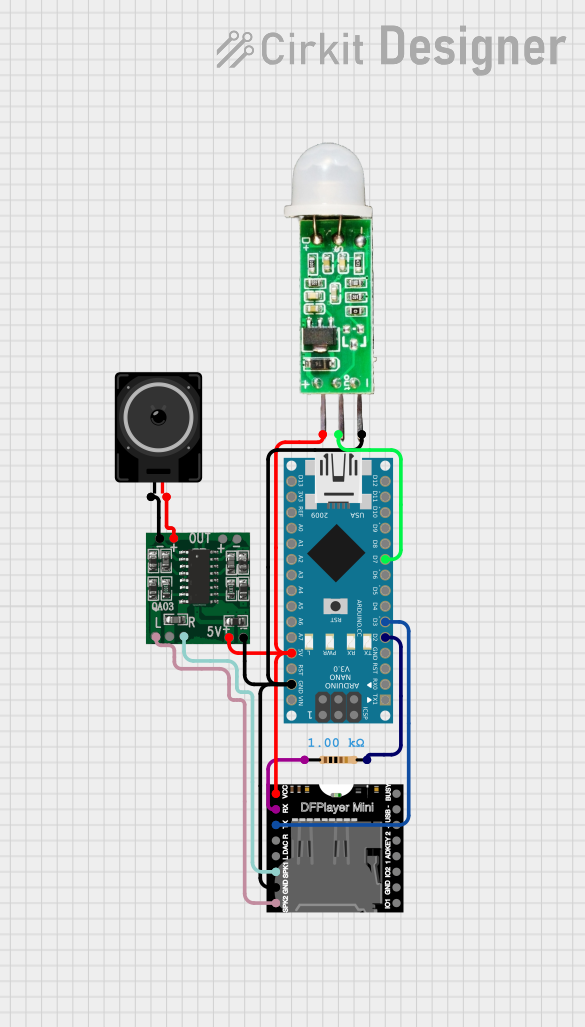
Circuit Documentation
Summary
This circuit is designed to detect motion using a PIR sensor and play an audio file through a DFPlayer Mini module when motion is detected. The audio output is amplified using a PAM8403 amplifier and played through a loudspeaker. The entire system is controlled by an Arduino Nano.
Component List
Arduino Nano
- Description: Microcontroller board based on the ATmega328P.
- Pins: D1/TX, D0/RX, RESET, GND, D2, D3, D4, D5, D6, D7, D8, D9, D10, D11/MOSI, D12/MISO, VIN, 5V, A7, A6, A5, A4, A3, A2, A1, A0, AREF, 3V3, D13/SCK
DFPlayer MINI
- Description: A small MP3 player module with a simple serial interface.
- Pins: VCC, BUSY, RX, USB -, TX, USB +, DAC_R, K2/ADC_KEY, DAC_L, K1/ADC_KEY, SPK1, IO 2, GND, SPK2, IO 1
Resistor
- Description: A 1000 Ohms resistor.
- Pins: pin1, pin2
- Properties: Resistance: 1000 Ohms
Loudspeaker
- Description: A standard loudspeaker.
- Pins: pin1, pin2
HC-SR505 Mini PIR Motion Sensing Module
- Description: A mini PIR motion sensor module.
- Pins: +, out, -
PAM8403
- Description: A small digital amplifier module.
- Pins: 5vIN+, GND/IN-, R-INPUT, GND, L-INPUT, L-, L+, R+, R-
Wiring Details
Arduino Nano
- D2: Connected to pin2 of the Resistor.
- D3: Connected to TX of the DFPlayer MINI.
- D7: Connected to out of the HC-SR505 Mini PIR Motion Sensing Module.
- GND: Connected to GND of the DFPlayer MINI, - of the HC-SR505 Mini PIR Motion Sensing Module, and GND/IN- of the PAM8403.
- 5V: Connected to VCC of the DFPlayer MINI, + of the HC-SR505 Mini PIR Motion Sensing Module, and 5vIN+ of the PAM8403.
DFPlayer MINI
- TX: Connected to D3 of the Arduino Nano.
- GND: Connected to GND of the Arduino Nano, - of the HC-SR505 Mini PIR Motion Sensing Module, and GND/IN- of the PAM8403.
- VCC: Connected to 5V of the Arduino Nano, + of the HC-SR505 Mini PIR Motion Sensing Module, and 5vIN+ of the PAM8403.
- RX: Connected to pin1 of the Resistor.
- SPK1: Connected to R-INPUT of the PAM8403.
- SPK2: Connected to L-INPUT of the PAM8403.
Resistor
- pin1: Connected to RX of the DFPlayer MINI.
- pin2: Connected to D2 of the Arduino Nano.
Loudspeaker
- pin1: Connected to L- of the PAM8403.
- pin2: Connected to L+ of the PAM8403.
HC-SR505 Mini PIR Motion Sensing Module
- out: Connected to D7 of the Arduino Nano.
- -: Connected to GND of the Arduino Nano, GND of the DFPlayer MINI, and GND/IN- of the PAM8403.
- +: Connected to 5V of the Arduino Nano, VCC of the DFPlayer MINI, and 5vIN+ of the PAM8403.
PAM8403
- 5vIN+: Connected to 5V of the Arduino Nano, VCC of the DFPlayer MINI, and + of the HC-SR505 Mini PIR Motion Sensing Module.
- GND/IN-: Connected to GND of the Arduino Nano, GND of the DFPlayer MINI, and - of the HC-SR505 Mini PIR Motion Sensing Module.
- R-INPUT: Connected to SPK1 of the DFPlayer MINI.
- L-INPUT: Connected to SPK2 of the DFPlayer MINI.
- L-: Connected to pin1 of the Loudspeaker.
- L+: Connected to pin2 of the Loudspeaker.
Documented Code
#include "SoftwareSerial.h"
#include "DFRobotDFPlayerMini.h"

// Use pins 2 and 3 to communicate with DFPlayer Mini
static const uint8_t PIN_MP3_TX = 2; // Connects to module's RX
static const uint8_t PIN_MP3_RX = 3; // Connects to module's TX
SoftwareSerial softwareSerial(PIN_MP3_RX, PIN_MP3_TX);

const int PIR = 7;
int input_val = 0;
bool motion_detected = false;

// Create the Player object
DFRobotDFPlayerMini player;

void setup() {
  // Init USB serial port for debugging
  Serial.begin(9600);
  // Init serial port for DFPlayer Mini
  softwareSerial.begin(9600);

  // Start communication with DFPlayer Mini
  if (player.begin(softwareSerial)) {
    Serial.println("OK");
    // Set volume to maximum (0 to 30)
    player.volume(30);
  } else {
    Serial.println("Connecting to DFPlayer Mini failed!");
  }
  pinMode(PIR, INPUT);  // Initialize the PIR pin as an input
}

void loop() {
  input_val = digitalRead(PIR);

  // Check if motion is detected
  if (input_val > 0 && !motion_detected) {
    player.play(1);
    Serial.println("Motion detected and audio played");
    motion_detected = true;
  }

  // Check for reset condition (no motion detected)
  if (input_val == 0) {
    Serial.println("No motion detected, resetting for next detection");
    motion_detected = false;
  }

  // Minimal delay for debouncing
  delay(50);  // Short delay to allow for sensor stabilization
}
This code initializes the Arduino Nano to communicate with the DFPlayer Mini module and the PIR sensor. When motion is detected by the PIR sensor, the DFPlayer Mini plays an audio file. The system resets when no motion is detected, allowing it to detect motion again.