
Arduino UNO Wi-Fi Environmental Monitoring System with DS18B20, pH Meter, and Turbidity Sensor
View and Edit Project In Cirkit Designer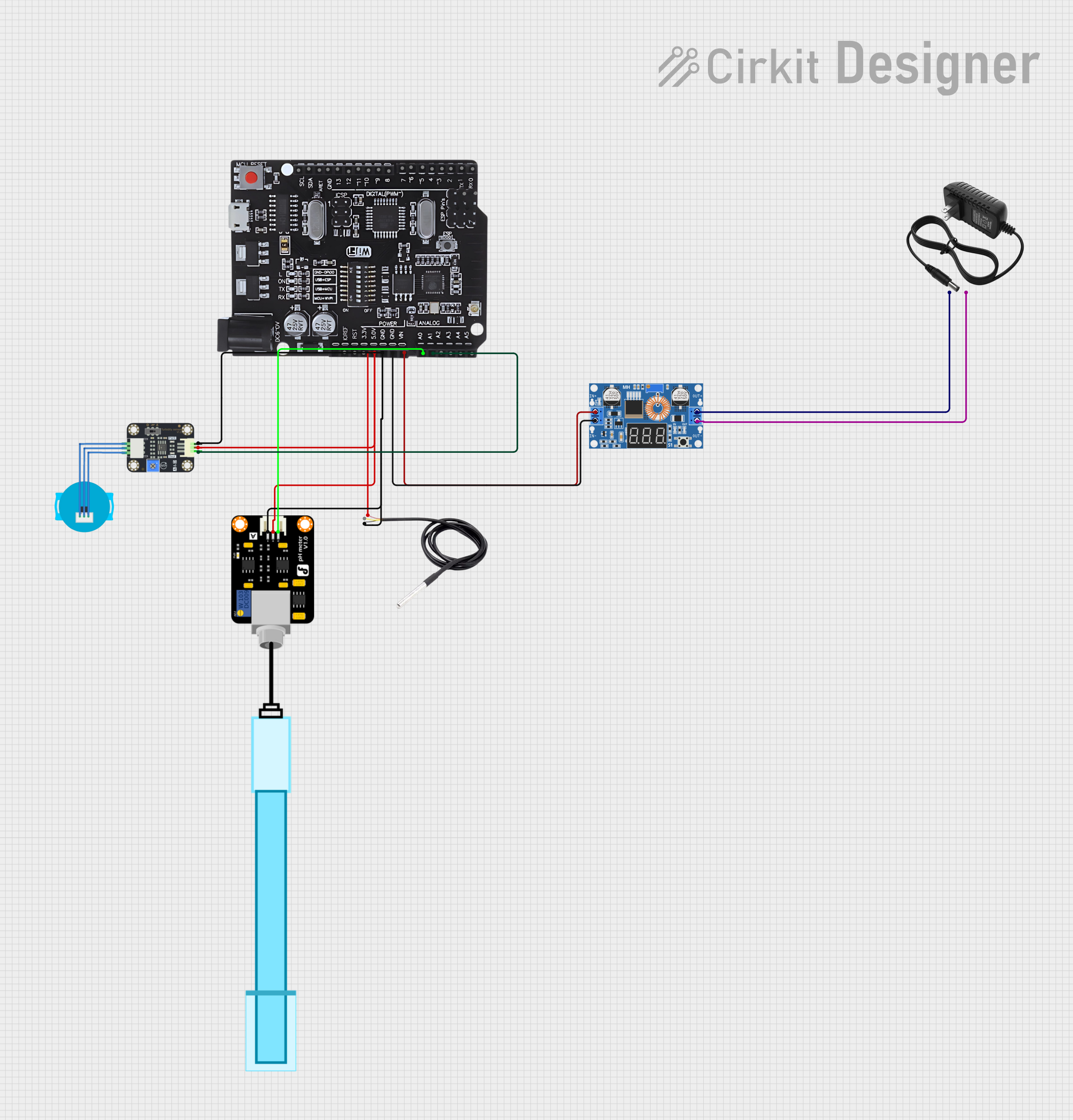
Circuit Documentation
Summary
This circuit is designed to read data from a DS18B20 temperature sensor, a pH meter, and a turbidity sensor. The data is then serialized and sent via WiFi to the Blynk app for remote monitoring. The circuit utilizes an Arduino UNO with WiFi capabilities, a DC Buck Step-down converter, and a 12V power supply to power the sensors and the microcontroller.
Component List
DS18B20
- Description: Digital temperature sensor
- Pins: signal, GND, vcc
PH Meter
- Description: Analog pH sensor
- Pins: Signal, VCC, GND
Turbidity Sensor
- Description: Analog turbidity sensor
- Pins: OUT, VCC, GND
12V Power Supply
- Description: Provides 12V DC power
- Pins: +, -
Arduino UNO+WiFi R3 ATmega328P+Node MCU ESP8266 CH340G
- Description: Microcontroller with WiFi capabilities
- Pins: KORF, RST, 3.5v, 5.0v, GND, VIN, A0, A1, A2, A3, A4, A5, SCL, SDA, ARET, 13, 12, 11, 10, 9, 8, 7, 6, 5, 4, 3, 2, 1, 0, TX, RX
XL4015 5A DC Buck Step-down
- Description: DC-DC converter to step down voltage
- Pins: Output +, Output -, Input +, Input -
Wiring Details
DS18B20
- vcc connected to 5.0v of Arduino UNO
- GND connected to GND of Arduino UNO
- signal connected to pin 2 of Arduino UNO (as defined in the code)
PH Meter
- VCC connected to 5.0v of Arduino UNO
- GND connected to GND of Arduino UNO
- Signal connected to A0 of Arduino UNO
Turbidity Sensor
- VCC connected to 5.0v of Arduino UNO
- GND connected to GND of Arduino UNO
- OUT connected to A1 of Arduino UNO
12V Power Supply
- + connected to Output + of XL4015 DC Buck Step-down
- - connected to Output - of XL4015 DC Buck Step-down
Arduino UNO+WiFi R3 ATmega328P+Node MCU ESP8266 CH340G
- 5.0v connected to vcc of DS18B20, VCC of PH Meter, and VCC of Turbidity Sensor
- GND connected to GND of DS18B20, GND of PH Meter, GND of Turbidity Sensor, and Input - of XL4015 DC Buck Step-down
- VIN connected to Input + of XL4015 DC Buck Step-down
- A0 connected to Signal of PH Meter
- A1 connected to OUT of Turbidity Sensor
XL4015 5A DC Buck Step-down
- Input + connected to VIN of Arduino UNO
- Input - connected to GND of Arduino UNO
- Output + connected to + of 12V Power Supply
- Output - connected to - of 12V Power Supply
Code Documentation
/*
 * This Arduino Sketch reads data from a DS18B20 temperature sensor, a pH meter,
 * and a turbidity sensor. The data is then serialized and sent via WiFi to the
 * Blynk app for remote monitoring.
 */

#include <OneWire.h>
#include <DallasTemperature.h>
#include <ESP8266WiFi.h>
#include <BlynkSimpleEsp8266.h>

// Data wire is connected to Arduino pin 2
#define ONE_WIRE_BUS 2

// Setup a oneWire instance to communicate with any OneWire devices
OneWire oneWire(ONE_WIRE_BUS);

// Pass our oneWire reference to Dallas Temperature sensor
DallasTemperature sensors(&oneWire);

// Blynk credentials
char auth[] = "YourAuthToken";
char ssid[] = "YourNetworkName";
char pass[] = "YourPassword";

// Sensor pins
const int pH_PIN = A0;
const int TURBIDITY_PIN = A1;

void setup() {
  // Start serial communication
  Serial.begin(9600);
  Blynk.begin(auth, ssid, pass);

  // Start up the DS18B20 library
  sensors.begin();
}

void loop() {
  Blynk.run();

  // Request temperature readings
  sensors.requestTemperatures();
  float temperature = sensors.getTempCByIndex(0);

  // Read pH value
  int pHValue = analogRead(pH_PIN);
  float pH = (pHValue * 5.0 / 1024.0) * 3.5; // Example conversion

  // Read turbidity value
  int turbidityValue = analogRead(TURBIDITY_PIN);
  float turbidity = (turbidityValue * 5.0 / 1024.0) * 2.5; // Example conversion

  // Print values to serial monitor
  Serial.print("Temperature: ");
  Serial.print(temperature);
  Serial.print(" °C, pH: ");
  Serial.print(pH);
  Serial.print(", Turbidity: ");
  Serial.println(turbidity);

  // Send values to Blynk
  Blynk.virtualWrite(V1, temperature);
  Blynk.virtualWrite(V2, pH);
  Blynk.virtualWrite(V3, turbidity);

  // Wait 2 seconds before next loop
  delay(2000);
}
This code initializes the sensors and WiFi connection, reads data from the sensors, and sends the data to the Blynk app for remote monitoring. The temperature is read from the DS18B20 sensor, the pH value is read from the pH meter, and the turbidity value is read from the turbidity sensor. The values are printed to the serial monitor and sent to the Blynk app every 2 seconds.