
Arduino-Based Environmental Monitoring System with DHT11, MQ-4, and MQ135 Sensors
View and Edit Project In Cirkit Designer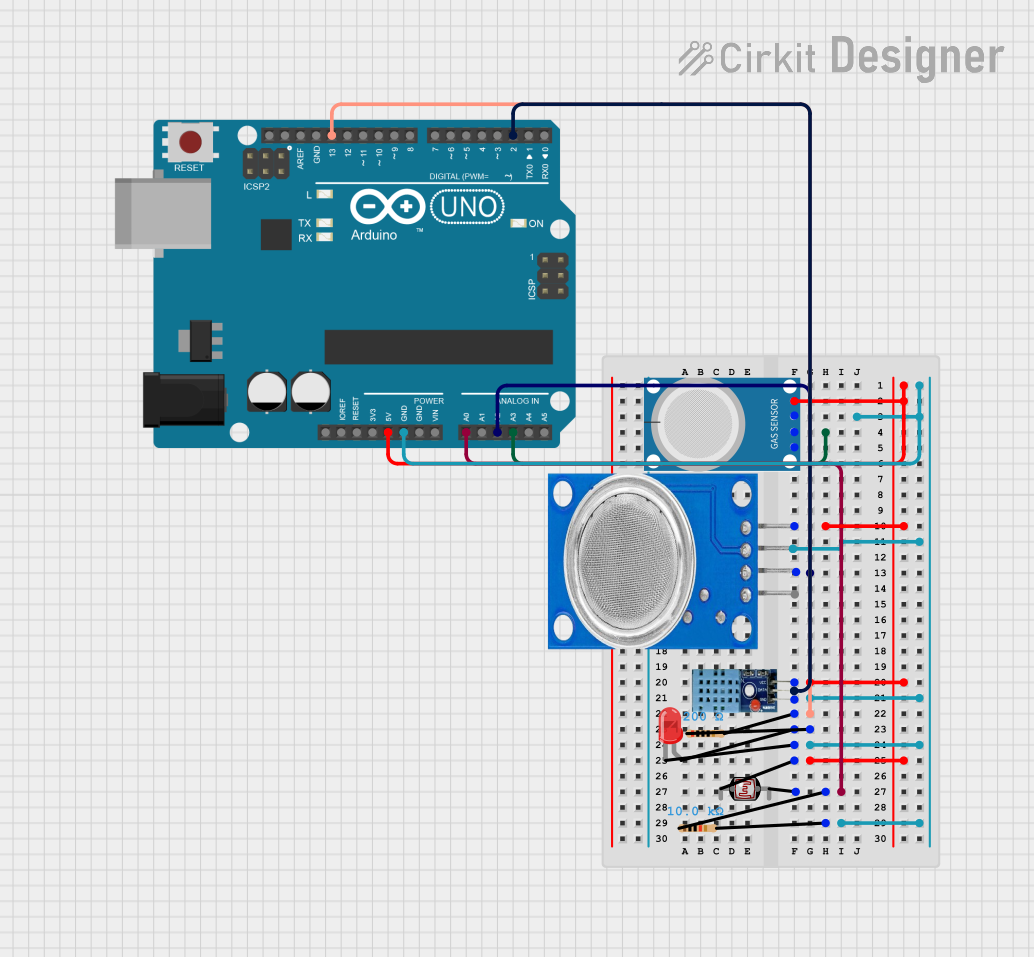
Circuit Documentation
Summary
This circuit is designed to monitor environmental conditions using various sensors and an Arduino UNO microcontroller. It includes a DHT11 sensor for temperature and humidity, an MQ-4 and MQ-135 for gas detection, a photocell (LDR) for light intensity measurement, and an LED indicator. The Arduino UNO processes the sensor data and controls the LED based on the light intensity.
Component List
DHT11
- Description: Temperature and Humidity Sensor
- Pins: VCC, GND, DATA
MQ-4
- Description: Methane Gas Sensor
- Pins: A0, D0, GND, VCC
Photocell (LDR)
- Description: Light Dependent Resistor
- Pins: pin 0, pin 1
Resistor (10k Ohms)
- Description: Resistor
- Pins: pin1, pin2
- Properties: Resistance: 10k Ohms
LED: Two Pin (red)
- Description: Red LED
- Pins: cathode, anode
Resistor (200 Ohms)
- Description: Resistor
- Pins: pin1, pin2
- Properties: Resistance: 200 Ohms
MQ-135
- Description: Air Quality Sensor
- Pins: VCC, GND, A0, D0
Arduino UNO
- Description: Microcontroller
- Pins: UNUSED, IOREF, Reset, 3.3V, 5V, GND, Vin, A0, A1, A2, A3, A4, A5, SCL, SDA, AREF, D13, D12, D11, D10, D9, D8, D7, D6, D5, D4, D3, D2, D1, D0
Wiring Details
DHT11
- VCC connected to 5V of Arduino UNO
- GND connected to GND of Arduino UNO
- DATA connected to D2 of Arduino UNO
MQ-4
- A0 connected to 5V of Arduino UNO
- D0 connected to GND of Arduino UNO
- GND connected to A3 of Arduino UNO
- VCC connected to 5V of Arduino UNO
Photocell (LDR)
- pin 0 connected to 5V of Arduino UNO
- pin 1 connected to pin1 of 10k Ohm Resistor
- pin1 of 10k Ohm Resistor connected to A0 of Arduino UNO
- pin2 of 10k Ohm Resistor connected to GND of Arduino UNO
Resistor (10k Ohms)
- pin1 connected to pin 1 of Photocell (LDR)
- pin2 connected to GND of Arduino UNO
LED: Two Pin (red)
- cathode connected to GND of Arduino UNO
- anode connected to pin1 of 200 Ohm Resistor
Resistor (200 Ohms)
- pin1 connected to anode of LED
- pin2 connected to D13 of Arduino UNO
MQ-135
- VCC connected to 5V of Arduino UNO
- GND connected to GND of Arduino UNO
- A0 connected to A2 of Arduino UNO
- D0 connected to GND of Arduino UNO
Arduino UNO
- 5V connected to VCC of DHT11, MQ-4, MQ-135, and Photocell (LDR)
- GND connected to GND of DHT11, MQ-4, MQ-135, and Resistor (10k Ohms)
- A0 connected to pin2 of 10k Ohm Resistor
- A2 connected to A0 of MQ-135
- A3 connected to GND of MQ-4
- D2 connected to DATA of DHT11
- D13 connected to pin2 of 200 Ohm Resistor
Code Documentation
#include <DHT.h>

#define DHTPIN 2
#define DHTTYPE DHT11
DHT dht(DHTPIN, DHTTYPE);

const int ledPin = 13;   // the number of the LED pin
const int ldrPin = A0;   // the number of the LDR pin
#define MQ135_PIN A1     // Analog pin connected to MQ-135
#define RLOAD 10.0
#define R0 10.0
const float SCALING_FACTOR = -0.42;  // Slope from datasheet (Provided in the Drive)
const float INTERCEPT = 1.1;         // Y-intercept from datasheet (Provided in the Drive)

void setup() {
  Serial.begin(9600); // Start serial communication
  dht.begin();        // Initialize the DHT sensor
  pinMode(ledPin, OUTPUT);  // initialize the LED pin as an output
  pinMode(ldrPin, INPUT);   // initialize the LDR pin as an input
}

void loop() {
  float humidity = dht.readHumidity();
  float temperature = dht.readTemperature();
  if (isnan(humidity) || isnan(temperature)) {
    Serial.println("Failed to read from DHT sensor!");
  } else {
    Serial.print("Humidity: ");
    Serial.print(humidity);
    Serial.print(" %\t");
    Serial.print("Temperature: ");
    Serial.print(temperature);
    Serial.println(" *C");
  }

  int ldrStatus = analogRead(ldrPin);   // read the status of the LDR value
  Serial.print("LDR reading : ");
  Serial.println(ldrStatus);

  if (ldrStatus <= 15) {
    digitalWrite(ledPin, LOW);  // turn LED on
  } else {
    digitalWrite(ledPin, HIGH);
    Serial.println("Light intensity is high!");
  }

  int sensorValue = analogRead(MQ135_PIN);
  Serial.print("CO2 concentration : ");
  Serial.println(sensorValue);
  Serial.println("---------------");
  delay(2000);
}
This code initializes the DHT11 sensor, reads temperature and humidity values, and prints them to the serial monitor. It also reads the LDR value to control the LED and reads the MQ-135 sensor value to monitor CO2 concentration.