
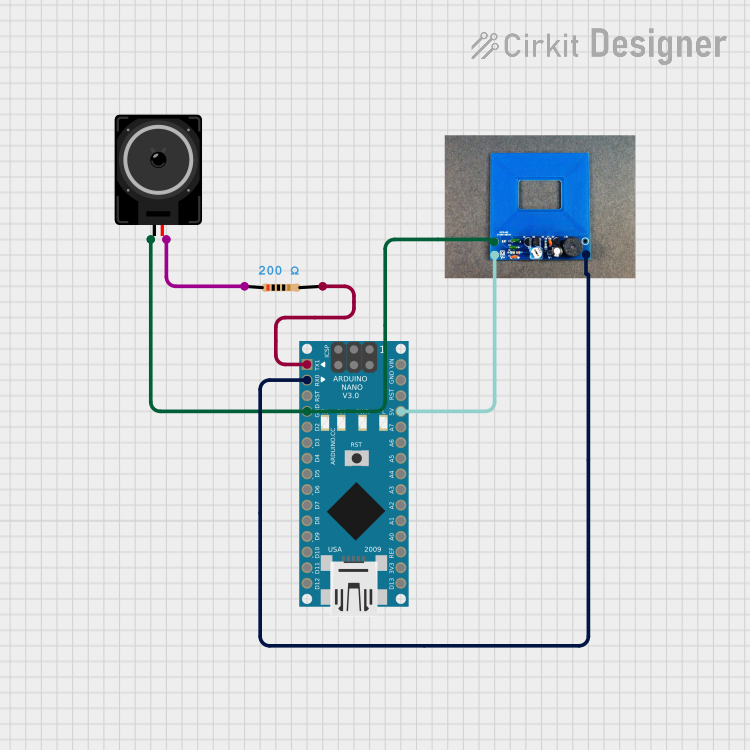
Circuit Documentation
Summary
This circuit is designed to detect the presence of metal using a metal detector module and provide audio feedback through a loudspeaker. The circuit is controlled by an Arduino Nano microcontroller, which processes the input from the metal detector and drives the loudspeaker accordingly. A resistor is used to limit the current to the loudspeaker.
Component List
Loudspeaker
- Description: Converts electrical signals into sound.
- Pins: pin1, pin2
Resistor
- Description: Limits the current in the circuit.
- Pins: pin1, pin2
- Properties:
- Resistance: 200 Ohms
Metal Detector
- Description: Detects the presence of metal objects.
- Pins: VCC, GND, D
Arduino Nano
- Description: Microcontroller used to control the circuit.
- Pins: D1/TX, D0/RX, RESET, GND, D2, D3, D4, D5, D6, D7, D8, D9, D10, D11/MOSI, D12/MISO, VIN, 5V, A7, A6, A5, A4, A3, A2, A1, A0, AREF, 3V3, D13/SCK
Wiring Details
Loudspeaker
pin1 is connected to:
- Metal Detector GND
- Arduino Nano GND
pin2 is connected to:
- Resistor pin1
Resistor
pin1 is connected to:
- Loudspeaker pin2
pin2 is connected to:
- Arduino Nano D1/TX
Metal Detector
VCC is connected to:
- Arduino Nano 5V
GND is connected to:
- Loudspeaker pin1
- Arduino Nano GND
D is connected to:
- Arduino Nano D0/RX
Arduino Nano
GND is connected to:
- Loudspeaker pin1
- Metal Detector GND
D1/TX is connected to:
- Resistor pin2
5V is connected to:
- Metal Detector VCC
D0/RX is connected to:
- Metal Detector D
Code Documentation
Arduino Nano Code
#include <Talkie.h>
#include <Vocab_US_Large.h>
#include <Vocab_Special.h>

const int sensorPin = 2;
const int speakerPin = 3;

// The message said by (TTS)
const uint8_t openMessage[] = {sp2_IS, sp2_S, sp2_O, sp2_P, sp2_E, sp2_N};
const uint8_t closeMessage[] = {sp2_IS, sp2_S, sp2_C, sp2_L, sp2_O, sp2_S, sp2_E, sp2_D};

// Previous sensor state
int lastState = LOW;

Talkie voice;

void setup() {
  pinMode(sensorPin, INPUT);
  pinMode(speakerPin, OUTPUT);
}

void loop() {
  int presentState = digitalRead(sensorPin);

  // Detecting change in state
  if (presentState == HIGH && lastState == LOW) {
    voice.say(openMessage);
  }

  // Detecting change (closed)
  if (presentState == LOW && lastState == HIGH) {
    voice.say(closeMessage);
  }

  lastState = presentState;
  delay(10); // default
}
This code is designed to read the state of the metal detector and provide audio feedback through the loudspeaker. When the metal detector detects metal, the Arduino Nano will play a pre-defined "open" message. When the metal detector no longer detects metal, the Arduino Nano will play a pre-defined "closed" message. The Talkie library is used for text-to-speech functionality.