
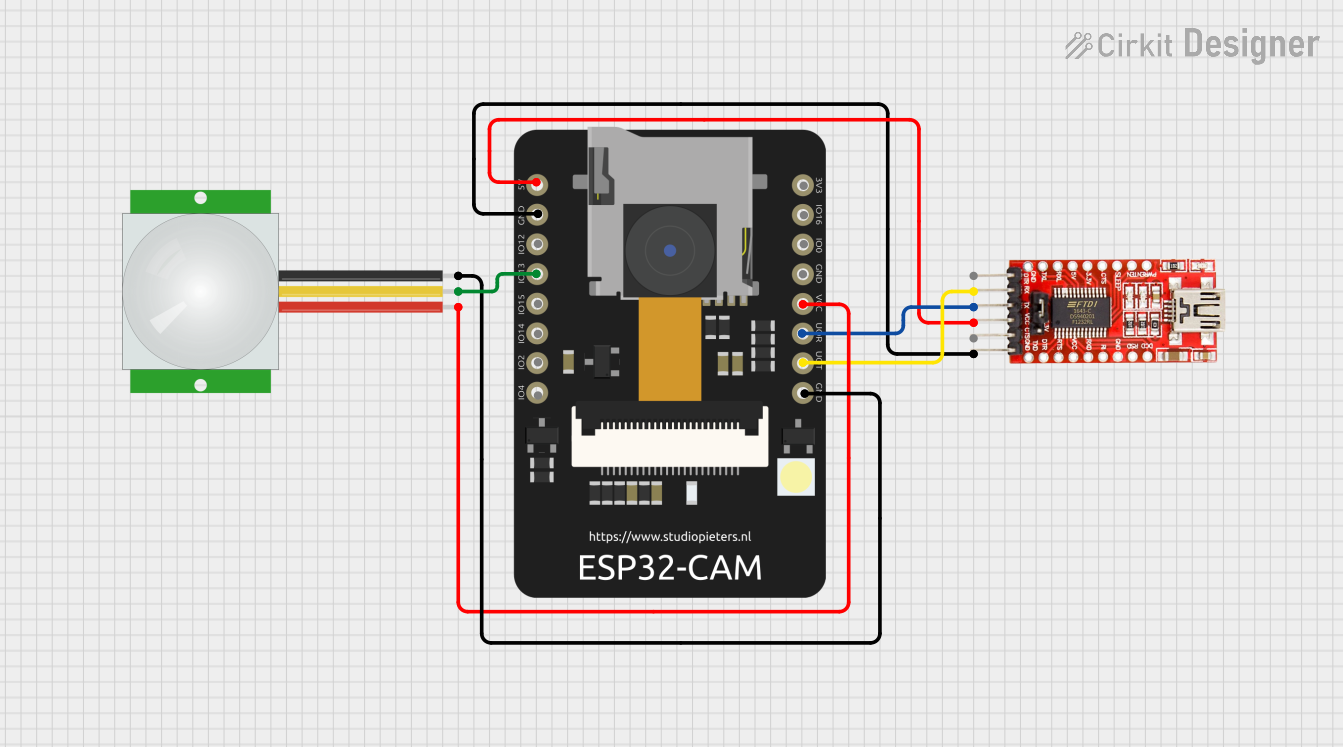
Circuit Documentation
Summary
This circuit involves an ESP32 CAM module, an FTDI Programmer, and a PIR sensor. The ESP32 CAM is used for capturing images and sending them over WiFi. The FTDI Programmer is used for programming the ESP32 CAM, and the PIR sensor is used for motion detection. The ESP32 CAM is programmed to capture images when motion is detected and send them to a server for analysis.
Component List
ESP32 CAM
- Description: A microcontroller with an integrated camera module.
- Pins: 5V, GND, GPIO12, GPIO13, GPIO15, GPIO14, GPIO2, GPIO4, 3.3V, GPIO16, GPIO0, 3.3V / 5V / P_OUT, GPIO3 / RX, GPIO1 / TX
FTDI Programmer
- Description: A USB-to-serial adapter used for programming the ESP32 CAM.
- Pins: DTR, RX, TX, VCC, CTS, GND
PIR Sensor
- Description: A sensor used to detect motion.
- Pins: VDD, SIG, GND
Wiring Details
ESP32 CAM
- 5V: Connected to FTDI Programmer VCC
- GND: Connected to FTDI Programmer GND and PIR Sensor GND
- GPIO13: Connected to PIR Sensor SIG
- 3.3V / 5V / P_OUT: Connected to PIR Sensor VDD
- GPIO3 / RX: Connected to FTDI Programmer TX
- GPIO1 / TX: Connected to FTDI Programmer RX
FTDI Programmer
- VCC: Connected to ESP32 CAM 5V
- GND: Connected to ESP32 CAM GND
- TX: Connected to ESP32 CAM GPIO3 / RX
- RX: Connected to ESP32 CAM GPIO1 / TX
PIR Sensor
- VDD: Connected to ESP32 CAM 3.3V / 5V / P_OUT
- SIG: Connected to ESP32 CAM GPIO13
- GND: Connected to ESP32 CAM GND
Code Documentation
Overview
The code for the ESP32 CAM is written in Arduino and includes libraries for WiFi, HTTP, camera control, and WebSockets. The main functionality includes initializing the camera and WiFi, detecting motion using the PIR sensor, capturing images, and sending them to a server for analysis.
Code Breakdown
Libraries and Configuration
#include <Arduino.h>
#include <WiFi.h>
#include <HTTPClient.h>
#include <esp_camera.h>
#include <base64.h>
#include <ArduinoJson.h>
#include <NTPClient.h>
#include <WiFiUdp.h>
#include <WebSocketsClient.h>

// WiFi Configuration
#define WIFI_SSID "Gagan A Ayi"
#define WIFI_PASSWORD "29842984"
#define WEBSOCKET_SERVER "ws://localhost:12345"
#define SERVER_URL "http://localhost/fras/api"

// ESP32-CAM Pin Configuration
#define CAMERA_MODEL_AI_THINKER
#define PWDN_GPIO_NUM     32
#define RESET_GPIO_NUM    -1
#define XCLK_GPIO_NUM      0
#define SIOD_GPIO_NUM     26
#define SIOC_GPIO_NUM     27
#define Y9_GPIO_NUM       35
#define Y8_GPIO_NUM       34
#define Y7_GPIO_NUM       39
#define Y6_GPIO_NUM       36
#define Y5_GPIO_NUM       21
#define Y4_GPIO_NUM       19
#define Y3_GPIO_NUM       18
#define Y2_GPIO_NUM        5
#define VSYNC_GPIO_NUM    25
#define HREF_GPIO_NUM     23
#define PCLK_GPIO_NUM     22

// Sensor Configurations
#define PIR_SENSOR_PIN 13
#define LED_INDICATOR_PIN 4

// System Configuration
#define CONFIDENCE_THRESHOLD 0.7
#define NO_MOTION_TIMEOUT 5000  // 5 seconds to confirm no motion

// Global Variables
WiFiUDP ntpUDP;
NTPClient timeClient(ntpUDP, "pool.ntp.org");
WebSocketsClient webSocket;

String currentClassroom = "";
String currentSubject = "";
String assignedTeacher = "";
unsigned long lastMotionTime = 0;
bool isCameraActive = false;
Function Prototypes
bool initializeCamera();
bool initializeWiFi();
void captureAndSendFrame();
bool noHumansInFrame();
void syncClassroomContext();
Setup Function
void setup() {
  Serial.begin(115200);

  // Initialize Pins
  pinMode(PIR_SENSOR_PIN, INPUT);
  pinMode(LED_INDICATOR_PIN, OUTPUT);

  // Initialize Components
  if (!initializeCamera()) {
    Serial.println("Camera initialization failed!");
    return;
  }

  if (!initializeWiFi()) {
    Serial.println("WiFi connection failed!");
    return;
  }

  // Initialize Time Client
  timeClient.begin();
  timeClient.setTimeOffset(19800);  // Indian Standard Time

  // Initialize WebSocket
  String host = "localhost";
  uint16_t port = 12345;
  String url = "/";
  String protocol = "arduino";
  webSocket.begin(host, port, url, protocol);
}
Loop Function
void loop() {
  // Periodically sync classroom context
  static unsigned long lastContextSync = 0;
  if (millis() - lastContextSync > 300000) {  // Every 5 minutes
    syncClassroomContext();
    lastContextSync = millis();
  }

  // Motion Detection
  if (!isCameraActive && digitalRead(PIR_SENSOR_PIN) == HIGH) {
    // Turn on the camera and LED indicator
    lastMotionTime = millis();
    digitalWrite(LED_INDICATOR_PIN, HIGH);
    isCameraActive = true;
    captureAndSendFrame();
  }

  // Check for turning off the camera and LED indicator
  if (isCameraActive && millis() - lastMotionTime > NO_MOTION_TIMEOUT) {
    if (noHumansInFrame()) {
      digitalWrite(LED_INDICATOR_PIN, LOW);
      isCameraActive = false;
      Serial.println("No humans detected, turning off camera and LED");
    } else {
      lastMotionTime = millis();  // Reset the timer if a human is detected
    }
  }

  webSocket.loop();
}
Initialize Camera Function
bool initializeCamera() {
  camera_config_t config;
  config.ledc_channel = LEDC_CHANNEL_0;
  config.ledc_timer = LEDC_TIMER_0;
  config.pin_d0 = Y2_GPIO_NUM;
  config.pin_d1 = Y3_GPIO_NUM;
  config.pin_d2 = Y4_GPIO_NUM;
  config.pin_d3 = Y5_GPIO_NUM;
  config.pin_d4 = Y6_GPIO_NUM;
  config.pin_d5 = Y7_GPIO_NUM;
  config.pin_d6 = Y8_GPIO_NUM;
  config.pin_d7 = Y9_GPIO_NUM;
  config.pin_xclk = XCLK_GPIO_NUM;
  config.pin_pclk = PCLK_GPIO_NUM;
  config.pin_vsync = VSYNC_GPIO_NUM;
  config.pin_href = HREF_GPIO_NUM;
  config.pin_sccb_sda = SIOD_GPIO_NUM;
  config.pin_sccb_scl = SIOC_GPIO_NUM;
  config.pin_pwdn = PWDN_GPIO_NUM;
  config.pin_reset = RESET_GPIO_NUM;

  config.xclk_freq_hz = 20000000;
  config.pixel_format = PIXFORMAT_JPEG;
  config.frame_size = FRAMESIZE_SVGA;
  config.jpeg_quality = 10;
  config.fb_count = 2;

  return esp_camera_init(&config) == ESP_OK;
}
Initialize WiFi Function
bool initializeWiFi() {
  WiFi.begin(WIFI_SSID, WIFI_PASSWORD);

  int attempts = 0;
  while (WiFi.status() != WL_CONNECTED && attempts < 20) {
    delay(500);
    Serial.print(".");
    attempts++;
  }

  return WiFi.status() == WL_CONNECTED;
}
Capture and Send Frame Function
void captureAndSendFrame() {
  camera_fb_t* fb = esp_camera_fb_get();
  if (!fb) {
    Serial.println("Camera capture failed");
    return;
  }

  // Base64 encode image
  String encodedImage = base64::encode(fb->buf, fb->len);

  // Send to server
  webSocket.sendTXT(encodedImage);

  esp_camera_fb_return(fb);
}
No Humans in Frame Function
bool noHumansInFrame() {
  camera_fb_t* fb = esp_camera_fb_get();
  if (!fb) {
    Serial.println("Camera capture failed");
    return false;
  }

  // Base64 encode image
  String encodedImage = base64::encode(fb->buf, fb->len);
  esp_camera_fb_return(fb);

  // Send to server for analysis
  HTTPClient http;
  http.begin(SERVER_URL + String("/analyze"));
  http.addHeader("Content-Type", "application/json");

  DynamicJsonDocument payload(512);
  payload["image"] = encodedImage;