
Arduino Uno and SIM900A-Based Water Level Monitoring System with SMS Notifications
View and Edit Project In Cirkit Designer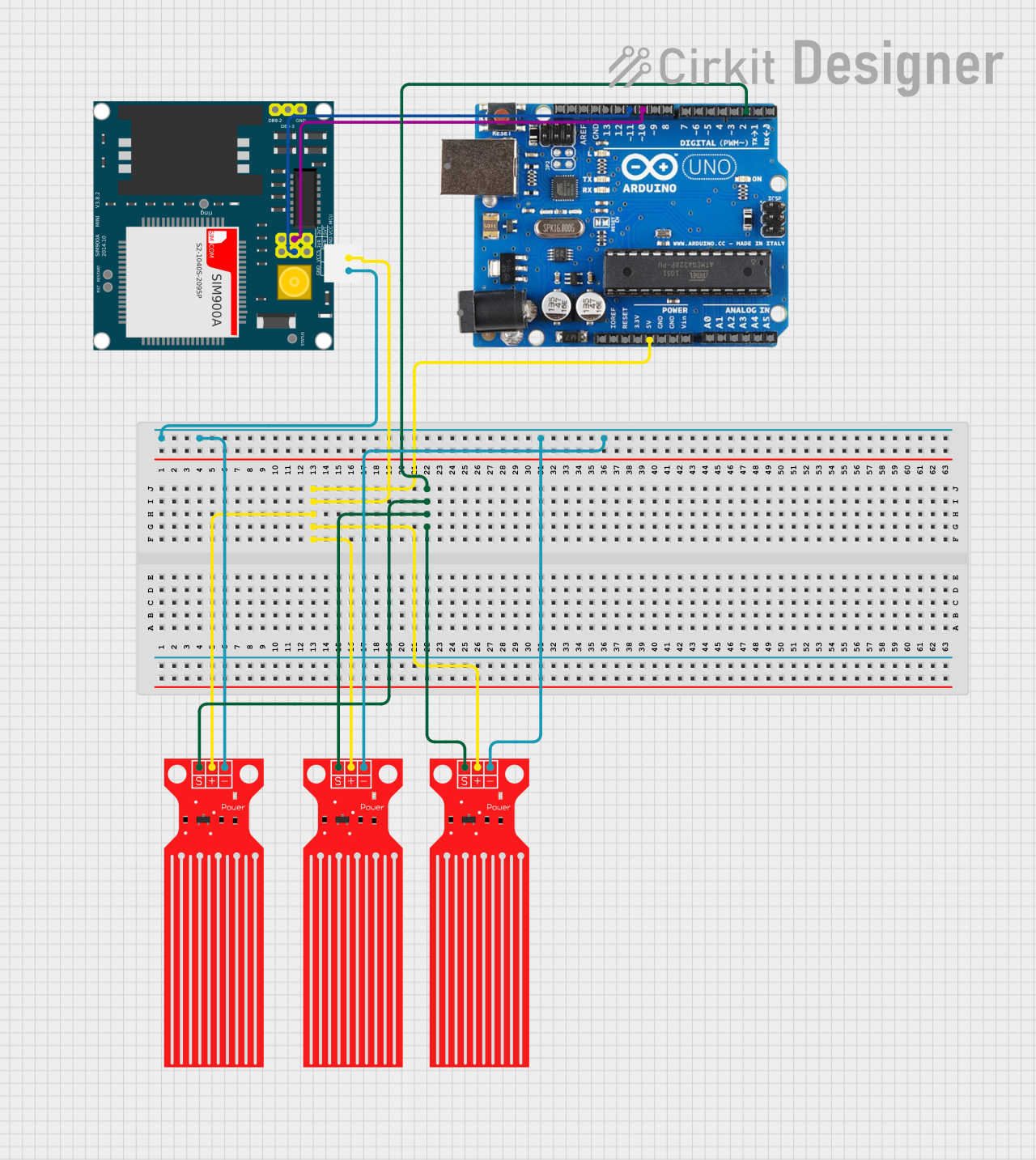
Circuit Documentation
Summary
This circuit is designed to monitor water levels using three water level sensors and send notifications via a SIM900A GSM module. The sensors are connected to an Arduino Uno R3, which processes the sensor data and communicates with the SIM900A module to send SMS notifications based on the water level readings.
Component List
Water Level Sensor
- Description: Measures the water level and outputs a digital signal.
- Pins: SIG, VCC, GND
SIM900A
- Description: GSM module used for sending SMS notifications.
- Pins: GND, DB9-3 (RXD), DB9-2 (TXD), 5V, 3VR, 5VR, 3VT, 5VT, VCC, Ring, RESTART, RESET, STATUS
Arduino Uno R3
- Description: Microcontroller board used to read sensor data and control the SIM900A module.
- Pins: D8, D9, D10, D11, D12, D13, GND, AREF, SDA, SCL, D0/RX, D1/Tx, D2, D3, D4, D5, 6, D7, A5/SCL, A4/SDA, A3, A2, A1, A0, Vin, 5V, 3.3V, RESET, IOREF, NONE, USB Jack, Power Jack
Wiring Details
Water Level Sensor 1
- SIG connected to D2 on Arduino Uno R3
- VCC connected to 5V on Arduino Uno R3
- GND connected to GND on SIM900A
Water Level Sensor 2
- SIG connected to D2 on Arduino Uno R3
- VCC connected to 5V on Arduino Uno R3
- GND connected to GND on SIM900A
Water Level Sensor 3
- SIG connected to D2 on Arduino Uno R3
- VCC connected to 5V on Arduino Uno R3
- GND connected to GND on SIM900A
SIM900A
- GND connected to GND on Water Level Sensors
- 5V connected to 5V on Arduino Uno R3
- 5VR connected to D11 on Arduino Uno R3
- 5VT connected to D10 on Arduino Uno R3
Code Documentation
/*
 * This Arduino Sketch reads water levels from three sensors and sends
 * notifications via the SIM900A module. The water level sensors are
 * connected to digital pin D2, and the SIM900A module is connected to
 * digital pins D10 (TX) and D11 (RX) of the Arduino Uno R3.
 */

#include <SoftwareSerial.h>

// Define pins
const int waterLevelSensorPin = 2;
const int sim900aTxPin = 10;
const int sim900aRxPin = 11;

// Create a SoftwareSerial object for SIM900A communication
SoftwareSerial sim900a(sim900aRxPin, sim900aTxPin);

void setup() {
  // Initialize serial communication for debugging
  Serial.begin(9600);
  // Initialize SIM900A communication
  sim900a.begin(9600);
  // Set water level sensor pin as input
  pinMode(waterLevelSensorPin, INPUT);
  // Send initial message to SIM900A
  sendNotification("System Initialized");
}

void loop() {
  // Read water level sensor value
  int waterLevel = digitalRead(waterLevelSensorPin);
  // Check if water level is detected
  if (waterLevel == HIGH) {
    // Send notification if water level is high
    sendNotification("Water level is high!");
  } else {
    // Send notification if water level is low
    sendNotification("Water level is low.");
  }
  // Wait for a while before next reading
  delay(5000);
}

void sendNotification(String message) {
  // Send AT command to SIM900A to send SMS
  sim900a.println("AT+CMGF=1"); // Set SMS mode to text
  delay(100);
  sim900a.println("AT+CMGS=\"+1234567890\""); // Replace with recipient number
  delay(100);
  sim900a.println(message); // Send the message
  delay(100);
  sim900a.write(26); // ASCII code for CTRL+Z to send the SMS
  delay(1000);
}
This code initializes the Arduino Uno R3 to read water levels from the sensors and send SMS notifications using the SIM900A module. The sendNotification function handles the communication with the SIM900A module to send the SMS messages.