
ESP8266 NodeMCU Wi-Fi Controlled OLED Display with Pushbuttons
View and Edit Project In Cirkit Designer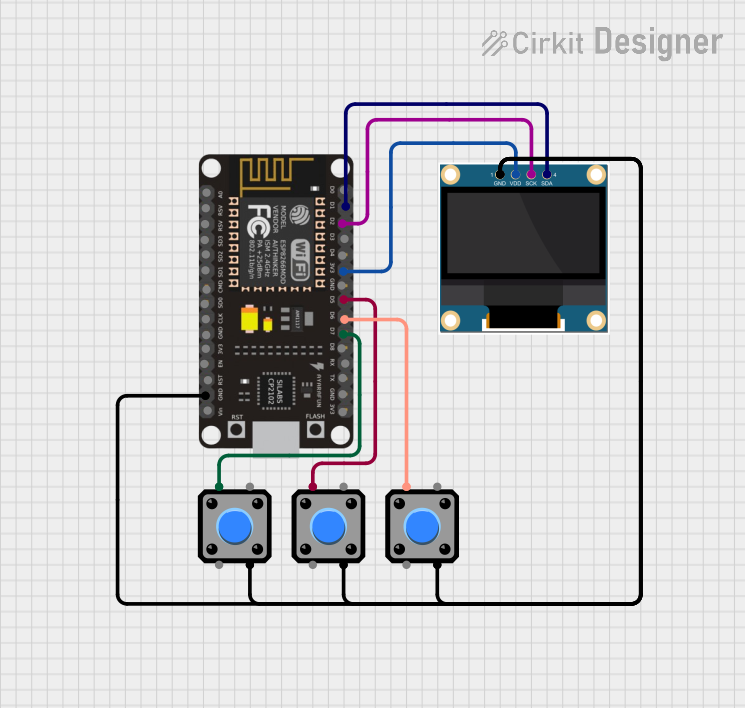
Circuit Documentation
Summary
This circuit involves an ESP8266 NodeMCU microcontroller, a 0.96" OLED display, and three pushbuttons. The ESP8266 NodeMCU serves as the main controller, interfacing with the OLED display for visual output and the pushbuttons for user input.
Component List
ESP8266 NodeMCU
- Description: A low-cost Wi-Fi microcontroller with GPIO, PWM, ADC, I2C, and SPI capabilities.
- Pins: D0, D1, D2, D3, D4, 3V3, GND, D5, D6, D7, D8, RX, TX, A0, RSV, SD3, SD2, SD1, CMD, SD0, CLK, EN, RST, VIN
0.96" OLED Display
- Description: A small, monochrome OLED display used for visual output.
- Pins: GND, VDD, SCK, SDA
Pushbutton (x3)
- Description: A simple pushbutton used for user input.
- Pins: Pin 1, Pin 2, Pin 3, Pin 4
Wiring Details
ESP8266 NodeMCU
- D1: Connected to SDA of the 0.96" OLED Display
- D2: Connected to SCK of the 0.96" OLED Display
- 3V3: Connected to VDD of the 0.96" OLED Display
- D5: Connected to Pin 1 of Pushbutton 1
- D6: Connected to Pin 1 of Pushbutton 2
- D7: Connected to Pin 1 of Pushbutton 3
- GND: Connected to GND of the 0.96" OLED Display, Pin 3 of Pushbutton 1, Pin 3 of Pushbutton 2, and Pin 3 of Pushbutton 3
0.96" OLED Display
- SDA: Connected to D1 of the ESP8266 NodeMCU
- SCK: Connected to D2 of the ESP8266 NodeMCU
- VDD: Connected to 3V3 of the ESP8266 NodeMCU
- GND: Connected to GND of the ESP8266 NodeMCU, Pin 3 of Pushbutton 1, Pin 3 of Pushbutton 2, and Pin 3 of Pushbutton 3
Pushbutton 1
- Pin 1: Connected to D5 of the ESP8266 NodeMCU
- Pin 3: Connected to GND of the ESP8266 NodeMCU, GND of the 0.96" OLED Display, Pin 3 of Pushbutton 2, and Pin 3 of Pushbutton 3
Pushbutton 2
- Pin 1: Connected to D6 of the ESP8266 NodeMCU
- Pin 3: Connected to GND of the ESP8266 NodeMCU, GND of the 0.96" OLED Display, Pin 3 of Pushbutton 1, and Pin 3 of Pushbutton 3
Pushbutton 3
- Pin 1: Connected to D7 of the ESP8266 NodeMCU
- Pin 3: Connected to GND of the ESP8266 NodeMCU, GND of the 0.96" OLED Display, Pin 3 of Pushbutton 1, and Pin 3 of Pushbutton 2
Documented Code
ESP8266 NodeMCU Code
void setup() {
  // put your setup code here, to run once:

}

void loop() {
  // put your main code here, to run repeatedly:

}
0.96" OLED Display Code
void setup() {
  // put your setup code here, to run once:

}

void loop() {
  // put your main code here, to run repeatedly:

}
This documentation provides a comprehensive overview of the circuit, including a summary, detailed component list, wiring details, and the code used for the microcontrollers.