
Circuit Documentation
Summary
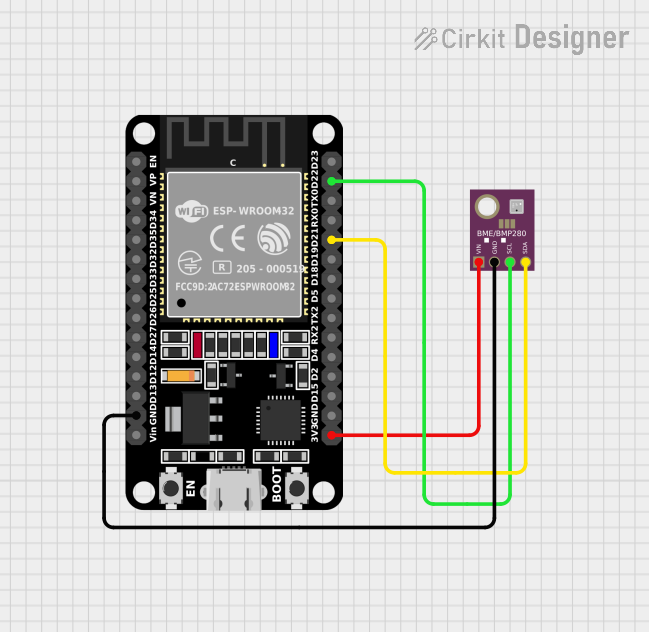
This document provides a detailed overview of a circuit that includes an ESP32 microcontroller and a BME/BMP280 sensor. The ESP32 reads temperature, pressure, and humidity data from the BME/BMP280 sensor and prints the data to the Serial Monitor. The document includes a component list, wiring details, and the embedded code used in the microcontroller.
Component List
ESP32 (30 pin)
- Description: A powerful microcontroller with integrated Wi-Fi and Bluetooth capabilities.
- Pins: EN, VP, VN, D34, D35, D32, D33, D25, D26, D27, D14, D12, D13, GND, Vin, D23, D22, TX0, RX0, D21, D19, D18, D5, TX2, RX2, D4, D2, D15, 3V3
BME/BMP280
- Description: A sensor module that measures temperature, pressure, and humidity.
- Pins: GND, SCL, SDA, VIN
Wiring Details
ESP32 (30 pin)
- GND: Connected to GND of BME/BMP280
- D22: Connected to SCL of BME/BMP280
- D21: Connected to SDA of BME/BMP280
- 3V3: Connected to VIN of BME/BMP280
BME/BMP280
- GND: Connected to GND of ESP32
- SCL: Connected to D22 of ESP32
- SDA: Connected to D21 of ESP32
- VIN: Connected to 3V3 of ESP32
Code
Code for ESP32
/*
 * This Arduino Sketch reads temperature, pressure, and humidity data from
 * the BME/BMP280 sensor connected to the ESP32 microcontroller and prints
 * the data to the Serial Monitor.
 */

#include <Wire.h>
#include <Adafruit_Sensor.h>
#include <Adafruit_BME280.h>

#define SEALEVELPRESSURE_HPA (1013.25)

Adafruit_BME280 bme; // I2C

void setup() {
  Serial.begin(115200);
  if (!bme.begin(0x76)) {
    Serial.println("Could not find a valid BME280 sensor, check wiring!");
    while (1);
  }
}

void loop() {
  printSensorData();
  delay(2000);
}

void printSensorData() {
  Serial.print("Temperature = ");
  Serial.print(bme.readTemperature());
  Serial.println(" *C");

  Serial.print("Pressure = ");
  Serial.print(bme.readPressure() / 100.0F);
  Serial.println(" hPa");

  Serial.print("Humidity = ");
  Serial.print(bme.readHumidity());
  Serial.println(" %");

  Serial.println();
}
Code for BME/BMP280
/*
 * This Arduino Sketch reads temperature, pressure, and humidity data from
 * the BME/BMP280 sensor connected to the microcontroller and prints the data
 * to the Serial Monitor.
 */

#include <Wire.h>
#include <Adafruit_Sensor.h>
#include <Adafruit_BME280.h>

#define SEALEVELPRESSURE_HPA (1013.25)

Adafruit_BME280 bme; // I2C

void setup() {
  Serial.begin(115200);
  if (!bme.begin(0x76)) {
    Serial.println("Could not find a valid BME280 sensor, check wiring!");
    while (1);
  }
}

void loop() {
  printSensorData();
  delay(2000);
}

void printSensorData() {
  Serial.print("Temperature = ");
  Serial.print(bme.readTemperature());
  Serial.println(" *C");

  Serial.print("Pressure = ");
  Serial.print(bme.readPressure() / 100.0F);
  Serial.println(" hPa");

  Serial.print("Humidity = ");
  Serial.print(bme.readHumidity());
  Serial.println(" %");

  Serial.println();
}
This documentation provides a comprehensive overview of the circuit, including the components used, their wiring, and the code running on the microcontroller.