
Circuit Documentation
Summary of the Circuit
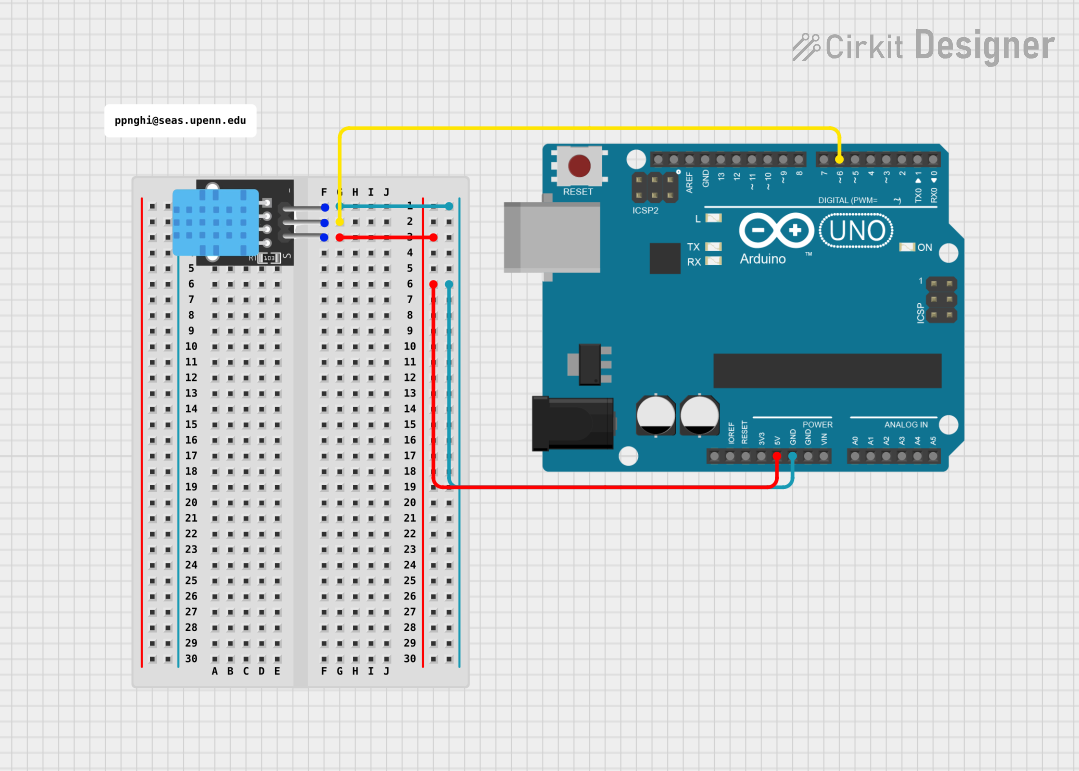
This circuit integrates an Arduino UNO with a DHT11 temperature and humidity sensor. The Arduino UNO serves as the central processing unit, controlling the data flow and processing sensor readings. The DHT11 sensor is used to measure the ambient temperature and humidity, providing digital signal output to the Arduino. The circuit is powered by the Arduino's 5V output, ensuring that both the microcontroller and the sensor operate at the correct voltage levels.
Component List
Arduino UNO
- Description: A microcontroller board based on the ATmega328P.
- Purpose: Acts as the central processing unit for the circuit, interfacing with the DHT11 sensor and executing the embedded code.
- Pins: UNUSED, IOREF, Reset, 3.3V, 5V, GND, Vin, A0-A5, SCL, SDA, AREF, D0-D13.
DHT11
- Description: A basic, ultra low-cost digital temperature and humidity sensor.
- Purpose: Measures the ambient temperature and humidity and provides a digital output to the Arduino.
- Pins: 5V, S (Signal), GND.
Comment
- Description: A placeholder for additional comments or notes within the circuit design.
- Purpose: Provides annotations or explanations within the circuit design, not an actual physical component.
Wiring Details
Arduino UNO
- 5V: Provides power to the DHT11 sensor.
- GND: Common ground with the DHT11 sensor.
- D6: Receives the digital signal from the DHT11 sensor's data pin.
DHT11
- 5V: Connected to the Arduino UNO's 5V pin for power.
- S (Signal): Connected to the Arduino UNO's D6 pin to send temperature and humidity data.
- GND: Connected to the Arduino UNO's GND pin to complete the circuit.
Documented Code
Arduino UNO Code (sketch.ino)
void setup() {
  // put your setup code here, to run once:

}

void loop() {
  // put your main code here, to run repeatedly:

}
Additional Notes
- The code provided is a template and does not include specific instructions for interacting with the DHT11 sensor. To complete the circuit functionality, the code needs to be expanded to initialize the DHT11 sensor on the correct pin, read data from it, and handle the data accordingly.
- The
documentation.txtfile is empty and thus not included in this documentation. It may be intended for additional notes or explanations to accompany the code.