
Arduino-Controlled Ultrasonic Sensor with Dual Servo Missile Ejection System
View and Edit Project In Cirkit Designer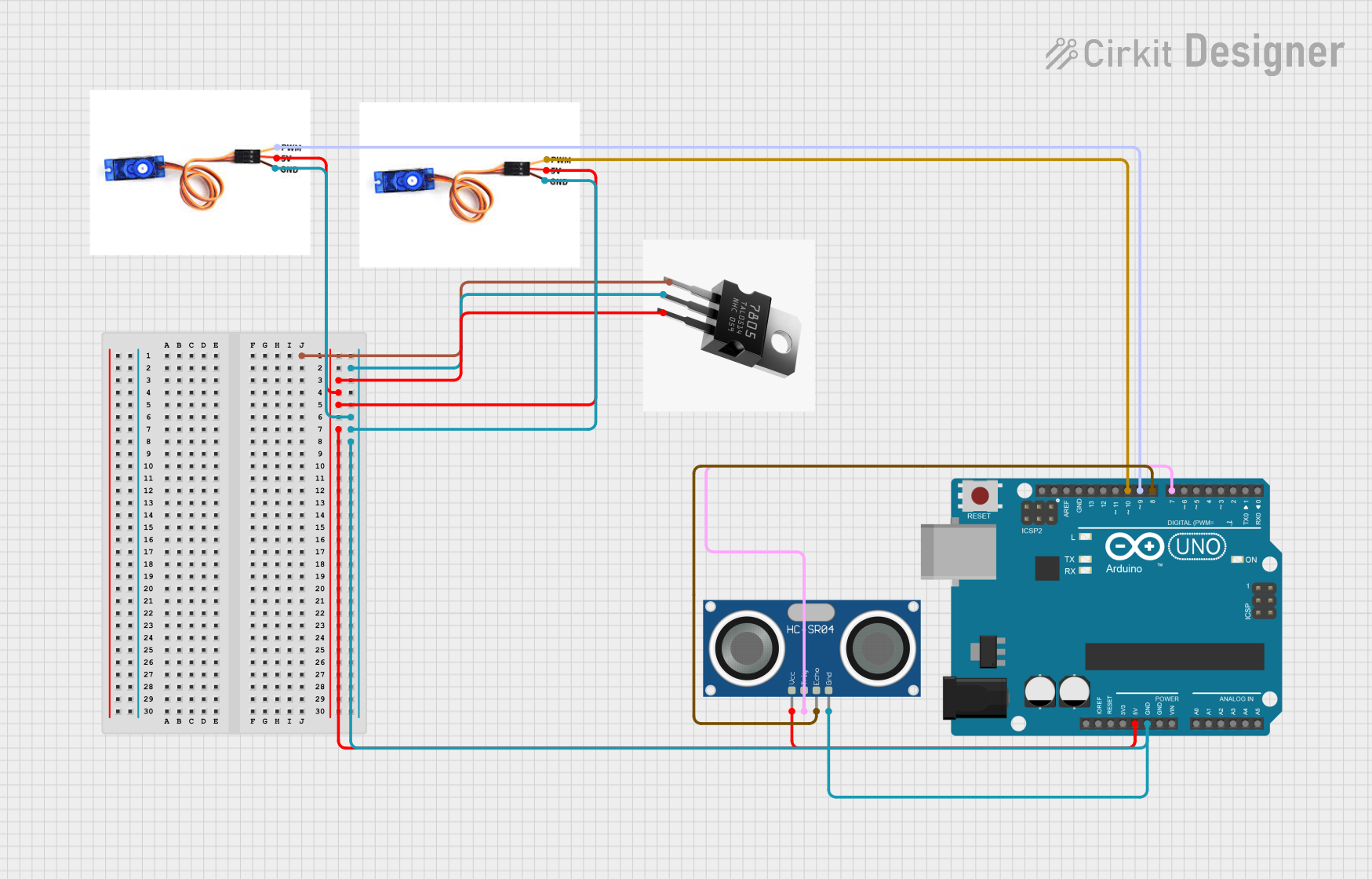
Circuit Documentation
Summary
The circuit in question is designed to control two SG90 servo motors and an HC-SR04 ultrasonic sensor using an Arduino UNO microcontroller. The circuit utilizes a 7805 voltage regulator to provide a stable 5V supply to the components. One servo motor is used to rotate the ultrasonic sensor, while the other is used to eject a missile when an object is detected within a certain distance. The ultrasonic sensor measures the distance to objects in front of it, and the Arduino UNO processes this information to control the servo motors accordingly.
Component List
SG90 Servo Motor
- Description: A small and lightweight servo motor commonly used for RC vehicles and small robotics projects.
- Pins: PWM, 5V, GND
HC-SR04 Ultrasonic Sensor
- Description: An ultrasonic ranging module that provides 2cm to 400cm non-contact measurement functionality.
- Pins: VCC, TRIG, ECHO, GND
7805 Voltage Regulator
- Description: A voltage regulator that takes an input voltage and provides a constant 5V output.
- Pins: INPUT, OUTPUT, GND
Arduino UNO
- Description: A microcontroller board based on the ATmega328P, widely used for building digital devices and interactive objects.
- Pins: UNUSED, IOREF, Reset, 3.3V, 5V, GND, Vin, A0-A5, SCL, SDA, AREF, D0-D13
Wiring Details
SG90 Servo Motor (Rotate)
- PWM: Connected to Arduino UNO pin D9
- 5V: Connected to 7805 OUTPUT
- GND: Connected to common ground
SG90 Servo Motor (Eject)
- PWM: Connected to Arduino UNO pin D10
- 5V: Connected to 7805 OUTPUT
- GND: Connected to common ground
HC-SR04 Ultrasonic Sensor
- VCC: Connected to 7805 OUTPUT
- TRIG: Connected to Arduino UNO pin D7
- ECHO: Connected to Arduino UNO pin D8
- GND: Connected to common ground
7805 Voltage Regulator
- INPUT: Connected to an external voltage source (not specified in the net list)
- OUTPUT: Connected to the 5V pins of both SG90 servo motors, the HC-SR04 Ultrasonic Sensor, and the Arduino UNO
- GND: Connected to common ground
Arduino UNO
- 5V & GND: Connected to 7805 OUTPUT and common ground respectively
- D7: Connected to HC-SR04 TRIG
- D8: Connected to HC-SR04 ECHO
- D9: Connected to Rotate Servo PWM
- D10: Connected to Eject Servo PWM
Documented Code
#include <Servo.h>

// Pin Definitions
const int trigPin = 7;    // Ultrasonic sensor trig pin
const int echoPin = 8;    // Ultrasonic sensor echo pin
const int rotateServoPin = 9;  // Servo for rotating the ultrasonic sensor
const int ejectServoPin = 10;  // Servo for ejecting the missile

Servo rotateServo;  // Servo object for rotation
Servo ejectServo;   // Servo object for ejection

long duration;
int distance;
int thresholdDistance = 40; // Eject missile if object is within 40 cm

void setup() {
    pinMode(trigPin, OUTPUT);
    pinMode(echoPin, INPUT);
    rotateServo.attach(rotateServoPin); // Attach the rotation servo
    ejectServo.attach(ejectServoPin);   // Attach the ejection servo
    Serial.begin(9600);
}

void loop() {
    // Rotate the sensor and missile (Servo 1)
    for (int i = 15; i <= 165; i++) {
        rotateServo.write(i);
        delay(30);
        distance = calculateDistance(); // Calculate the distance
        Serial.print("Angle: ");
        Serial.print(i);
        Serial.print(", Distance: ");
        Serial.println(distance);
        // Check if object is within the threshold distance
        if (distance <= thresholdDistance) {
            ejectMissile();  // Call the ejection function
            delay(2000);     // Wait for 2 seconds before continuing
        }
    }
    // Rotate the sensor back (Servo 1)
    for (int i = 165; i >= 15; i--) {
        rotateServo.write(i);
        delay(30);
        distance = calculateDistance(); // Calculate the distance
        Serial.print("Angle: ");
        Serial.print(i);
        Serial.print(", Distance: ");
        Serial.println(distance);
        // Check if object is within the threshold distance
        if (distance <= thresholdDistance) {
            ejectMissile();  // Call the ejection function
            delay(2000);     // Wait for 2 seconds before continuing
        }
    }
}

// Function to calculate distance using Ultrasonic Sensor
int calculateDistance() {
    digitalWrite(trigPin, LOW);
    delayMicroseconds(2);
    digitalWrite(trigPin, HIGH);
    delayMicroseconds(10);
    digitalWrite(trigPin, LOW);
    duration = pulseIn(echoPin, HIGH);
    return duration * 0.034 / 2;  // Convert to cm
}

// Function to eject the missile
void ejectMissile() {
    ejectServo.write(90);  // Rotate servo to 90 degrees to pull the needle
    delay(500);            // Wait for the ejection
    ejectServo.write(0);   // Return servo to original position
}
This code is designed to be uploaded to the Arduino UNO microcontroller. It initializes two servo motors and an ultrasonic sensor, then enters a loop where it rotates the sensor, measures distance, and ejects a missile if an object is detected within the threshold distance. The calculateDistance function is used to measure the distance using the ultrasonic sensor, and the ejectMissile function controls the ejection servo.