
Arduino UNO-Based Temperature Monitoring System with MLX90614 Sensor and OLED Display
View and Edit Project In Cirkit Designer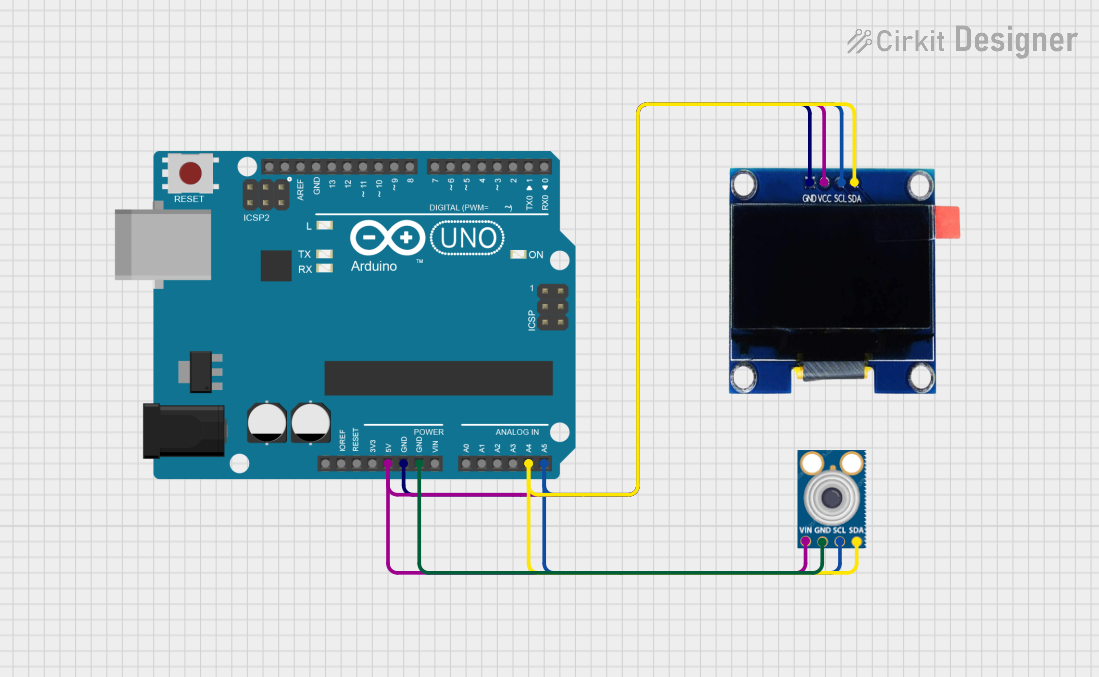
Circuit Documentation
Summary
This circuit is designed to read temperature data from an MLX90614 infrared temperature sensor and display the readings on a 1.3" OLED display. The components are connected to an Arduino UNO microcontroller via the I2C communication protocol.
Component List
Arduino UNO
- Description: A microcontroller board based on the ATmega328P.
- Pins: UNUSED, IOREF, Reset, 3.3V, 5V, GND, Vin, A0, A1, A2, A3, A4, A5, SCL, SDA, AREF, D13, D12, D11, D10, D9, D8, D7, D6, D5, D4, D3, D2, D1, D0
OLED 1.3"
- Description: A 1.3-inch OLED display module.
- Pins: GND, VCC, SCL, SDA
MLX90614
- Description: An infrared temperature sensor.
- Pins: SDA, SCL, GND, VIN
Wiring Details
Arduino UNO
- 5V: Connected to VIN of MLX90614 and VCC of OLED 1.3"
- GND: Connected to GND of MLX90614 and GND of OLED 1.3"
- A4 (SDA): Connected to SDA of MLX90614 and SDA of OLED 1.3"
- A5 (SCL): Connected to SCL of MLX90614 and SCL of OLED 1.3"
OLED 1.3"
- VCC: Connected to 5V of Arduino UNO
- GND: Connected to GND of Arduino UNO
- SDA: Connected to A4 (SDA) of Arduino UNO
- SCL: Connected to A5 (SCL) of Arduino UNO
MLX90614
- VIN: Connected to 5V of Arduino UNO
- GND: Connected to GND of Arduino UNO
- SDA: Connected to A4 (SDA) of Arduino UNO
- SCL: Connected to A5 (SCL) of Arduino UNO
Code Documentation
Arduino Sketch
/*
 * This Arduino sketch reads temperature data from an MLX90614 sensor
 * and displays it on a 1.3" OLED display. The sensor and display are
 * connected to the Arduino UNO via I2C.
 */

#include <Wire.h>
#include <Adafruit_MLX90614.h>
#include <Adafruit_SSD1306.h>

#define SCREEN_WIDTH 128 // OLED display width, in pixels
#define SCREEN_HEIGHT 64 // OLED display height, in pixels

// Declaration for an SSD1306 display connected to I2C (SDA, SCL pins)
Adafruit_SSD1306 display(SCREEN_WIDTH, SCREEN_HEIGHT, &Wire, -1);

Adafruit_MLX90614 mlx = Adafruit_MLX90614();

void setup() {
  // Initialize serial communication
  Serial.begin(9600);

  // Initialize the MLX90614 sensor
  if (!mlx.begin()) {
    Serial.println("Error connecting to MLX90614 sensor. Check wiring.");
    while (1);
  }

  // Initialize the OLED display
  if (!display.begin(SSD1306_I2C_ADDRESS, 0x3C)) {
    Serial.println("SSD1306 allocation failed");
    while (1);
  }
  display.display();
  delay(2000); // Pause for 2 seconds
  display.clearDisplay();
}

void loop() {
  // Read temperature from the MLX90614 sensor
  double tempC = mlx.readObjectTempC();
  double tempF = mlx.readObjectTempF();

  // Print temperature to the serial monitor
  Serial.print("Temperature: ");
  Serial.print(tempC);
  Serial.print(" *C ");
  Serial.print(tempF);
  Serial.println(" *F");

  // Display temperature on the OLED
  display.clearDisplay();
  display.setTextSize(1);
  display.setTextColor(SSD1306_WHITE);
  display.setCursor(0, 0);
  display.print("Temp: ");
  display.print(tempC);
  display.print(" *C");
  display.setCursor(0, 10);
  display.print("Temp: ");
  display.print(tempF);
  display.print(" *F");
  display.display();

  // Wait for 1 second before the next reading
  delay(1000);
}
This code initializes the MLX90614 sensor and the OLED display, reads temperature data from the sensor, and displays the readings on the OLED display as well as prints them to the serial monitor. The loop continuously updates the temperature readings every second.