
ESP32 and DHT11 Wi-Fi Enabled Temperature and Humidity Sensor
View and Edit Project In Cirkit Designer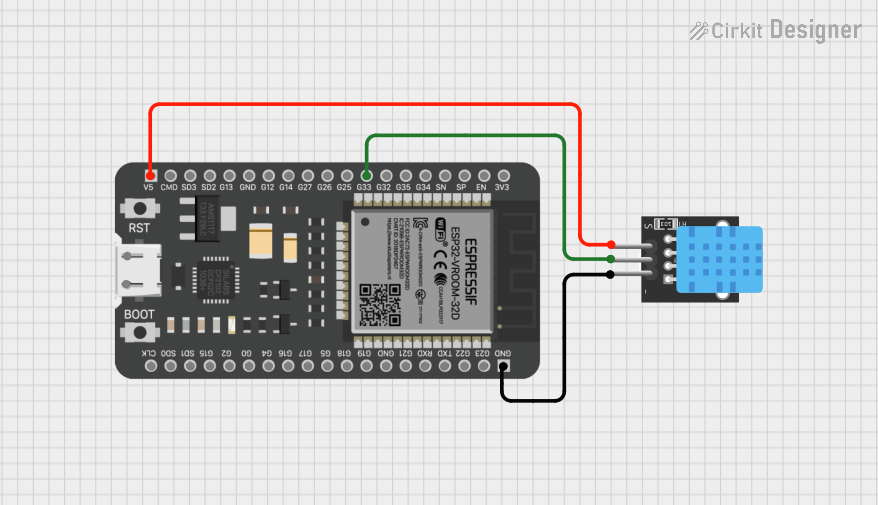
Circuit Documentation
Summary
This document provides a detailed overview of a circuit that includes an ESP32 microcontroller and a DHT11 temperature and humidity sensor. The ESP32 is used to read data from the DHT11 sensor. The circuit is powered by a 5V supply from the ESP32.
Component List
ESP32 - 38 pins
- Description: A powerful microcontroller with built-in Wi-Fi and Bluetooth capabilities.
- Pins: 3V3, EN, SP, SN, G34, G35, G32, G33, G25, G26, G27, G14, G12, GND, G13, SD2, SD3, CMD, 5V, G23, G22, TXD, RXD, G21, G19, G18, G5, G17, G16, G4, G0, G2, G15, SD1, SD0, CLK
- Purpose in Circuit: Acts as the main controller, reading data from the DHT11 sensor and potentially processing or transmitting it.
DHT11
- Description: A basic, low-cost digital temperature and humidity sensor.
- Pins: 5V, S, GND
- Purpose in Circuit: Measures temperature and humidity and sends the data to the ESP32.
Wiring Details
ESP32 - 38 pins
- G33: Connected to the S pin of the DHT11.
- 5V: Connected to the 5V pin of the DHT11.
- GND: Connected to the GND pin of the DHT11.
DHT11
- S: Connected to the G33 pin of the ESP32.
- 5V: Connected to the 5V pin of the ESP32.
- GND: Connected to the GND pin of the ESP32.
Code
There is no code provided for this circuit. However, typically, the ESP32 would run a program to read data from the DHT11 sensor and process or transmit it as needed. Below is a sample code snippet that could be used to read data from the DHT11 sensor using the ESP32:
#include "DHT.h"

#define DHTPIN 33     // Pin connected to the DHT11 sensor
#define DHTTYPE DHT11 // DHT 11

DHT dht(DHTPIN, DHTTYPE);

void setup() {
  Serial.begin(115200);
  dht.begin();
}

void loop() {
  delay(2000); // Wait a few seconds between measurements

  float humidity = dht.readHumidity();
  float temperature = dht.readTemperature();

  if (isnan(humidity) || isnan(temperature)) {
    Serial.println("Failed to read from DHT sensor!");
    return;
  }

  Serial.print("Humidity: ");
  Serial.print(humidity);
  Serial.print(" %\t");
  Serial.print("Temperature: ");
  Serial.print(temperature);
  Serial.println(" *C");
}
This code initializes the DHT11 sensor, reads the temperature and humidity values, and prints them to the serial monitor.