
Arduino UNO Temperature Monitoring System with MAX6675 and I2C LCD Display
View and Edit Project In Cirkit Designer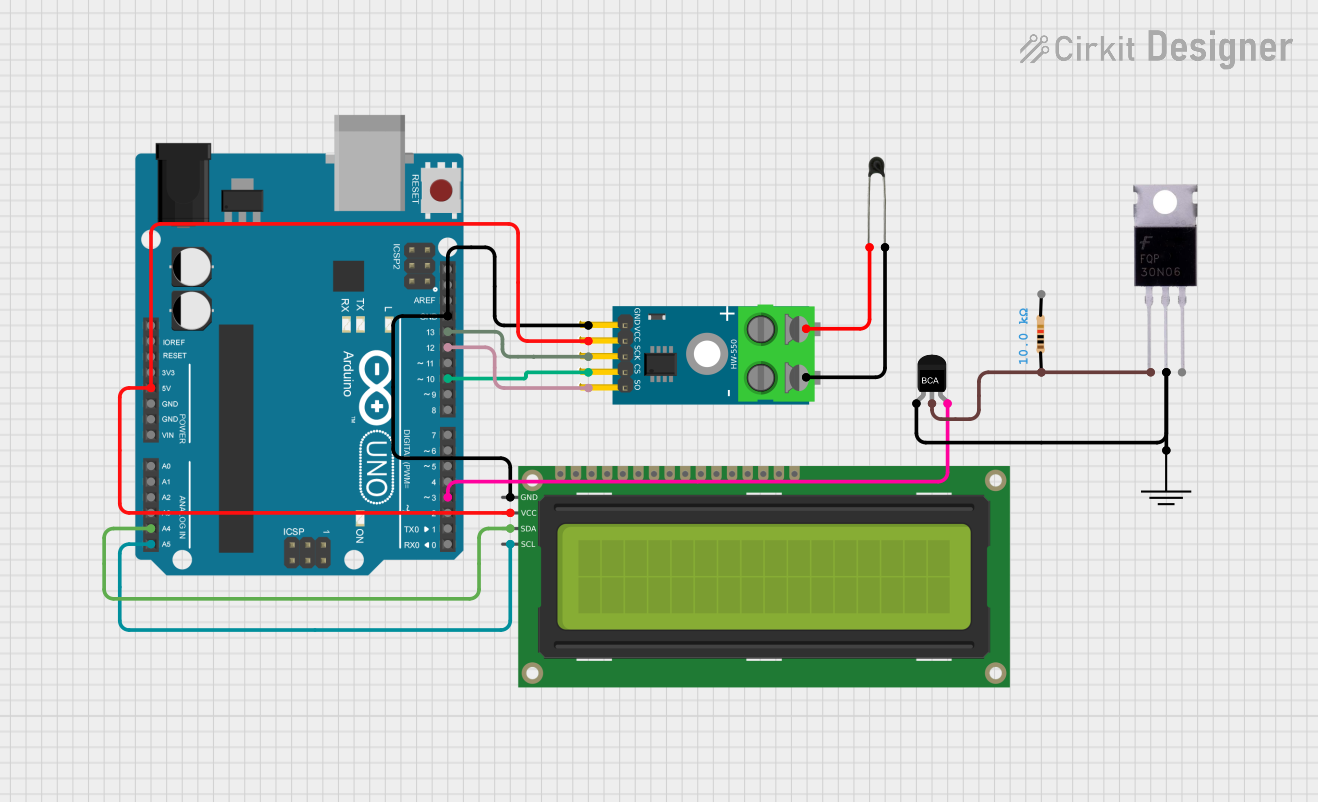
Circuit Documentation
Summary
This circuit involves an Arduino UNO microcontroller interfacing with a MAX6675 thermocouple module, a 16x2 I2C LCD display, an NPN transistor, a MOSFET, a resistor, and an NTC thermistor. The circuit is designed to read temperature data from the thermocouple, display it on the LCD, and control a load using the transistor and MOSFET.
Component List
MAX6675 Module
- Description: Thermocouple-to-Digital Converter
- Pins: GND, VCC, SCK, CS, SO, -, +
Arduino UNO
- Description: Microcontroller Board
- Pins: UNUSED, IOREF, Reset, 3.3V, 5V, GND, Vin, A0, A1, A2, A3, A4, A5, SCL, SDA, AREF, D13, D12, D11, D10, D9, D8, D7, D6, D5, D4, D3, D2, D1, D0
16x2 I2C LCD
- Description: LCD Display with I2C Interface
- Pins: GND, VCC, SDA, SCL
NPN Transistor
- Description: General Purpose NPN Transistor
- Pins: E, C, B
Mosfet
- Description: General Purpose MOSFET
- Pins: Gate, Drain, Source
Resistor
- Description: 10k Ohm Resistor
- Pins: pin1, pin2
- Properties: Resistance: 10k Ohms
GND
- Description: Ground Connection
- Pins: GND
NTC
- Description: Negative Temperature Coefficient Thermistor
- Pins: A0, A1
Wiring Details
MAX6675 Module
- VCC connected to 5V of Arduino UNO
- GND connected to GND of Arduino UNO
- SCK connected to D13 of Arduino UNO
- SO connected to D12 of Arduino UNO
- CS connected to D10 of Arduino UNO
- - connected to A1 of NTC
- + connected to A0 of NTC
Arduino UNO
- 5V connected to VCC of 16x2 I2C LCD and MAX6675 Module
- GND connected to GND of 16x2 I2C LCD and MAX6675 Module
- A4 connected to SDA of 16x2 I2C LCD
- A5 connected to SCL of 16x2 I2C LCD
- D3 connected to B of NPN Transistor
16x2 I2C LCD
- VCC connected to 5V of Arduino UNO
- GND connected to GND of Arduino UNO
- SDA connected to A4 of Arduino UNO
- SCL connected to A5 of Arduino UNO
NPN Transistor
- E connected to GND of GND
- C connected to pin1 of Resistor
- B connected to D3 of Arduino UNO
Mosfet
- Gate connected to pin1 of Resistor
- Drain connected to GND of GND
Resistor
- pin1 connected to C of NPN Transistor and Gate of Mosfet
- pin2 not connected
GND
- GND connected to E of NPN Transistor and Drain of Mosfet
NTC
- A0 connected to + of MAX6675 Module
- A1 connected to - of MAX6675 Module
Code Documentation
Arduino UNO Code
void setup() {
  // put your setup code here, to run once:

}

void loop() {
  // put your main code here, to run repeatedly:

}
This code is a basic template for the Arduino UNO. The setup() function is where you initialize your components and settings, and the loop() function is where the main logic of your program runs repeatedly.