
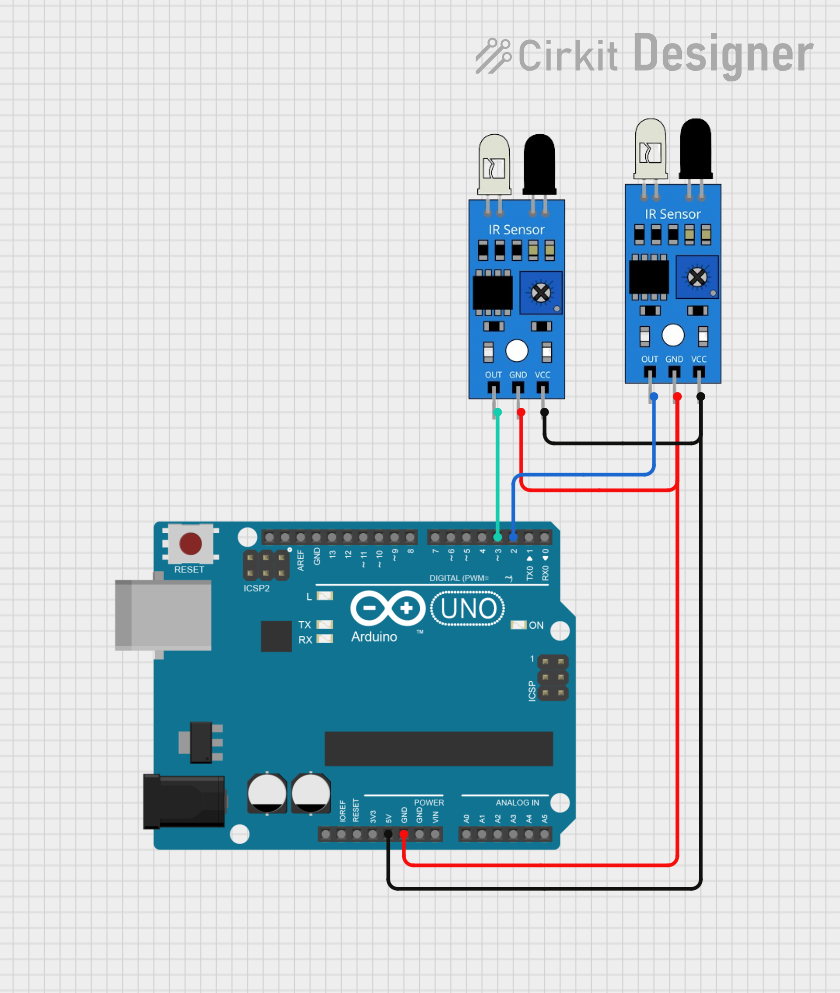
Circuit Documentation
Summary of the Circuit
This circuit consists of an Arduino UNO microcontroller board and two infrared (IR) sensors. The Arduino UNO is used as the central processing unit to interpret signals from the IR sensors. The IR sensors are used to detect the presence of objects or motion within their field of view. The sensors are powered by the 5V output from the Arduino and are grounded through the Arduino's ground (GND) pin. The output signals from the IR sensors are connected to digital input pins on the Arduino for processing.
Component List
Arduino UNO
- Description: A microcontroller board based on the ATmega328P.
- Pins: UNUSED, IOREF, Reset, 3.3V, 5V, GND, Vin, A0-A5, SCL, SDA, AREF, D0-D13.
- Purpose: Acts as the central processing unit for the circuit, reading sensor inputs and executing embedded code.
IR Sensor 1
- Description: An infrared sensor capable of detecting object presence and motion.
- Pins: out, gnd, vcc.
- Purpose: To detect objects or motion and send a signal to the Arduino UNO.
IR Sensor 2
- Description: An infrared sensor capable of detecting object presence and motion.
- Pins: out, gnd, vcc.
- Purpose: To detect objects or motion and send a signal to the Arduino UNO.
Wiring Details
Arduino UNO
- 5V: Provides power to both IR sensors.
- GND: Connected to the ground pins of both IR sensors to complete the power circuit.
- D3: Receives the output signal from IR Sensor 1.
- D2: Receives the output signal from IR Sensor 2.
IR Sensor 1
- vcc: Connected to the 5V pin on the Arduino UNO for power.
- gnd: Connected to the GND pin on the Arduino UNO.
- out: Connected to the D3 pin on the Arduino UNO to send the detection signal.
IR Sensor 2
- vcc: Connected to the 5V pin on the Arduino UNO for power.
- gnd: Connected to the GND pin on the Arduino UNO.
- out: Connected to the D2 pin on the Arduino UNO to send the detection signal.
Documented Code
Arduino UNO Code (sketch.ino)
void setup() {
  // put your setup code here, to run once:

}

void loop() {
  // put your main code here, to run repeatedly:

}
Note: The provided code is a template and does not contain any functional code to interact with the IR sensors. The user should implement the setup and loop functions to initialize the digital pins as inputs and to read the sensor outputs, respectively.