
RFID-Controlled Solenoid Door Lock with Arduino and Buzzer Alert
View and Edit Project In Cirkit Designer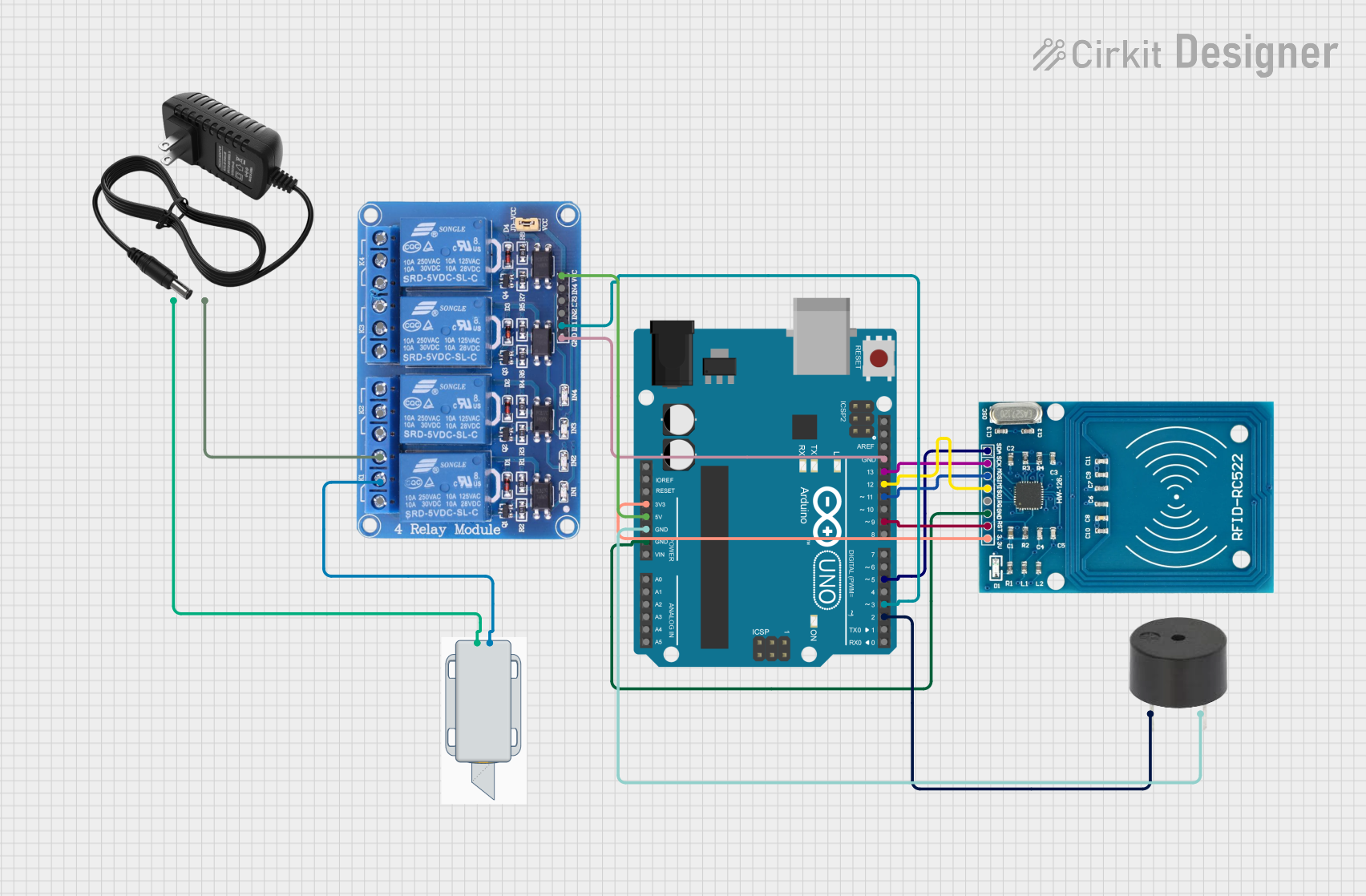
Circuit Documentation
Summary of the Circuit
This circuit is designed to control a 12V solenoid lock using an Arduino UNO microcontroller in conjunction with an RFID-RC522 reader. When an authorized RFID card is presented to the reader, the Arduino activates a relay to unlock the solenoid lock for a predetermined amount of time. Additionally, the circuit includes a buzzer that sounds when an unauthorized card is detected.
Component List
12V Solenoid Lock
- Description: An electromechanical lock that is actuated by a 12V signal.
- Pins:
-(Ground),+(12V Input)
RFID-RC522
- Description: An RFID module capable of reading RFID tags and cards.
- Pins:
VCC (3.3V),RST,GND,IRQ,MISO,MOSI,SCK,SDA
Arduino UNO
- Description: A microcontroller board based on the ATmega328P.
- Pins:
UNUSED,IOREF,Reset,3.3V,5V,GND,Vin,A0toA5,SCL,SDA,AREF,D13toD0
Buzzer
- Description: An audible signaling device.
- Pins:
PIN(Signal Input),GND(Ground)
12V Power Supply
- Description: A power source that provides a 12V output.
- Pins:
+(12V Output),-(Ground)
Relay 4 Channel 5V
- Description: A 4-channel relay module that allows control of high-power devices.
- Pins:
GND,IN1toIN4,VCC,COM1toCOM4,NO1toNO4,NC1toNC4
Wiring Details
12V Solenoid Lock
-connected to Relay 4 Channel 5VCOM1+connected to 12V Power Supply+
RFID-RC522
VCC (3.3V)connected to Arduino UNO3.3VRSTconnected to Arduino UNOD9GNDconnected to Arduino UNOGNDMISOconnected to Arduino UNOD12MOSIconnected to Arduino UNOD11SCKconnected to Arduino UNOD13SDAconnected to Arduino UNOD5
Arduino UNO
3.3Vconnected to RFID-RC522VCC (3.3V)5Vconnected to Relay 4 Channel 5VVCC- Multiple
GNDpins connected to RFID-RC522GND, BuzzerGND, and Relay 4 Channel 5VGND D9connected to RFID-RC522RSTD12connected to RFID-RC522MISOD11connected to RFID-RC522MOSID13connected to RFID-RC522SCKD5connected to RFID-RC522SDAD3connected to Relay 4 Channel 5VIN1D2connected to BuzzerPIN
Buzzer
PINconnected to Arduino UNOD2GNDconnected to Arduino UNOGND
12V Power Supply
+connected to 12V Solenoid Lock+-connected to Relay 4 Channel 5VNO1
Relay 4 Channel 5V
VCCconnected to Arduino UNO5VGNDconnected to Arduino UNOGNDIN1connected to Arduino UNOD3COM1connected to 12V Solenoid Lock-NO1connected to 12V Power Supply-
Documented Code
#include <SPI.h>
#include <MFRC522.h>

#define SS_PIN 10     // Slave Select pin for RFID
#define RST_PIN 9     // Reset pin for RFID
#define RELAY_PIN 7   // Relay control pin for the lock
#define BUZZER_PIN 6  // Buzzer pin

MFRC522 rfid(SS_PIN, RST_PIN); // Create an instance of the RFID module

// Predefined authorized card ID (replace this with your actual RFID card UID)
byte authorizedUID[] = {0xDE, 0xAD, 0xBE, 0xEF}; // Update with actual UID of your card

void setup() {
  Serial.begin(9600);        // Initialize serial communication
  SPI.begin();               // Start SPI bus
  rfid.PCD_Init();           // Initialize RFID reader

  pinMode(RELAY_PIN, OUTPUT);  // Set relay pin as output
  pinMode(BUZZER_PIN, OUTPUT); // Set buzzer pin as output

  digitalWrite(RELAY_PIN, LOW);  // Start with the lock closed (relay off)
  digitalWrite(BUZZER_PIN, LOW); // Buzzer off initially

  Serial.println("Place your card on the reader...");
}

void loop() {
  // Look for new RFID cards
  if (!rfid.PICC_IsNewCardPresent()) {
    return;
  }

  // Select the RFID card
  if (!rfid.PICC_ReadCardSerial()) {
    return;
  }

  // Show the UID of the card
  Serial.print("UID: ");
  for (byte i = 0; i < rfid.uid.size; i++) {
    Serial.print(rfid.uid.uidByte[i], HEX);
    Serial.print(" ");
  }
  Serial.println();

  // Compare the read UID with the authorized UID
  if (checkUID()) {
    // Authorized card
    Serial.println("Authorized card. Unlocking the door...");
    digitalWrite(RELAY_PIN, HIGH);  // Unlock (relay on)
    delay(5000);                    // Keep the door unlocked for 5 seconds
    digitalWrite(RELAY_PIN, LOW);   // Lock the door (relay off)
  } else {
    // Unauthorized card
    Serial.println("Unauthorized card. Buzzing...");
    digitalWrite(BUZZER_PIN, HIGH); // Buzz (buzzer on)
    delay(3000);                    // Buzz for 3 seconds
    digitalWrite(BUZZER_PIN, LOW);  // Turn off the buzzer
  }

  rfid.PICC_HaltA(); // Halt RFID reader
}

// Function to check if the scanned UID matches the authorized UID
bool checkUID() {
  if (rfid.uid.size != sizeof(authorizedUID)) {
    return false;  // UID sizes don't match
  }

  for (byte i = 0; i < rfid.uid.size; i++) {
    if (rfid.uid.uidByte[i] != authorizedUID[i]) {
      return false;  // UID bytes don't match
    }
  }

  return true;  // All bytes match, card is authorized
}
This code is designed to run on an Arduino UNO and interfaces with an RFID-RC522 module to read RFID cards. When an authorized card is detected, it activates a relay to unlock a solenoid lock for five seconds. If an unauthorized card is presented, it activates a buzzer for three seconds. The code includes setup and loop functions, as well as a helper function checkUID to compare the scanned UID with a predefined authorized UID.