
Wi-Fi Controlled Servo Motor with MyoWare Muscle Sensor and Arduino
View and Edit Project In Cirkit Designer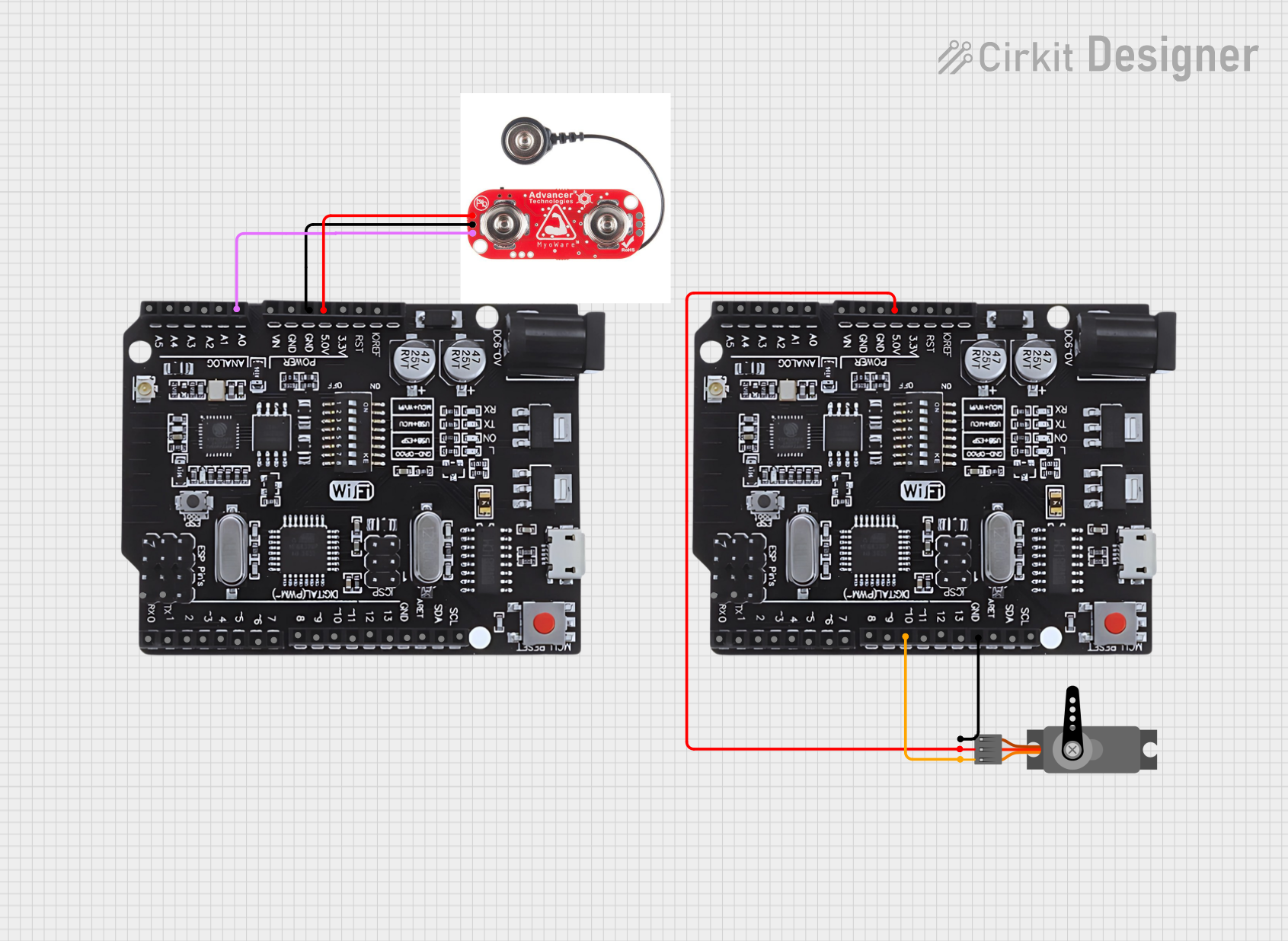
Circuit Documentation
Summary
This circuit involves an Arduino UNO with WiFi capabilities, a MyoWare Muscle Sensor, and a Servo motor. The MyoWare Muscle Sensor reads muscle activity and sends the data to the Arduino, which then transmits the data over WiFi. The Arduino also controls a Servo motor based on the muscle sensor readings.
Component List
Servo
- Description: A servo motor used for precise control of angular position.
- Pins: GND, VCC, PWM
MyoWare Muscle Sensor
- Description: A sensor that measures muscle activity.
- Pins: +, -, SIG, RAW, SHID, GND
Arduino UNO+WiFi R3 ATmega328P+Node MCU ESP8266 CH340G
- Description: A microcontroller board with built-in WiFi capabilities.
- Pins: KORF, RST, 3.5v, 5.0v, GND, VIN, A0, A1, A2, A3, A4, A5, SCL, SDA, ARET, 13, 12, 11, 10, 9, 8, 7, 6, 5, 4, 3, 2, 1, 0, TX, RX
Wiring Details
Servo
- GND connected to GND of Arduino UNO+WiFi
- VCC connected to 5.0v of Arduino UNO+WiFi
- PWM connected to pin 10 of Arduino UNO+WiFi
MyoWare Muscle Sensor
- + connected to 5.0v of Arduino UNO+WiFi
- - connected to GND of Arduino UNO+WiFi
- SIG connected to A0 of Arduino UNO+WiFi
Code Documentation
/*
 * This Arduino sketch reads data from the MyoWare Muscle Sensor and sends it
 * to another Arduino over WiFi. The network name is 'D0' and the password is
 * '00000000'.
 */

#include <ESP8266WiFi.h>
#include <WiFiClient.h>

const char* ssid = "D0";
const char* password = "00000000";

WiFiClient client;

const int muscleSensorPin = A0; // MyoWare Muscle Sensor connected to A0
const int servoPin = 10; // Servo connected to pin 10

void setup() {
  Serial.begin(115200);
  pinMode(muscleSensorPin, INPUT);
  pinMode(servoPin, OUTPUT);
  connectToWiFi();
}

void loop() {
  int muscleValue = analogRead(muscleSensorPin);
  sendData(muscleValue);
  delay(1000); // Send data every second
}

void connectToWiFi() {
  Serial.print("Connecting to ");
  Serial.println(ssid);
  WiFi.begin(ssid, password);

  while (WiFi.status() != WL_CONNECTED) {
    delay(500);
    Serial.print(".");
  }

  Serial.println("");
  Serial.println("WiFi connected");
  Serial.println("IP address: ");
  Serial.println(WiFi.localIP());
}

void sendData(int data) {
  if (client.connect("<SECOND_ARDUINO_IP>", 80)) {
    client.print("GET /update?value=");
    client.print(data);
    client.println(" HTTP/1.1");
    client.println("Host: <SECOND_ARDUINO_IP>");
    client.println("Connection: close");
    client.println();
    client.stop();
  } else {
    Serial.println("Connection to server failed");
  }
}
Code Explanation
- Libraries: The code includes the
ESP8266WiFi.handWiFiClient.hlibraries for WiFi functionality. - WiFi Credentials: The SSID and password for the WiFi network are defined.
- Pin Definitions: The muscle sensor is connected to analog pin A0, and the servo is connected to digital pin 10.
- Setup Function: Initializes serial communication, sets pin modes, and connects to WiFi.
- Loop Function: Reads the muscle sensor value, sends the data over WiFi, and delays for 1 second.
- connectToWiFi Function: Connects the Arduino to the specified WiFi network and prints the IP address.
- sendData Function: Sends the muscle sensor data to another Arduino over WiFi using an HTTP GET request.