
Arduino UNO Controlled Servo and DC Motor System with Bluetooth Connectivity
View and Edit Project In Cirkit Designer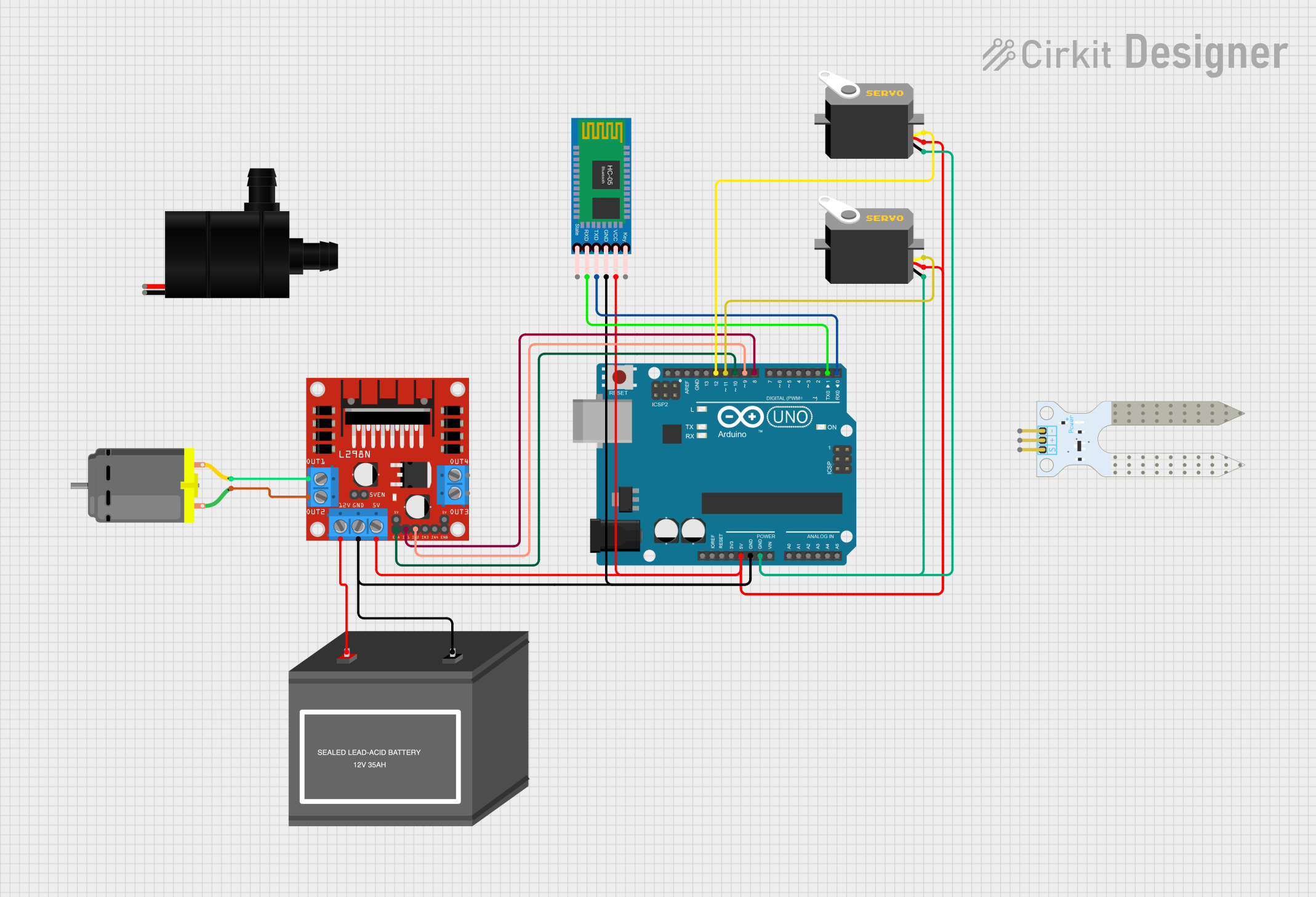
Circuit Documentation
Summary
This circuit integrates various components to create a system capable of controlling a DC motor, servos, and interfacing with a soil moisture sensor and a Bluetooth module. The Arduino UNO serves as the central microcontroller, managing inputs and outputs, and communicating with the HC-05 Bluetooth module for wireless data exchange. The L298N motor driver interfaces with the Arduino to control the DC motor's speed and direction. Two servos are controlled by the Arduino for position-based tasks. The soil moisture sensor provides feedback on soil conditions, and a 12V battery powers the motor driver and the water pump.
Component List
Arduino UNO
- Microcontroller board based on the ATmega328P
- It has 14 digital input/output pins, 6 analog inputs, a USB connection, a power jack, an ICSP header, and a reset button.
Servo (2x)
- A rotary actuator or linear actuator that allows for precise control of angular or linear position, velocity, and acceleration.
- It consists of a suitable motor coupled to a sensor for position feedback.
Soil Moisture Sensor
- A sensor that measures the volumetric content of water within the soil.
- It provides a digital output when the soil moisture threshold is reached.
L298N DC Motor Driver
- A high-power motor driver module that allows controlling the speed and direction of two DC motors or one stepper motor.
- It uses an H-bridge configuration and can provide a continuous current of 2A to your DC motor.
DC Motor
- An electric motor that runs on direct current (DC) electricity.
- Typically used for driving mechanical loads.
HC-05 Bluetooth Module
- A wireless communication module that can be used in master or slave configuration.
- It allows for serial communication over Bluetooth.
Water Pump
- A device that moves fluids by mechanical action, typically operated by an electric motor.
- It is used for circulating water in the system.
12V Battery (Mini)
- A compact power source providing 12 volts of direct current.
- It is used to power the motor driver and the water pump.
Wiring Details
Arduino UNO
- 5V connected to Servos (VCC), HC-05 Bluetooth Module (VCC), and L298N Motor Driver (5V).
- GND connected to Servos (GND), HC-05 Bluetooth Module (GND), 12V Battery (mini) (-), and L298N Motor Driver (GND).
- D12 connected to Servo (pulse).
- D11 connected to Servo (pulse).
- D10 connected to L298N Motor Driver (ENA).
- D9 connected to L298N Motor Driver (IN2).
- D8 connected to L298N Motor Driver (IN1).
- D1 connected to HC-05 Bluetooth Module (RXD).
- D0 connected to HC-05 Bluetooth Module (TXD).
Servos
- VCC connected to Arduino UNO (5V).
- GND connected to Arduino UNO (GND).
- Pulse connected to Arduino UNO (D12 or D11).
Soil Moisture Sensor
- (No wiring details provided in the net list)
L298N DC Motor Driver
- 5V connected to Arduino UNO (5V).
- GND connected to Arduino UNO (GND).
- 12V connected to 12V Battery (mini) (+).
- ENA connected to Arduino UNO (D10).
- IN1 connected to Arduino UNO (D8).
- IN2 connected to Arduino UNO (D9).
- OUT1 connected to DC Motor (pin 2).
- OUT2 connected to DC Motor (pin 1).
DC Motor
- Pin 1 connected to L298N Motor Driver (OUT2).
- Pin 2 connected to L298N Motor Driver (OUT1).
HC-05 Bluetooth Module
- VCC connected to Arduino UNO (5V).
- GND connected to Arduino UNO (GND).
- TXD connected to Arduino UNO (D0).
- RXD connected to Arduino UNO (D1).
Water Pump
- (No wiring details provided in the net list)
12V Battery (Mini)
- + connected to L298N Motor Driver (12V).
- - connected to Arduino UNO (GND).
Documented Code
Arduino UNO Code (sketch.ino)
void setup() {
  // put your setup code here, to run once:

}

void loop() {
  // put your main code here, to run repeatedly:

}
(Note: The actual functionality of the code is not provided in the input code snippet. The user should implement the setup and loop functions to control the components as per the requirements of the circuit.)
Additional Documentation (documentation.txt)
(No additional documentation code was provided.)