
ESP32-Based Heart Rate and SpO2 Monitor with OLED Display and Wi-Fi Connectivity
View and Edit Project In Cirkit Designer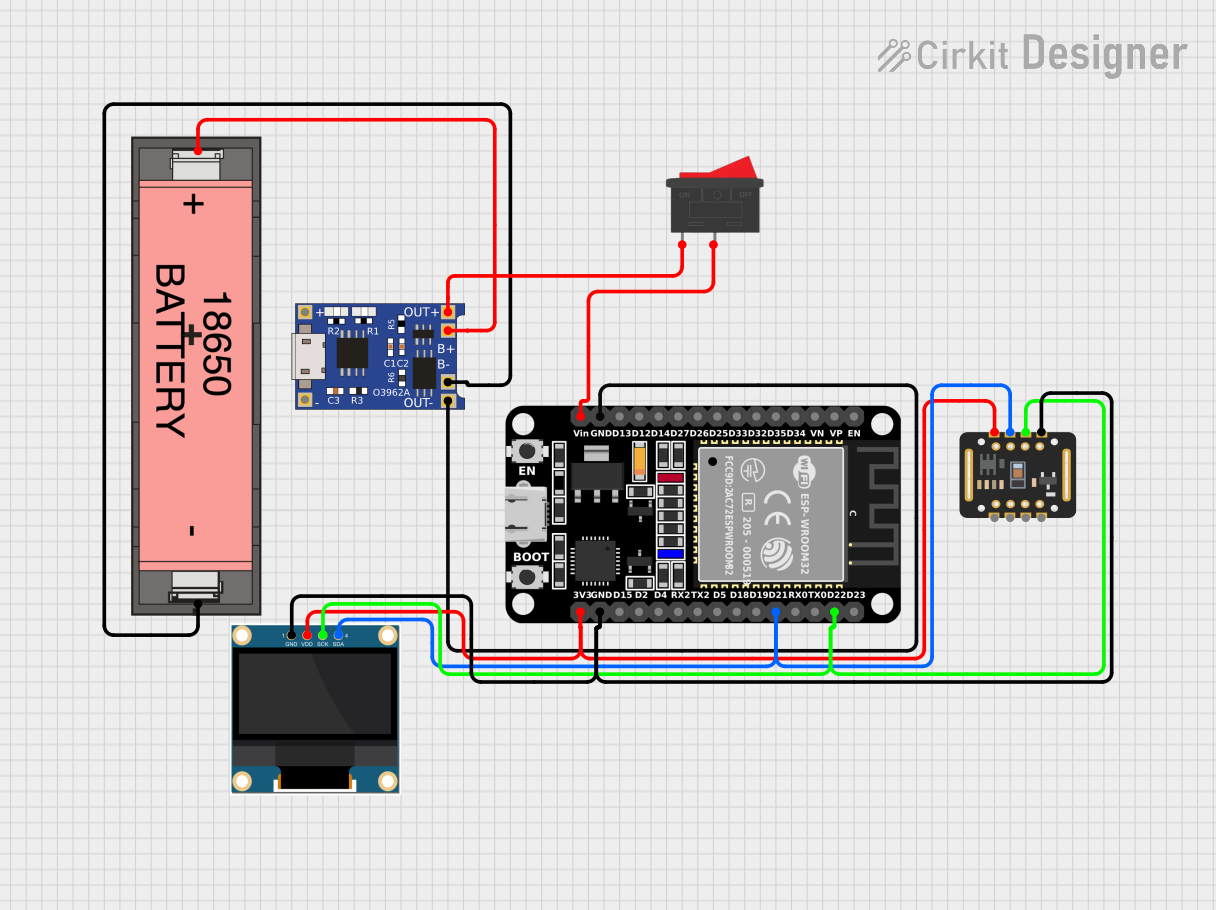
Circuit Documentation
Summary
This document provides a detailed overview of a circuit designed to monitor heart rate and SpO2 levels using an ESP32 microcontroller, a MAX30102 sensor, and a 0.96" OLED display. The circuit is powered by a Li-ion 18650 battery and includes a TP4056 charging module and a rocker switch for power control. The ESP32 microcontroller is programmed to read data from the MAX30102 sensor and display it on the OLED screen, as well as send the data to a Blynk server for remote monitoring.
Component List
ESP32 (30 pin)
- Description: A powerful microcontroller with built-in WiFi and Bluetooth capabilities.
- Pins: EN, VP, VN, D34, D35, D32, D33, D25, D26, D27, D14, D12, D13, GND, Vin, D23, D22, TX0, RX0, D21, D19, D18, D5, TX2, RX2, D4, D2, D15, 3V3
0.96" OLED
- Description: A small OLED display used to show heart rate and SpO2 levels.
- Pins: GND, VDD, SCK, SDA
MAX30102
- Description: A sensor module used to measure heart rate and SpO2 levels.
- Pins: VIN, SDA, SCL, GND, RD, IRD, INT
TP4056
- Description: A charging module for Li-ion batteries.
- Pins: OUT-, B-, B+, OUT+, IN-, IN+
Li-ion 18650 Battery
- Description: A rechargeable battery used to power the circuit.
- Pins: -, +
Rocker Switch
- Description: A switch used to control the power supply to the circuit.
- Pins: 1, 2
Wiring Details
ESP32 (30 pin)
- GND: Connected to TP4056 OUT-
- Vin: Connected to Rocker Switch pin 2
- D22: Connected to MAX30102 SCL and OLED SCK
- D21: Connected to MAX30102 SDA and OLED SDA
- GND: Connected to MAX30102 GND and OLED GND
- 3V3: Connected to MAX30102 VIN and OLED VDD
0.96" OLED
- GND: Connected to ESP32 GND
- VDD: Connected to ESP32 3V3
- SCK: Connected to ESP32 D22
- SDA: Connected to ESP32 D21
MAX30102
- VIN: Connected to ESP32 3V3
- SDA: Connected to ESP32 D21
- SCL: Connected to ESP32 D22
- GND: Connected to ESP32 GND
TP4056
- OUT-: Connected to ESP32 GND
- B-: Connected to Li-ion 18650 Battery -
- B+: Connected to Li-ion 18650 Battery +
- OUT+: Connected to Rocker Switch pin 1
Li-ion 18650 Battery
- -: Connected to TP4056 B-
- +: Connected to TP4056 B+
Rocker Switch
- 1: Connected to TP4056 OUT+
- 2: Connected to ESP32 Vin
Code Documentation
Blynk Credentials
#define BLYNK_TEMPLATE_ID "TMPL6LpHZKiX2"
#define BLYNK_TEMPLATE_NAME "HeartBit"
#define BLYNK_AUTH_TOKEN "cT29IADaMDiTjjyGtFh3p-CWC5n5_E4R"
Libraries
#include <Wire.h>
#include <Adafruit_GFX.h>
#include <Adafruit_SSD1306.h>
#include <DFRobot_MAX30102.h>
#include <WiFi.h>
#include <WiFiClient.h>
#include <BlynkSimpleEsp32.h>
OLED Display Configuration
#define SCREEN_WIDTH 128
#define SCREEN_HEIGHT 64
#define OLED_RESET -1
Adafruit_SSD1306 display(SCREEN_WIDTH, SCREEN_HEIGHT, &Wire, OLED_RESET);
MAX30102 Sensor Configuration
DFRobot_MAX30102 particleSensor;
int32_t SPO2;
int8_t SPO2Valid;
int32_t heartRate;
int8_t heartRateValid;
WiFi Credentials
char ssid[] = "Redmi 13";
char pass[] = "wewee101";
Heart Icon Bitmap
const unsigned char Heart_Icon[] PROGMEM = {
    0x00, 0x00, 0x18, 0x30, 0x3c, 0x78, 0x7e, 0xfc,
    0xff, 0xfe, 0xff, 0xfe, 0xee, 0xee, 0xd5, 0x56,
    0x7b, 0xbc, 0x3f, 0xf8, 0x1f, 0xf0, 0x0f, 0xe0,
    0x07, 0xc0, 0x03, 0x80, 0x01, 0x00, 0x00, 0x00
};
SpO2 Bitmap
const unsigned char SPO2_Bitmap[] PROGMEM = {
    0x00, 0x08, 0x0c, 0x1c, 0x1e, 0x26, 0x16, 0x2e,
    0x0c, 0x36, 0x00, 0x1c, 0x00, 0x00, 0x38, 0x60,
    0x4c, 0x90, 0x9e, 0x90, 0xbe, 0x30, 0xee, 0x40,
    0x7c, 0xd0, 0x38, 0xf0, 0x00, 0x00, 0x00, 0x00
};
Loading Bar Function
void drawLoadingBar(int progress) {
    int barWidth = 100;
    int barHeight = 5;
    int x = (SCREEN_WIDTH - barWidth) / 2;
    int y = SCREEN_HEIGHT - barHeight - 5;

    display.drawRect(x, y, barWidth, barHeight, SSD1306_WHITE);
    int fillWidth = map(progress, 0, 100, 0, barWidth);
    display.fillRect(x + 1, y + 1, fillWidth - 2, barHeight - 2, SSD1306_WHITE);
}
Welcome Screen Function
void displayWelcomeScreen() {
    display.clearDisplay();
    display.setTextSize(2);
    display.setTextColor(SSD1306_WHITE);
    display.setCursor(18, 20);
    display.print("HeartBit");
    display.display();
    delay(1000);

    for (int progress = 0; progress <= 100; progress += 10) {
        display.clearDisplay();
        display.drawBitmap(40, 30, Heart_Icon, 16, 16, SSD1306_WHITE);
        display.drawBitmap(70, 30, SPO2_Bitmap, 16, 16, SSD1306_WHITE);
        drawLoadingBar(progress);
        display.display();
        delay(100);
    }
}
Heart Rate Display Function
void displayHeartRate() {
    display.setCursor(0, 30);
    display.drawBitmap(0, 30, Heart_Icon, 16, 16, SSD1306_WHITE);
    display.setTextSize(2);
    display.setCursor(20, 30);
    if (heartRateValid) {
        display.print(heartRate);
        int scaledHeartRate = constrain(heartRate, 0, 999);
        Blynk.virtualWrite(V1, scaledHeartRate);
    } else {
        display.print("00");
        Blynk.virtualWrite(V1, 0);
    }
    display.print(" BPM");
}
SpO2 Display Function
void displaySpO2() {
    display.setCursor(0, 50);
    display.drawBitmap(0, 50, SPO2_Bitmap, 16, 16, SSD1306_WHITE);
    display.setTextSize(2);
    display.setCursor(20, 50);
    if (SPO2Valid) {
        display.print(SPO2);
        Blynk.virtualWrite(V2, SPO2);
    } else {
        display.print("00");
        Blynk.virtualWrite(V2, 0);
    }
    display.print(" %");
}
Setup Function
void setup()