
Voice-Controlled Robotic Vehicle with Joystick Override and Obstacle Detection
View and Edit Project In Cirkit Designer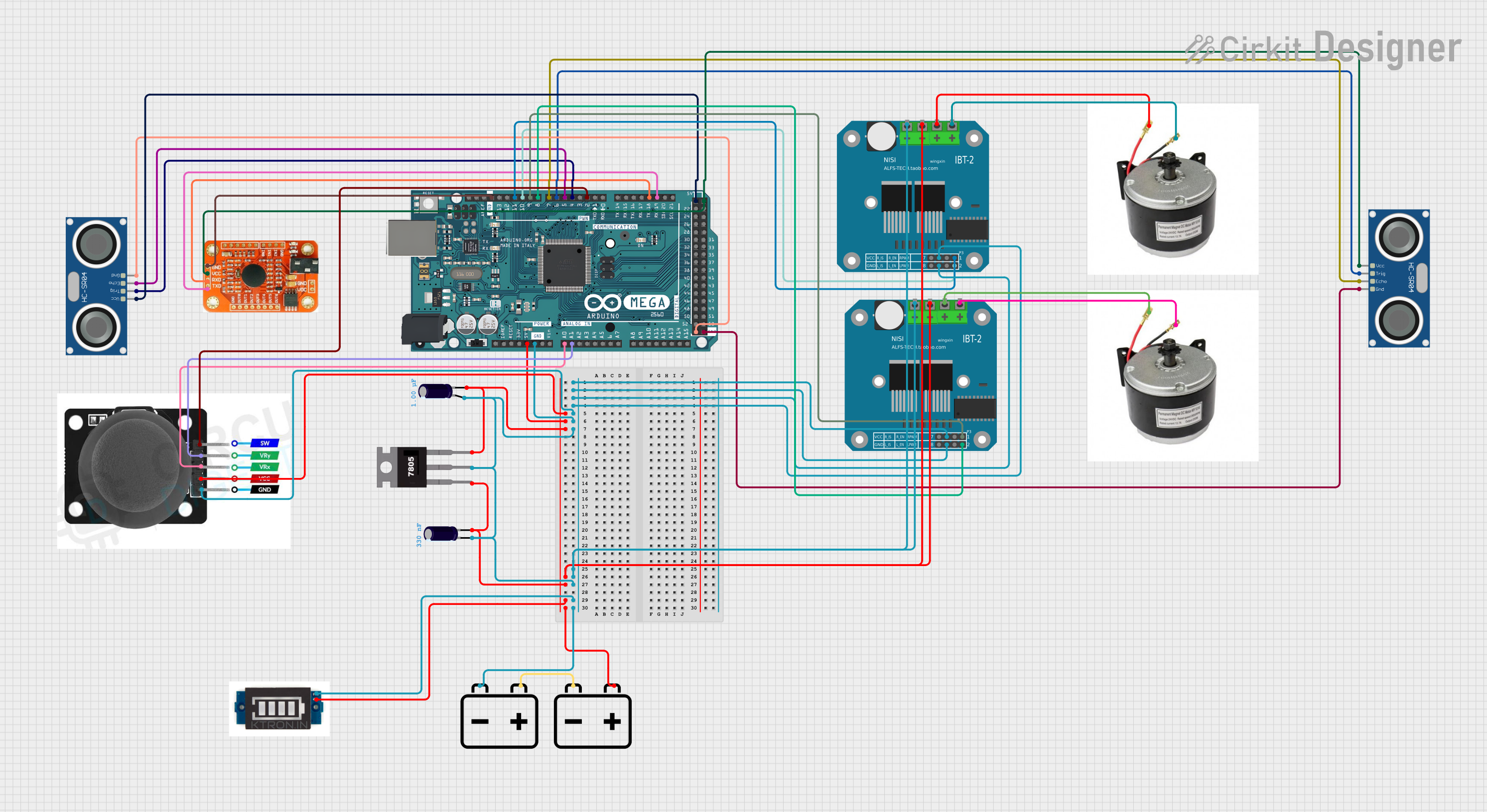
Circuit Documentation
Summary
This circuit integrates various components to perform multiple functions, including motor control, distance measurement, and voice recognition. It features an Arduino Mega 2560 as the central microcontroller, which interfaces with a joystick module, two HC-SR04 ultrasonic sensors, a voice recognition module, and two BTS7960 motor drivers to control a pair of 24v e-bike DC motors. Power management is handled by a 7805 voltage regulator and two 12v batteries, with additional components such as electrolytic capacitors and a battery level indicator to ensure stable operation.
Component List
HC-SR04 Ultrasonic Sensor
- Description: A sensor used for measuring distances via ultrasonic waves.
- Pins: VCC, TRIG, ECHO, GND
24v e-bike DC Motor
- Description: A motor used for propulsion in e-bike applications.
- Pins: VCC, GND
BTS7960 Motor Driver
- Description: A high-power motor driver designed for controlling large DC motors.
- Pins: Pin 1 to Pin 12
Arduino Mega 2560
- Description: A microcontroller board based on the ATmega2560, with numerous I/O pins for interfacing with various peripherals.
- Pins: Multiple digital and analog pins, power, and ground.
Voice Recognition Module
- Description: A module capable of recognizing voice commands.
- Pins: GND, VCC, RDX, RTX
Joystick Module
- Description: An input device that provides analog signal based on the X and Y axis movement and a digital signal for the switch.
- Pins: SW, VRY, VRX, VCC, GND
12v Battery
- Description: A power source for the circuit.
- Pins: +, -
Electrolytic Capacitor
- Description: A component used for filtering and stabilizing the power supply.
- Pins: +, -
- Properties: Capacitance value in Farads
7805 Voltage Regulator
- Description: A voltage regulator that outputs a stable 5V from a higher voltage input.
- Pins: Vin, Gnd, Vout
Battery Level Indicator
- Description: A device that indicates the charge level of the battery.
- Pins: Positive, GND
Wiring Details
HC-SR04 Ultrasonic Sensor
- VCC connected to 5V power supply.
- TRIG connected to a digital I/O pin on the Arduino.
- ECHO connected to a digital I/O pin on the Arduino.
- GND connected to the ground.
24v e-bike DC Motor
- VCC connected to the motor driver output.
- GND connected to the motor driver output.
BTS7960 Motor Driver
- Pins 1-12 connected to the Arduino, motors, power supply, and ground as per the control requirements.
Arduino Mega 2560
- Various I/O pins connected to sensors, motor drivers, and other peripherals.
- Power pins connected to the power supply and ground.
Voice Recognition Module
- GND connected to the ground.
- VCC connected to 5V power supply.
- RDX connected to a TX pin on the Arduino.
- RTX connected to an RX pin on the Arduino.
Joystick Module
- SW connected to a digital I/O pin on the Arduino.
- VRY connected to an analog input pin on the Arduino.
- VRX connected to an analog input pin on the Arduino.
- VCC connected to 5V power supply.
- GND connected to the ground.
12v Battery
-
- connected to the power input of the voltage regulator and other components as required.
-
- connected to the ground.
Electrolytic Capacitor
-
- connected to the positive side of the power supply.
-
- connected to the ground.
7805 Voltage Regulator
- Vin connected to the input voltage.
- Gnd connected to the ground.
- Vout connected to the 5V power rail.
Battery Level Indicator
- Positive connected to the positive terminal of the battery.
- GND connected to the ground.
Documented Code
void setup() {
  // put your setup code here, to run once:

}

void loop() {
  // put your main code here, to run repeatedly:

}
File: sketch.ino
The provided code is a template with empty setup() and loop() functions, which are the entry points for Arduino sketches. The setup() function is called once when the sketch starts and is used for initializing settings, while the loop() function runs repeatedly, allowing the microcontroller to perform operations based on the logic defined within it. The actual implementation details would be added to these functions based on the specific requirements of the circuit's operation.