
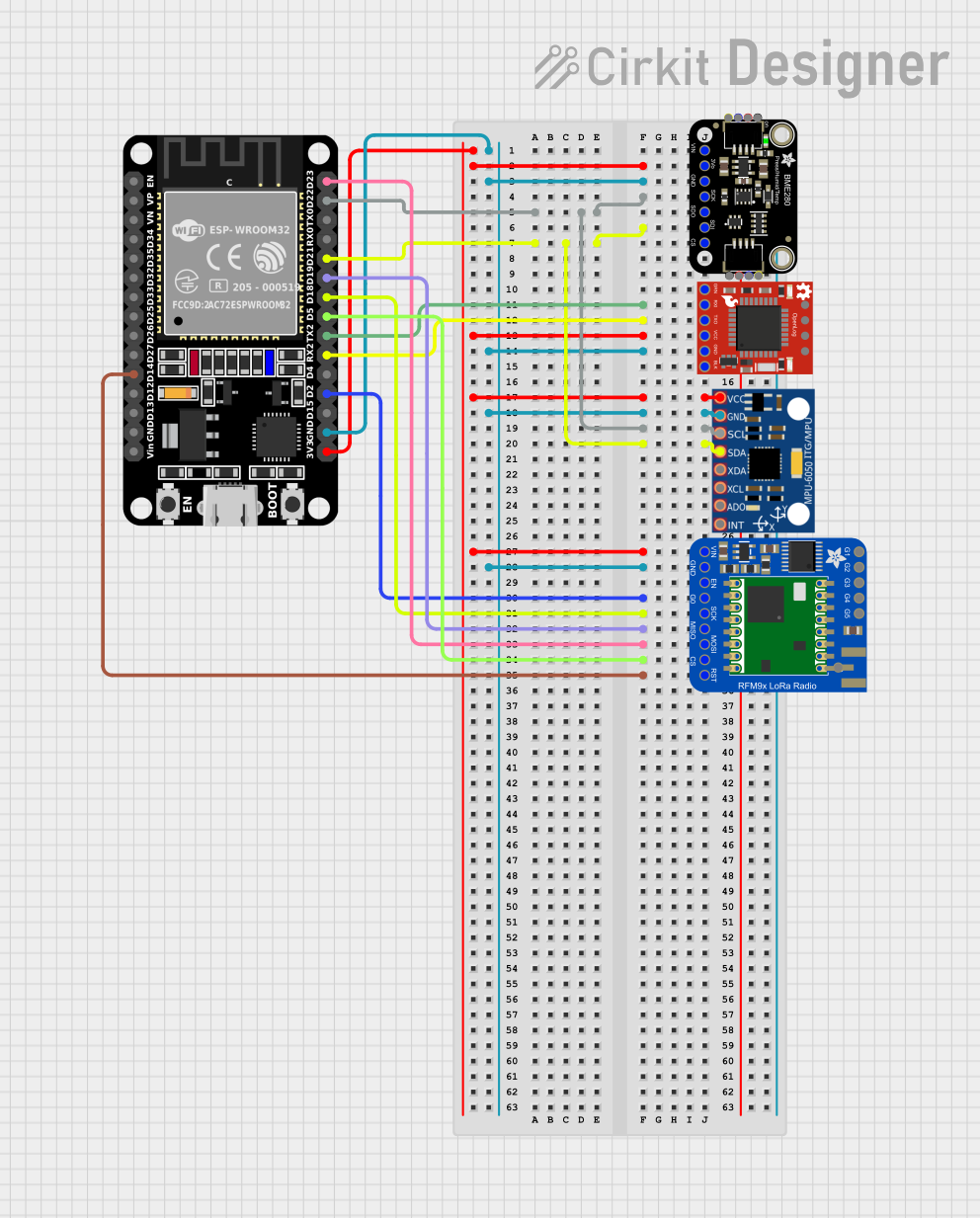
Circuit Documentation
Summary
This document provides a detailed overview of a circuit that integrates an ESP32 microcontroller with various sensors and modules, including the Adafruit BME280, SparkFun OpenLog, MPU-6050, and Adafruit RFM9x LoRa Radio. The circuit is designed to collect environmental data, log it, and transmit it via LoRa communication.
Component List
ESP32 (30 pin)
- Description: A powerful microcontroller with built-in Wi-Fi and Bluetooth capabilities.
- Pins: EN, VP, VN, D34, D35, D32, D33, D25, D26, D27, D14, D12, D13, GND, Vin, D23, D22, TX0, RX0, D21, D19, D18, D5, TX2, RX2, D4, D2, D15, 3V3
Adafruit BME280
- Description: A sensor module for measuring humidity, temperature, and pressure.
- Pins: VCC, 3.3V, GND, SCK/SCL, SDO/ADR, SDI/SDA, CS
SparkFun OpenLog
- Description: A simple serial logger that records data to a microSD card.
- Pins: DTR, RXI, TXO, VCC, GND, RST, SCK, MOSI, MISO
MPU-6050
- Description: A 6-axis motion tracking device that combines a 3-axis gyroscope and a 3-axis accelerometer.
- Pins: VCC, GND, SCL, SDA, XDA, XCL, AD0, INT
Adafruit RFM9x LoRa Radio
- Description: A long-range radio module for LoRa communication.
- Pins: DIO1, DIO2, DIO3, DIO4, DIO5, ANTENNA, VIN, GND, EN, DIO0, SCK, MISO, MOSI, CS, RST
Wiring Details
ESP32 (30 pin)
- 3V3: Connected to VCC of MPU-6050, VCC of SparkFun OpenLog, 3.3V of Adafruit BME280, and VIN of Adafruit RFM9x LoRa Radio
- GND: Connected to GND of MPU-6050, GND of SparkFun OpenLog, GND of Adafruit BME280, and GND of Adafruit RFM9x LoRa Radio
- D2: Connected to DIO0 of Adafruit RFM9x LoRa Radio
- D5: Connected to CS of Adafruit RFM9x LoRa Radio
- D14: Connected to RST of Adafruit RFM9x LoRa Radio
- D18: Connected to SCK of Adafruit RFM9x LoRa Radio
- D19: Connected to MISO of Adafruit RFM9x LoRa Radio
- D21: Connected to SDI/SDA of Adafruit BME280 and SDA of MPU-6050
- D22: Connected to SCK/SCL of Adafruit BME280 and SCL of MPU-6050
- D23: Connected to MOSI of Adafruit RFM9x LoRa Radio
- TX2: Connected to RXI of SparkFun OpenLog
- RX2: Connected to TXO of SparkFun OpenLog
Adafruit BME280
- 3.3V: Connected to 3V3 of ESP32
- GND: Connected to GND of ESP32
- SCK/SCL: Connected to D22 of ESP32 and SCL of MPU-6050
- SDI/SDA: Connected to D21 of ESP32 and SDA of MPU-6050
SparkFun OpenLog
- VCC: Connected to 3V3 of ESP32
- GND: Connected to GND of ESP32
- RXI: Connected to TX2 of ESP32
- TXO: Connected to RX2 of ESP32
MPU-6050
- VCC: Connected to 3V3 of ESP32
- GND: Connected to GND of ESP32
- SCL: Connected to D22 of ESP32 and SCK/SCL of Adafruit BME280
- SDA: Connected to D21 of ESP32 and SDI/SDA of Adafruit BME280
Adafruit RFM9x LoRa Radio
- VIN: Connected to 3V3 of ESP32
- GND: Connected to GND of ESP32
- DIO0: Connected to D2 of ESP32
- CS: Connected to D5 of ESP32
- RST: Connected to D14 of ESP32
- SCK: Connected to D18 of ESP32
- MISO: Connected to D19 of ESP32
- MOSI: Connected to D23 of ESP32
Documented Code
/***************************************************************************
  This is a library for the BME280 humidity, temperature & pressure sensor

  Designed specifically to work with the Adafruit BME280 Breakout
  ----> http://www.adafruit.com/products/2650

  These sensors use I2C or SPI to communicate, 2 or 4 pins are required
  to interface. The device's I2C address is either 0x76 or 0x77.

  Adafruit invests time and resources providing this open source code,
  please support Adafruit and open-source hardware by purchasing products
  from Adafruit!

  Written by Limor Fried & Kevin Townsend for Adafruit Industries.
  BSD license, all text above must be included in any redistribution
  See the LICENSE file for details.

  Introduce la función millis() para no dejar ocupado el microcontrolador.
  Programa procedente del proyecto Cansat2022-23 equipo Mersat adaptado
  a tarjeta ESP32

  CONEXIONES:  Sensor de Peysanet
  BME280 ESP32
  -------------
  Vin--- 3.3V
  GND--- GND
  SCL--- GPIO22  (I2C SCL PIN)
  SDA--- GPIO21  (I2C SDA PIN)

  CONEXIONES Sensor de Adafruit:  (usa la dirección 0x77 por defecto
  BME280 ESP32
  -------------
  Vin--- 3.3V
  GND--- GND
  SCK--- GPIO22  (I2C SCL PIN)
  SDI--- GPIO21  (I2C SDA PIN)

 ***************************************************************************/

#include <Wire.h>
#include <SPI.h>
#include <Adafruit_Sensor.h>
#include <Adafruit_BME280.h>
#include <LoRa.h>

//define the pins used by the transceiver module
#define ss 5
#define rst 14
#define dio0 2

// OpenLog Serial
#define OPENLOG_RX 16
#define OPENLOG_TX 17

#define SEALEVELPRESSURE_HPA (1013.25)

Adafruit_BME280 bme; // I2C

int paquete = 1;
int periodo = 1000;  // Tiempo entre medidas. Sustituye al anterior delay.
unsigned long tiempoAnterior = 0;  //guarda tiempo de referencia para comparar

void setup() {
    Serial.begin(115200);
    Serial2.begin(115200, SERIAL_8N1, OPENLOG_RX, OPENLOG_TX);
    while(!Serial);    // time to get serial running
    Serial.println(F("BME280 test"));
    Serial.println("LoRa Sender");
    //setup LoRa transceiver module
    LoRa.setPins(ss, rst, dio0);

    //replace the LoRa.begin(---E-) argument with your location's frequency
    //433E6 for Asia
    //868E6 for Europe
    //915E6 for North America
    while (!LoRa.begin(868E6)) {
        Serial.println(".");
        delay(500);
    }
    // Change sync word (0xF3) to match the receiver
    // The sync word assures you don't get LoRa messages from other LoRa transceivers
    // ranges from 0-0xFF
    LoRa.setSyncWord(0xF3);
    Serial.println("LoRa Initializing OK!");

    unsigned status;

    // default settings
    // status = bme.begin();
    // status = bme.begin(0x76);   // Sensor blanco de peysanet y el rojo chino
    status = bme.begin(0x77);   // Sensor bme280 original de adafruit
    // You can also pass in a Wire library object like &Wire2
    //status = bme.begin(0x76, &Wire2)
    if (!status) {
        Serial.println("Could not find a valid BME280 sensor, check wiring, address, sensor ID!");
        Serial.print("SensorID was: 0x"); Serial.println(bme.sensorID(),16);
        Serial.print("        ID of 0xFF probably means a bad address, a BMP 180 or BMP 085\n");
        Serial.print("   ID of 0x56-0