
Arduino Nano-Based Smart Soil Moisture Monitoring and Motor Control System with OLED Display
View and Edit Project In Cirkit Designer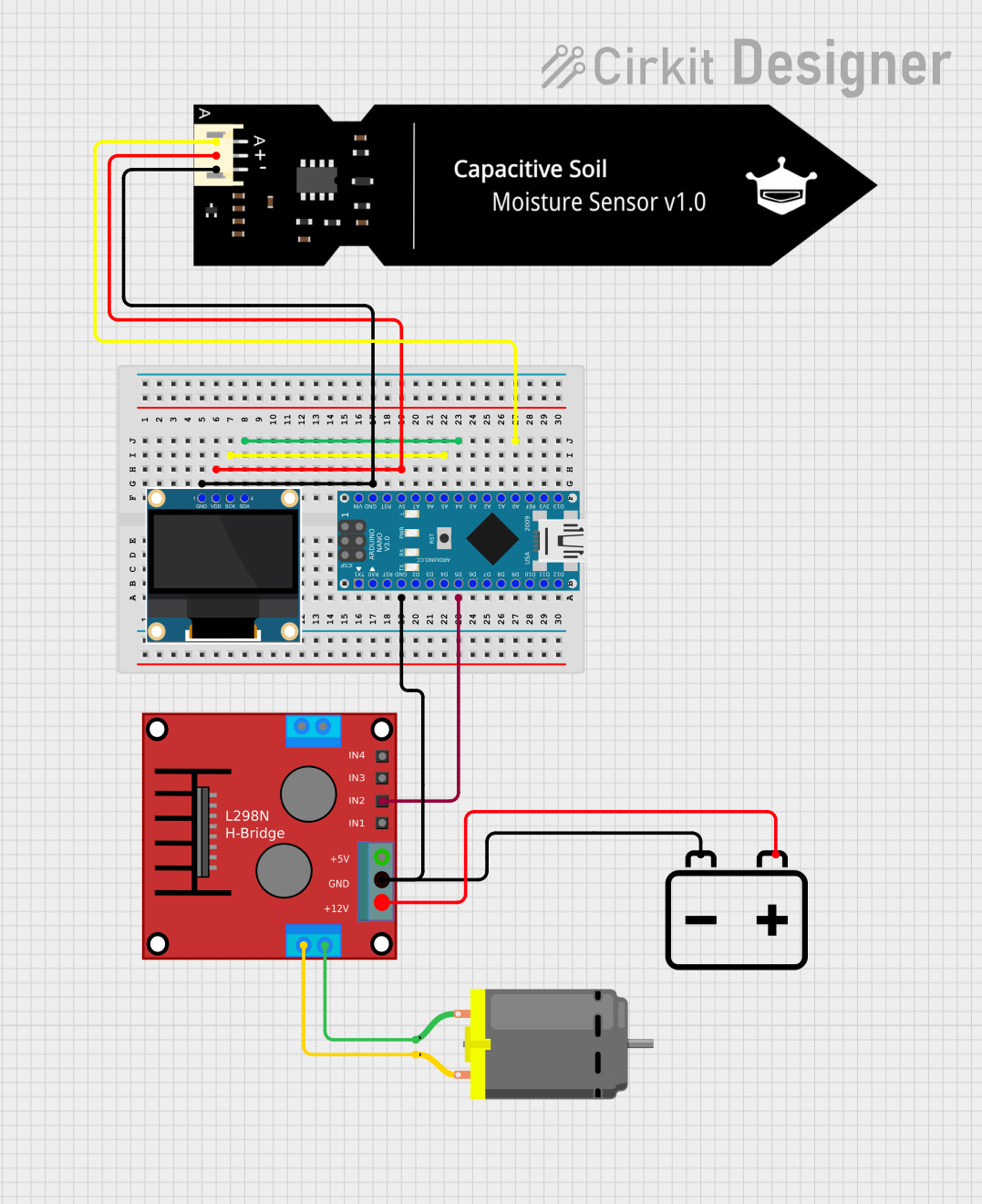
Circuit Documentation
Summary
This circuit integrates an Arduino Nano microcontroller, a 0.96" OLED display, a DFRobot Capacitive Soil Moisture Sensor, a DC Motor, a 12V Battery, and an H-Bridge motor driver. The Arduino Nano serves as the central controller, interfacing with the OLED display for visual output, the soil moisture sensor for environmental monitoring, and the H-Bridge for motor control. The 12V battery powers the motor through the H-Bridge.
Component List
Arduino Nano
- Description: A compact microcontroller board based on the ATmega328P.
- Pins: D1/TX, D0/RX, RESET, GND, D2, D3, D4, D5, D6, D7, D8, D9, D10, D11/MOSI, D12/MISO, VIN, 5V, A7, A6, A5, A4, A3, A2, A1, A0, AREF, 3V3, D13/SCK
0.96" OLED
- Description: A small OLED display module for visual output.
- Pins: GND, VDD, SCK, SDA
H-Bridge Motor Driver
- Description: A motor driver module for controlling DC motors.
- Pins: OUT4-Motor2, OUT3-Motor2, OUT2-Motor1, OUT1-Motor1, 5V, GND, 12V, IN3, IN1, IN2, IN4
DC Motor
- Description: A simple DC motor.
- Pins: pin 1, pin 2
12V Battery
- Description: A 12V power source.
- Pins: -, +
DFRobot Capacitive Soil Moisture Sensor (V1.0)
- Description: A sensor for measuring soil moisture levels.
- Pins: A, VCC, GND
Wiring Details
Arduino Nano
GND connected to:
- 0.96" OLED GND
- DFRobot Capacitive Soil Moisture Sensor GND
- 12V Battery -
- H-Bridge Motor Driver GND
5V connected to:
- 0.96" OLED VDD
- DFRobot Capacitive Soil Moisture Sensor VCC
A5 connected to:
- 0.96" OLED SCK
A4 connected to:
- 0.96" OLED SDA
D5 connected to:
- H-Bridge Motor Driver IN2
A0 connected to:
- DFRobot Capacitive Soil Moisture Sensor A
0.96" OLED
GND connected to:
- Arduino Nano GND
VDD connected to:
- Arduino Nano 5V
SCK connected to:
- Arduino Nano A5
SDA connected to:
- Arduino Nano A4
H-Bridge Motor Driver
GND connected to:
- Arduino Nano GND
- 12V Battery -
12V connected to:
- 12V Battery +
IN2 connected to:
- Arduino Nano D5
OUT2-Motor1 connected to:
- DC Motor pin 2
OUT1-Motor1 connected to:
- DC Motor pin 1
DC Motor
pin 1 connected to:
- H-Bridge Motor Driver OUT1-Motor1
pin 2 connected to:
- H-Bridge Motor Driver OUT2-Motor1
12V Battery
- connected to:
- Arduino Nano GND
- H-Bridge Motor Driver GND
+ connected to:
- H-Bridge Motor Driver 12V
DFRobot Capacitive Soil Moisture Sensor (V1.0)
GND connected to:
- Arduino Nano GND
VCC connected to:
- Arduino Nano 5V
A connected to:
- Arduino Nano A0
Documented Code
Arduino Nano Code
void setup() {
  // put your setup code here, to run once:

}

void loop() {
  // put your main code here, to run repeatedly:

}
This code is a basic template for the Arduino Nano. The setup() function is where you initialize your components and settings, and the loop() function is where the main logic of your program runs repeatedly.