
Arduino UNO Controlled Bipolar Stepper Motor with CNC Microstepper Driver
View and Edit Project In Cirkit Designer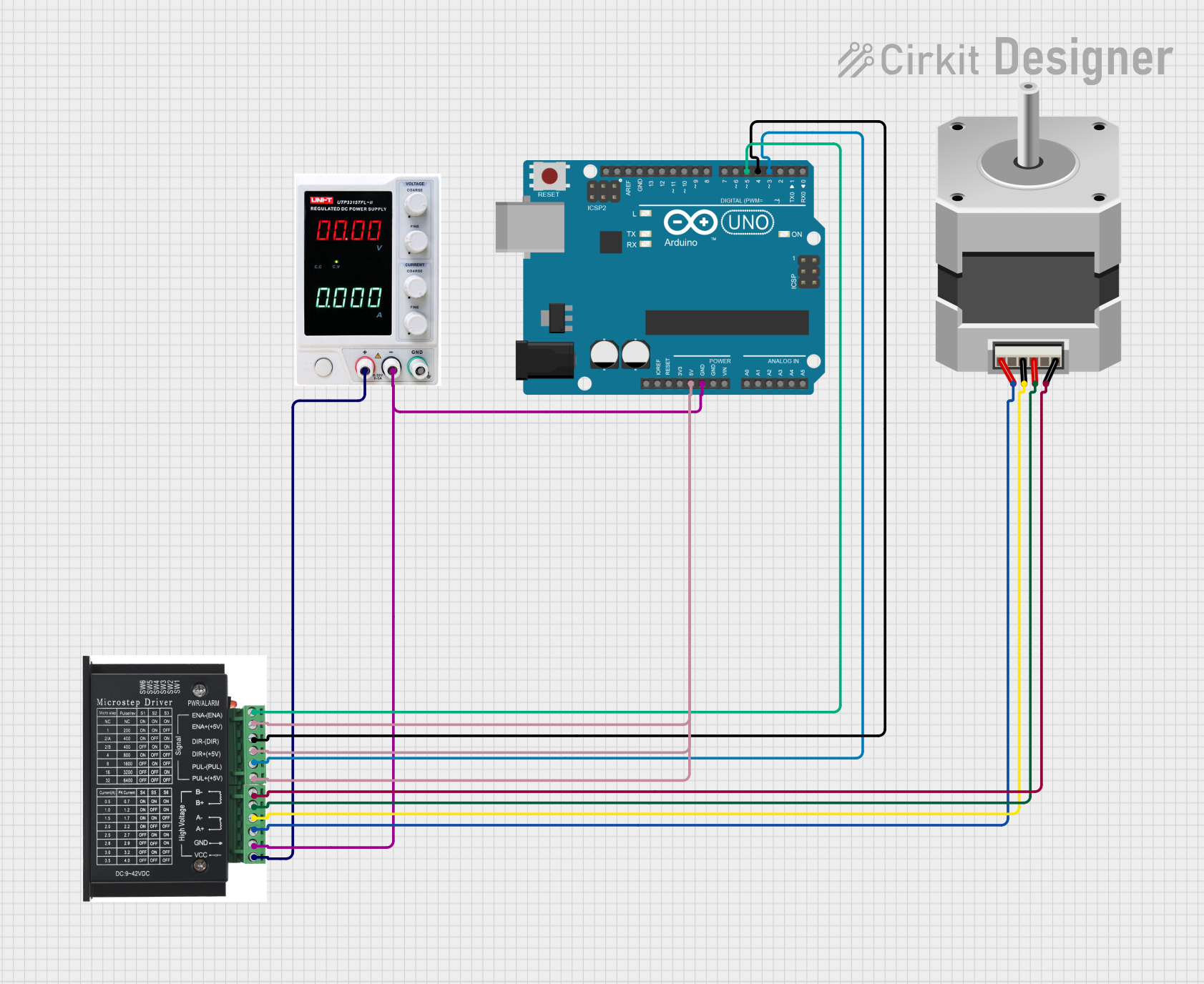
Circuit Documentation
Summary
This circuit consists of a power supply, an Arduino UNO microcontroller, a CNC microstepper driver board, and a bipolar stepper motor. The Arduino UNO controls the CNC microstepper driver, which in turn drives the stepper motor. The power supply provides the necessary voltage and current to the CNC microstepper driver and the Arduino UNO.
Component List
Power Supply
- Description: Provides the necessary voltage and current for the circuit.
- Pins: +, -, GND
Arduino UNO
- Description: A microcontroller board based on the ATmega328P.
- Pins: UNUSED, IOREF, Reset, 3.3V, 5V, GND, Vin, A0, A1, A2, A3, A4, A5, SCL, SDA, AREF, D13, D12, D11, D10, D9, D8, D7, D6, D5, D4, D3, D2, D1, D0
Stepper Motor (Bipolar)
- Description: A bipolar stepper motor with four pins.
- Pins: D, B, C, A
CNC Microstepper Driver - Board
- Description: A driver board for controlling a stepper motor with microstepping capability.
- Pins: ENA-, ENA+, DIR-, DIR+, PUL-, PUL+, B-, B+, A-, A+, GND, VCC
Wiring Details
Power Supply
- + connected to VCC of CNC Microstepper Driver - Board
- - connected to GND of CNC Microstepper Driver - Board and GND of Arduino UNO
Arduino UNO
- GND connected to - of Power Supply and GND of CNC Microstepper Driver - Board
- 5V connected to ENA+, DIR+, and PUL+ of CNC Microstepper Driver - Board
- D5 connected to ENA- of CNC Microstepper Driver - Board
- D4 connected to DIR- of CNC Microstepper Driver - Board
- D3 connected to PUL- of CNC Microstepper Driver - Board
Stepper Motor (Bipolar)
- D connected to B- of CNC Microstepper Driver - Board
- B connected to B+ of CNC Microstepper Driver - Board
- C connected to A- of CNC Microstepper Driver - Board
- A connected to A+ of CNC Microstepper Driver - Board
CNC Microstepper Driver - Board
- VCC connected to + of Power Supply
- GND connected to - of Power Supply and GND of Arduino UNO
- ENA+ connected to 5V of Arduino UNO
- DIR+ connected to 5V of Arduino UNO
- PUL+ connected to 5V of Arduino UNO
- ENA- connected to D5 of Arduino UNO
- DIR- connected to D4 of Arduino UNO
- PUL- connected to D3 of Arduino UNO
- B- connected to D of Stepper Motor (Bipolar)
- B+ connected to B of Stepper Motor (Bipolar)
- A- connected to C of Stepper Motor (Bipolar)
- A+ connected to A of Stepper Motor (Bipolar)
Code Documentation
Arduino UNO Code
void setup() {
  // put your setup code here, to run once:

}

void loop() {
  // put your main code here, to run repeatedly:

}
This code is a basic template for the Arduino UNO. The setup function is called once when the program starts and is used to initialize variables, pin modes, start using libraries, etc. The loop function runs continuously after the setup function has completed. This is where the main logic of the program will be implemented.