
Arduino-Based Self-Watering System with Soil Moisture and Temperature Sensors
View and Edit Project In Cirkit Designer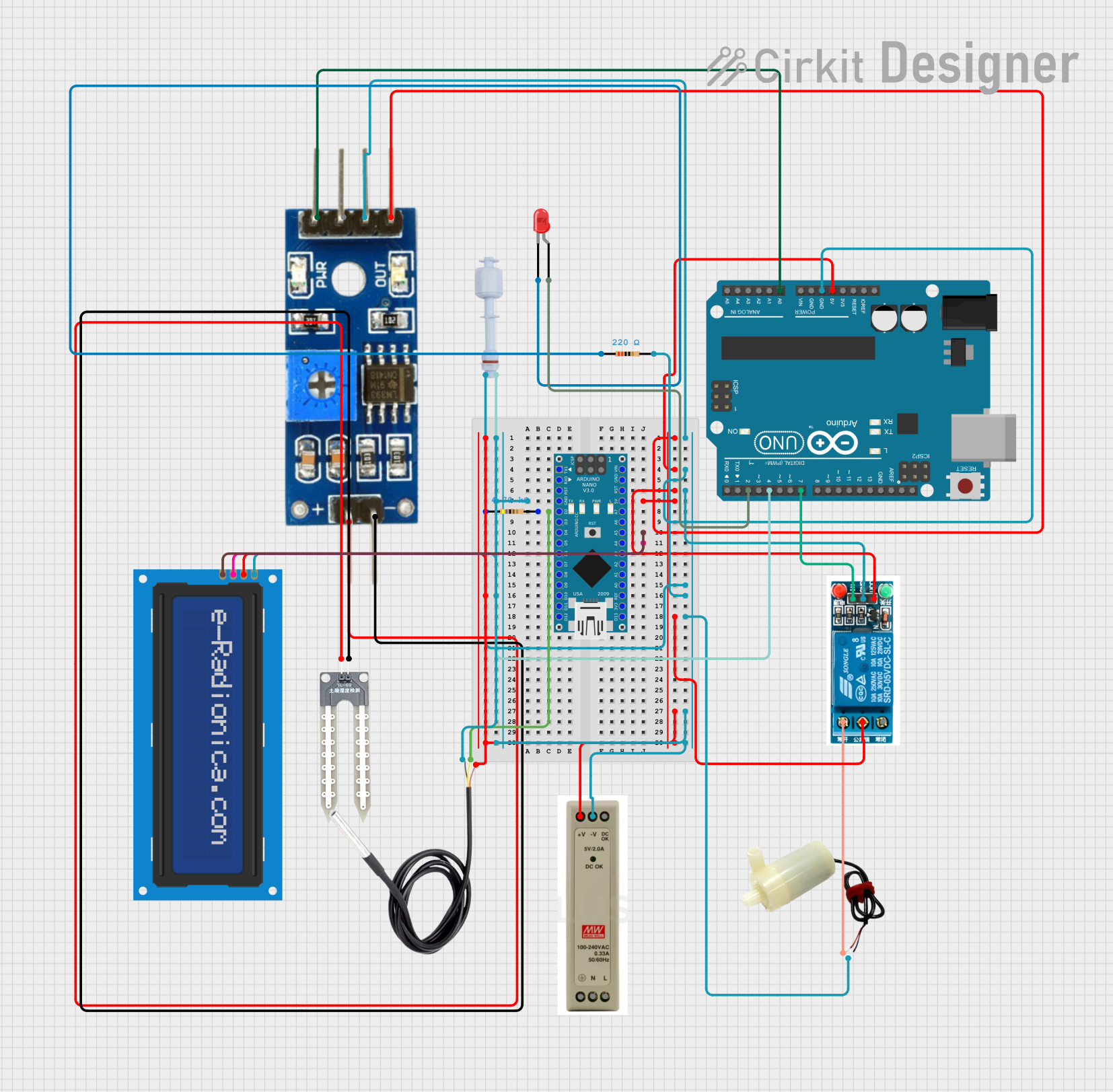
Circuit Documentation
Summary
This circuit is a self-watering system with a water level indicator. It uses an Arduino UNO and an Arduino Nano to control a water pump, monitor soil moisture, and display information on an LCD screen. The system also includes a float switch to detect low water levels and an LED indicator.
Component List
5V Mini Water Pump
- Pins: Positive pin, Negative pin
- Description: A small water pump powered by 5V.
- Purpose: Used to water plants when soil moisture is low.
Water Sensor
- Pins: +, -
- Description: A sensor to detect water presence.
- Purpose: Used to detect water levels in the soil.
5V PSU
- Pins: 5V+, GND, 5V OK, PE, N, L
- Description: A power supply unit providing 5V.
- Purpose: Powers the entire circuit.
5V Relay
- Pins: Normally Open, Common terminal, Normally Closed, In, GND, VCC
- Description: A relay module that operates at 5V.
- Purpose: Controls the water pump.
Arduino UNO
- Pins: UNUSED, IOREF, Reset, 3.3V, 5V, GND, Vin, A0, A1, A2, A3, A4, A5, SCL, SDA, AREF, D13, D12, D11, D10, D9, D8, D7, D6, D5, D4, D3, D2, D1, D0
- Description: A microcontroller board based on the ATmega328P.
- Purpose: Controls the self-watering system and water level indicator.
Float Switch
- Pins: GND, Digital Pin
- Description: A switch that floats on water to detect water levels.
- Purpose: Detects low water levels in the reservoir.
LED: Two Pin (red)
- Pins: Cathode, Anode
- Description: A red LED.
- Purpose: Indicates low water level.
Resistor (220 Ohms)
- Pins: Pin1, Pin2
- Description: A resistor with a resistance of 220 Ohms.
- Purpose: Current limiting for the LED.
Arduino Nano
- Pins: D1/TX, D0/RX, RESET, GND, D2, D3, D4, D5, D6, D7, D8, D9, D10, D11/MOSI, D12/MISO, VIN, 5V, A7, A6, A5, A4, A3, A2, A1, A0, AREF, 3V3, D13/SCK
- Description: A small, complete, and breadboard-friendly board based on the ATmega328P.
- Purpose: Monitors soil temperature and displays information on the LCD.
Resistor (4700 Ohms)
- Pins: Pin1, Pin2
- Description: A resistor with a resistance of 4700 Ohms.
- Purpose: Pull-up resistor for the DS18B20 temperature sensor.
DS18B20
- Pins: Signal, GND, VCC
- Description: A digital temperature sensor.
- Purpose: Measures soil temperature.
Soil Moisture Module
- Pins: Positive, Negative, Analog, Digital, Ground, VCC
- Description: A module to measure soil moisture.
- Purpose: Detects soil moisture levels.
LCD Screen 16x2 I2C
- Pins: SCL, SDA, VCC, GND
- Description: A 16x2 character LCD with I2C interface.
- Purpose: Displays information such as soil moisture and temperature.
Wiring Details
5V Mini Water Pump
- Positive pin: Connected to the Normally Open pin of the 5V relay.
- Negative pin: Connected to GND.
Water Sensor
- + pin: Connected to the Positive pin of the Soil Moisture Module.
- - pin: Connected to the Negative pin of the Soil Moisture Module.
5V PSU
- 5V+ pin: Connected to the 5V pin of the Arduino Nano, Arduino UNO, VCC pin of the Soil Moisture Module, VCC pin of the 5V relay, Common terminal of the 5V relay, and VCC pin of the DS18B20.
- GND pin: Connected to the GND pin of the Arduino Nano, Arduino UNO, Ground pin of the Soil Moisture Module, GND pin of the 5V relay, GND pin of the Float Switch, pin2 of the 220 Ohms Resistor, and Negative pin of the 5V Mini Water Pump.
5V Relay
- Normally Open pin: Connected to the Positive pin of the 5V Mini Water Pump.
- Common terminal: Connected to the 5V+ pin of the 5V PSU.
- In pin: Connected to the D7 pin of the Arduino UNO.
- GND pin: Connected to GND.
- VCC pin: Connected to the 5V+ pin of the 5V PSU.
Arduino UNO
- 5V pin: Connected to the 5V+ pin of the 5V PSU.
- GND pin: Connected to GND.
- A0 pin: Connected to the Analog pin of the Soil Moisture Module.
- D7 pin: Connected to the In pin of the 5V relay.
- D4 pin: Connected to the Digital Pin of the Float Switch.
- D2 pin: Connected to the Anode pin of the LED.
Float Switch
- GND pin: Connected to GND.
- Digital Pin: Connected to the D4 pin of the Arduino UNO.
LED: Two Pin (red)
- Cathode pin: Connected to pin1 of the 220 Ohms Resistor.
- Anode pin: Connected to the D2 pin of the Arduino UNO.
Resistor (220 Ohms)
- Pin1: Connected to the Cathode pin of the LED.
- Pin2: Connected to GND.
Arduino Nano
- 5V pin: Connected to the 5V+ pin of the 5V PSU.
- GND pin: Connected to GND.
- D2 pin: Connected to pin2 of the 4700 Ohms Resistor.
- A5 pin: Connected to the SCL pin of the LCD screen.
- A4 pin: Connected to the SDA pin of the LCD screen.
Resistor (4700 Ohms)
- Pin1: Connected to the 5V+ pin of the 5V PSU.
- Pin2: Connected to the D2 pin of the Arduino Nano and the Signal pin of the DS18B20.
DS18B20
- Signal pin: Connected to pin2 of the 4700 Ohms Resistor.
- GND pin: Connected to GND.
- VCC pin: Connected to the 5V+ pin of the 5V PSU.
Soil Moisture Module
- Positive pin: Connected to the + pin of the Water Sensor.
- Negative pin: Connected to the - pin of the Water Sensor.
- Analog pin: Connected to the A0 pin of the Arduino UNO.
- Ground pin: Connected to GND.
- VCC pin: Connected to the 5V+ pin of the 5V PSU.
LCD Screen 16x2 I2C
- SCL pin: Connected to the A5 pin of the Arduino Nano.
- SDA pin: Connected to the A4 pin of the Arduino Nano.
- VCC pin: Connected to the 5V+ pin of the 5V PSU.
- GND pin: Connected to GND.
Documented Code
Arduino UNO Code
// Pin Definitions for Self-Watering System
const int moisturePin = A0;    // Pin connected to the soil moisture sensor (analog pin)
const int pumpPin = 7;         // Pin connected to the relay for the pump (digital pin)

// Pin Definitions for Water Level Indicator
const int floatSwitchPin = 4;  // Pin connected to the float switch (D4)
const int ledPin = 2;          // Pin connected to the red LED (D2)

// Threshold values
const int moistureThreshold = 400; // Soil moisture threshold for watering
const int waterLevelThreshold = LOW; // LOW means water level is low (when the float switch is closed)

// Variables for timing and states
unsigned long previousMillis = 0;
const long interval = 500; // Interval for sensor checks
int waterLevelState = HIGH;    // Default state is HIGH (water is not low)
int moistureValue = 0;         // Variable to store the soil moisture reading

void setup() {
  // Initialize the float