
Arduino UNO-Based Automated Waste Sorting System with Stepper and Servo Motors
View and Edit Project In Cirkit Designer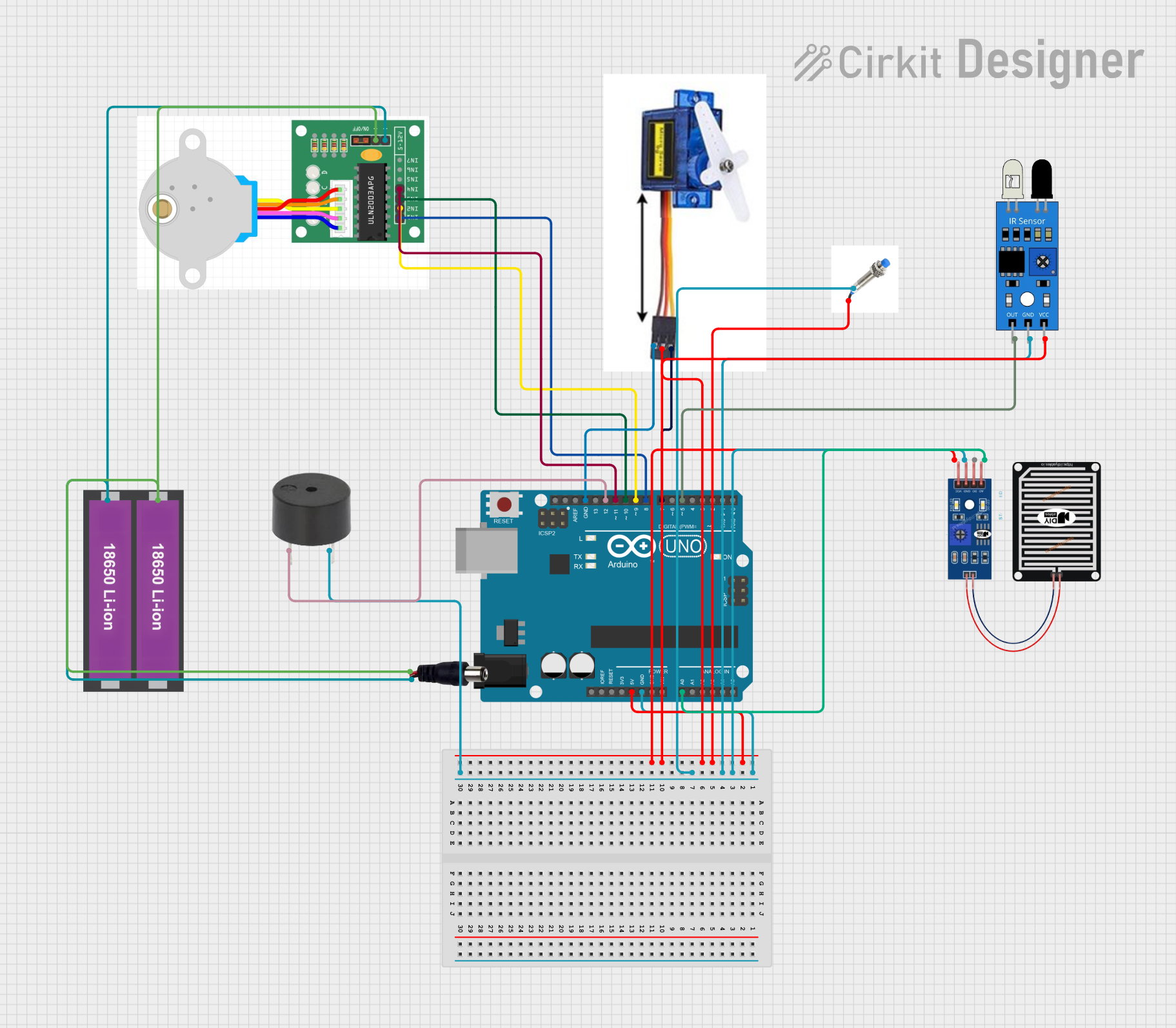
Circuit Documentation
Summary
This circuit is designed to control a waste sorting system that categorizes wet, dry, and metal waste. The system utilizes an Arduino UNO microcontroller to manage various sensors and actuators, including a stepper motor, a servo motor, a proximity sensor, an IR sensor, a rain sensor, and a buzzer. The stepper motor rotates a sorting mechanism, the servo motor opens and closes a gate, the proximity sensor detects the presence of waste, the IR sensor identifies the type of waste, and the rain sensor measures soil moisture. The buzzer provides audible feedback.
Component List
Arduino UNO
- Description: Microcontroller board based on the ATmega328P.
- Pins: UNUSED, IOREF, Reset, 3.3V, 5V, GND, Vin, A0, A1, A2, A3, A4, A5, SCL, SDA, AREF, D13, D12, D11, D10, D9, D8, D7, D6, D5, D4, D3, D2, D1, D0
Stepper Motor
- Description: Stepper motor for precise control of rotational position.
- Pins: IN1, IN2, IN3, IN4, +, -
Servo Motor 9G
- Description: Small servo motor for precise control of angular position.
- Pins: VCC 5V, PMW, GND
Proximity Sensor
- Description: Sensor to detect the presence of objects.
- Pins: GND, +12v
IR Sensor
- Description: Infrared sensor to detect the type of waste.
- Pins: out, gnd, vcc
Rain Sensor
- Description: Sensor to measure soil moisture.
- Pins: AO, DO, GRD, VCC
Buzzer
- Description: Provides audible feedback.
- Pins: PIN, GND
18650 Li-ion Battery x 2
- Description: Power source for the circuit.
- Pins: +, -
Power Jack
- Description: Connects the power source to the circuit.
- Pins: POSITIF, NEGATIF
Wiring Details
Arduino UNO
GND is connected to:
- Rain Sensor (GRD)
- IR Sensor (gnd)
- Proximity Sensor (GND)
- Buzzer (GND)
- Servo Motor 9G (GND)
5V is connected to:
- Proximity Sensor (+12v)
- Servo Motor 9G (VCC 5V)
- IR Sensor (vcc)
- Rain Sensor (VCC)
A0 is connected to:
- Rain Sensor (AO)
D12 is connected to:
- Buzzer (PIN)
D11 is connected to:
- Stepper Motor (IN4)
D10 is connected to:
- Stepper Motor (IN3)
D9 is connected to:
- Stepper Motor (IN2)
D8 is connected to:
- Stepper Motor (IN1)
D7 is connected to:
- Servo Motor 9G (PMW)
D5 is connected to:
- IR Sensor (out)
Stepper Motor
IN4 is connected to:
- Arduino UNO (D11)
IN3 is connected to:
- Arduino UNO (D10)
IN2 is connected to:
- Arduino UNO (D9)
IN1 is connected to:
- Arduino UNO (D8)
+ is connected to:
- Power Jack (POSITIF)
- 18650 Li-ion Battery x 2 (+)
- is connected to:
- Power Jack (NEGATIF)
- 18650 Li-ion Battery x 2 (-)
Servo Motor 9G
VCC 5V is connected to:
- Arduino UNO (5V)
PMW is connected to:
- Arduino UNO (D7)
GND is connected to:
- Arduino UNO (GND)
Proximity Sensor
GND is connected to:
- Arduino UNO (GND)
+12v is connected to:
- Arduino UNO (5V)
IR Sensor
out is connected to:
- Arduino UNO (D5)
gnd is connected to:
- Arduino UNO (GND)
vcc is connected to:
- Arduino UNO (5V)
Rain Sensor
AO is connected to:
- Arduino UNO (A0)
DO is not connected
GRD is connected to:
- Arduino UNO (GND)
VCC is connected to:
- Arduino UNO (5V)
Buzzer
PIN is connected to:
- Arduino UNO (D12)
GND is connected to:
- Arduino UNO (GND)
18650 Li-ion Battery x 2
+ is connected to:
- Stepper Motor (+)
- Power Jack (POSITIF)
- is connected to:
- Stepper Motor (-)
- Power Jack (NEGATIF)
Power Jack
POSITIF is connected to:
- Stepper Motor (+)
- 18650 Li-ion Battery x 2 (+)
NEGATIF is connected to:
- Stepper Motor (-)
- 18650 Li-ion Battery x 2 (-)
Code Documentation
/*
 * This Arduino sketch controls a system that sorts wet, dry, and metal waste.
 * It uses a stepper motor, a servo motor, a proximity sensor, an IR sensor,
 * a rain sensor, and a buzzer. The stepper motor is used to rotate a sorting
 * mechanism, the servo motor is used to open and close a gate, the proximity
 * sensor detects the presence of waste, the IR sensor detects the type of
 * waste, and the rain sensor measures soil moisture. The buzzer provides
 * audible feedback.
 */

#include <CheapStepper.h>
#include <Servo.h>

Servo servo1;
#define ir 5
#define proxi 6
#define buzzer 12
int potPin = A0; // input pin for rain sensor
int soil = 0; // global variable for soil moisture reading
int fsoil;

CheapStepper stepper(10, 9, 8, 7);

void setup() {
  Serial.begin(9600);
  pinMode(proxi, INPUT_PULLUP);
  pinMode(ir, INPUT);
  pinMode(buzzer, OUTPUT);
  servo1.attach(7);
  stepper.setRpm(17);
  servo1.write(180);
  delay(1000);
  servo1.write(70);
  delay(1000);
}

void loop() {
  fsoil = 0;
  int L = digitalRead(proxi);
  Serial.print("Proximity sensor state: ");
  Serial.println(L);

  if (L == 0) {
    tone(buzzer, 1000, 1000);
    stepper.moveDegreesCW(240);
    delay(1000);
    servo1.write(180);
    delay(1000);
    servo1.write(70);
    delay(1000);
    stepper.moveDegreesCCW(240);
    delay(1000);
  }

  if (digitalRead(ir) == 0) {
    tone(buzzer, 1000, 500);
    delay(1000);

    // Soil moisture calculation
    fsoil = 0;  // reset the fsoil average accumulator
    for (int i = 0; i < 3; i++) {
      soil = analogRead(potPin);
      soil = constrain(soil, 485, 1023);
      fsoil += map(soil, 485, 1023, 100, 0);
      delay(75);
    }
    fsoil = fsoil / 3;  // calculate average soil moisture level

    Serial.print("Soil Moisture: ");
    Serial.print(fsoil);
    Serial.println("%");

    if (fsoil > 20) {
      stepper.moveDegreesCW(120);
      delay(1000);
      servo1.write(180);
      delay(1000);
      servo1.write(70);
      delay(1000);
      stepper.moveDegreesCCW(120);
      delay(1000);
    } else {
      tone(buzzer, 1000, 500);
      delay(1000);
      servo1.write(180);
      delay(1000);
      servo1.write(70);
      delay(1000);
    }
  }
}
This code initializes the components and sets up the necessary pin modes. In the loop function, it continuously checks the state of the proximity sensor and the IR sensor. When the proximity sensor detects an object, the stepper motor rotates the sorting mechanism, and the servo