
ESP32-Based Ultrasonic Distance Measurement System with Wi-Fi and LED Indicators
View and Edit Project In Cirkit Designer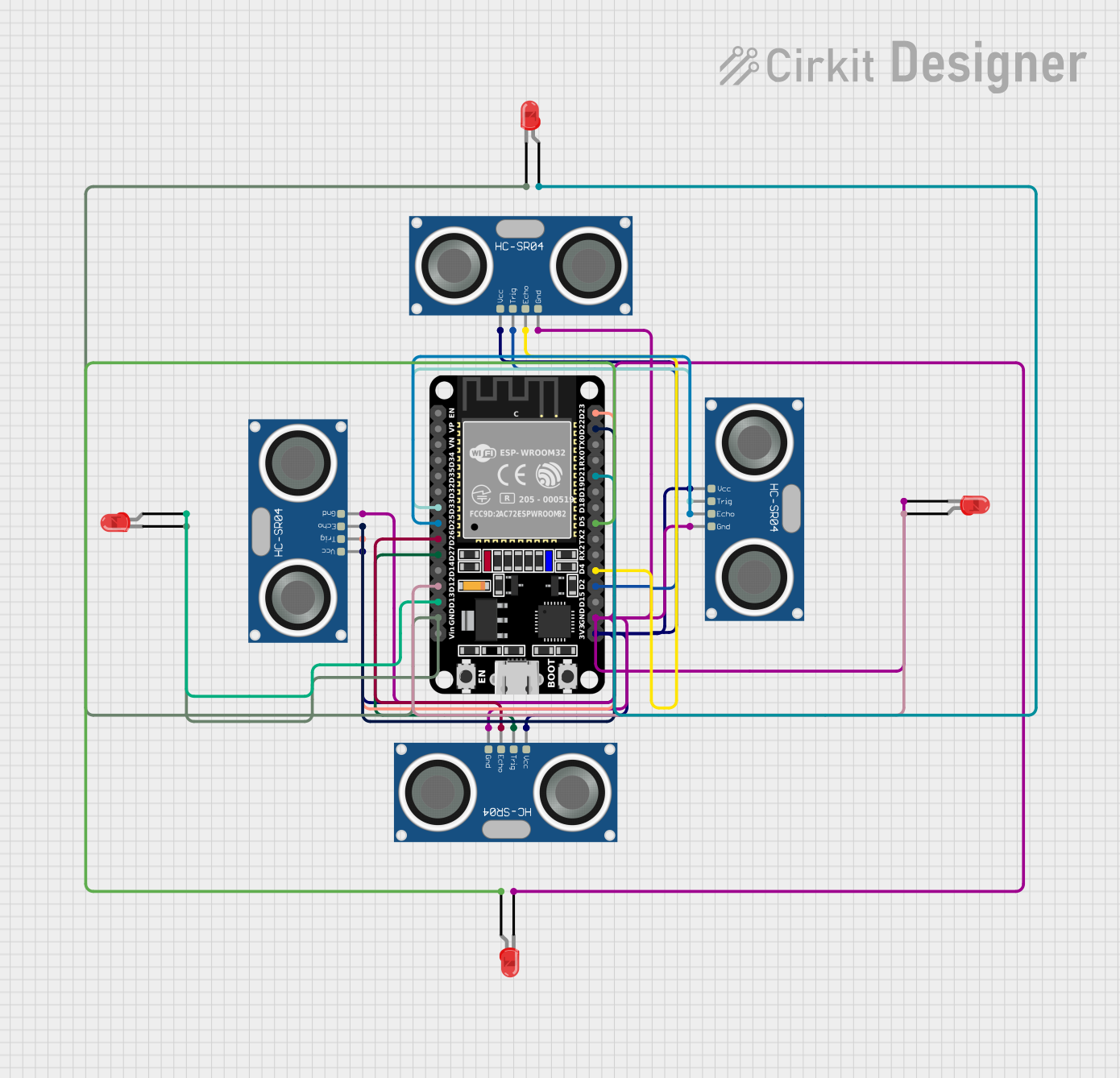
Circuit Documentation
Summary
This circuit utilizes an ESP32 microcontroller to interface with four HC-SR04 ultrasonic sensors and four red LEDs. The ESP32 reads distance measurements from the ultrasonic sensors and controls the LEDs based on these readings. Additionally, the ESP32 is configured to connect to a Wi-Fi network and serve a web page displaying sensor data. A buzzer is also included to provide audible alerts based on sensor readings.
Component List
ESP32 (30 pin)
- Description: A powerful microcontroller with Wi-Fi and Bluetooth capabilities.
- Pins: EN, VP, VN, D34, D35, D32, D33, D25, D26, D27, D14, D12, D13, GND, Vin, D23, D22, TX0, RX0, D21, D19, D18, D5, TX2, RX2, D4, D2, D15, 3V3
HC-SR04 Ultrasonic Sensor
- Description: A sensor used to measure distance by using ultrasonic waves.
- Pins: VCC, TRIG, ECHO, GND
LED: Two Pin (red)
- Description: A simple red LED used for visual indication.
- Pins: cathode, anode
Wiring Details
ESP32 (30 pin)
- D33: Connected to TRIG of HC-SR04 Ultrasonic Sensor
- D25: Connected to ECHO of HC-SR04 Ultrasonic Sensor
- D26: Connected to ECHO of HC-SR04 Ultrasonic Sensor
- D27: Connected to TRIG of HC-SR04 Ultrasonic Sensor
- D12: Connected to anode of LED
- D13: Connected to anode of LED
- GND: Connected to cathode of LED, GND of HC-SR04 Ultrasonic Sensor
- D23: Connected to TRIG of HC-SR04 Ultrasonic Sensor
- D22: Connected to ECHO of HC-SR04 Ultrasonic Sensor
- D21: Connected to anode of LED
- D5: Connected to anode of LED
- D4: Connected to ECHO of HC-SR04 Ultrasonic Sensor
- D2: Connected to TRIG of HC-SR04 Ultrasonic Sensor
- 3V3: Connected to VCC of HC-SR04 Ultrasonic Sensor
HC-SR04 Ultrasonic Sensor
- TRIG: Connected to D33 of ESP32
- ECHO: Connected to D25 of ESP32
- GND: Connected to GND of ESP32
- VCC: Connected to 3V3 of ESP32
HC-SR04 Ultrasonic Sensor
- TRIG: Connected to D27 of ESP32
- ECHO: Connected to D26 of ESP32
- GND: Connected to GND of ESP32
- VCC: Connected to 3V3 of ESP32
HC-SR04 Ultrasonic Sensor
- TRIG: Connected to D23 of ESP32
- ECHO: Connected to D22 of ESP32
- GND: Connected to GND of ESP32
- VCC: Connected to 3V3 of ESP32
HC-SR04 Ultrasonic Sensor
- TRIG: Connected to D2 of ESP32
- ECHO: Connected to D4 of ESP32
- GND: Connected to GND of ESP32
- VCC: Connected to 3V3 of ESP32
LED: Two Pin (red)
- anode: Connected to D12 of ESP32
- cathode: Connected to GND of ESP32
LED: Two Pin (red)
- anode: Connected to D13 of ESP32
- cathode: Connected to GND of ESP32
LED: Two Pin (red)
- anode: Connected to D21 of ESP32
- cathode: Connected to GND of ESP32
LED: Two Pin (red)
- anode: Connected to D5 of ESP32
- cathode: Connected to GND of ESP32
Code Documentation
#include <Wire.h>
#include <WiFi.h>
#include <WebServer.h>
#include <ESPmDNS.h>
#include <LiquidCrystal_I2C.h>
#include <BluetoothSerial.h>

BluetoothSerial SerialBT;
WebServer server(80);

const char* ssid = "Senso";
const char* password = "senso123";

// تعريف المتغيرات
int cmFront = 0, cmBack = 0, cmLeft = 0, cmRight = 0;
int lastFront = 0, lastBack = 0, lastLeft = 0, lastRight = 0;

int buzzersensor = 0;
unsigned long prevMillisFront = 0, prevMillisBack = 0, prevMillisLeft = 0, prevMillisRight = 0;

// إعداد الشاشة
LiquidCrystal_I2C lcd(0x27, 16, 2);

// تعريف الدبابيس
#define BUZZER_PIN 15
#define TRIG_PIN_FRONT 2
#define ECHO_PIN_FRONT 4
#define TRIG_PIN_BACK 27
#define ECHO_PIN_BACK 26
#define TRIG_PIN_LEFT 23
#define ECHO_PIN_LEFT 22
#define TRIG_PIN_RIGHT 33
#define ECHO_PIN_RIGHT 25

#define front_led 5
#define back_led 21
#define left_led 13
#define right_led 12

void handleRoot() {
  server.send(200, "text/html", R"rawliteral(
    <!DOCTYPE html>
    <html lang="en">
      <head>
        <title>Senso Settings</title>
      </head>
      <body>
        <h1>Buzzer Sensor Dashboard</h1>
        <script>
          setInterval(function() {
            fetch('/data')
              .then(response => response.json())
              .then(data => console.log(data));
          }, 500);
        </script>
      </body>
    </html>
  )rawliteral");
}

void handleData() {
  server.send(200, "application/json",
    "{\"front\":\"" + String(cmFront) +
    "\",\"back\":\"" + String(cmBack) +
    "\",\"left\":\"" + String(cmLeft) +
    "\",\"right\":\"" + String(cmRight) + "\"}");
}

void performSensorReadings() {
  cmFront = 0.01723 * readUltrasonicDistance(TRIG_PIN_FRONT, ECHO_PIN_FRONT);
  cmBack = 0.01723 * readUltrasonicDistance(TRIG_PIN_BACK, ECHO_PIN_BACK);
  cmLeft = 0.01723 * readUltrasonicDistance(TRIG_PIN_LEFT, ECHO_PIN_LEFT);
  cmRight = 0.01723 * readUltrasonicDistance(TRIG_PIN_RIGHT, ECHO_PIN_RIGHT);
}

int readUltrasonicDistance(int trigPin, int echoPin) {
  digitalWrite(trigPin, LOW);
  delayMicroseconds(2);
  digitalWrite(trigPin, HIGH);
  delayMicroseconds(10);
  digitalWrite(trigPin, LOW);

  int duration = pulseIn(echoPin, HIGH);
  return duration * 0.034 / 2;
}

void toggleLED(int pin, unsigned long prevMillis, unsigned long interval) {
  if (millis() - prevMillis > interval) {
    digitalWrite(pin, !digitalRead(pin));
  }
}

void loop() {
  server.handleClient();
  performSensorReadings();

  unsigned long currentMillis = millis();

  toggleLED(front_led, prevMillisFront, 100);
  toggleLED(back_led, prevMillisBack, 200);
  toggleLED(left_led, prevMillisLeft, 300);
  toggleLED(right_led, prevMillisRight, 400);

  prevMillisFront = currentMillis;
  prevMillisBack = currentMillis;
  prevMillisLeft = currentMillis;
  prevMillisRight = currentMillis;

  if (buzzersensor > 50) tone(BUZZER_PIN, 2000);
  else noTone(BUZZER_PIN);

  delay(10);
}
This code sets up the ESP32 to read distance measurements from four HC-SR04 ultrasonic sensors and control four LEDs based on these readings. It also sets up a web server to display the sensor data and a Bluetooth serial connection. The buzzer is activated based on the sensor readings.