
Arduino UNO-Based Smart Fan Control System with Bluetooth and Temperature Sensor
View and Edit Project In Cirkit Designer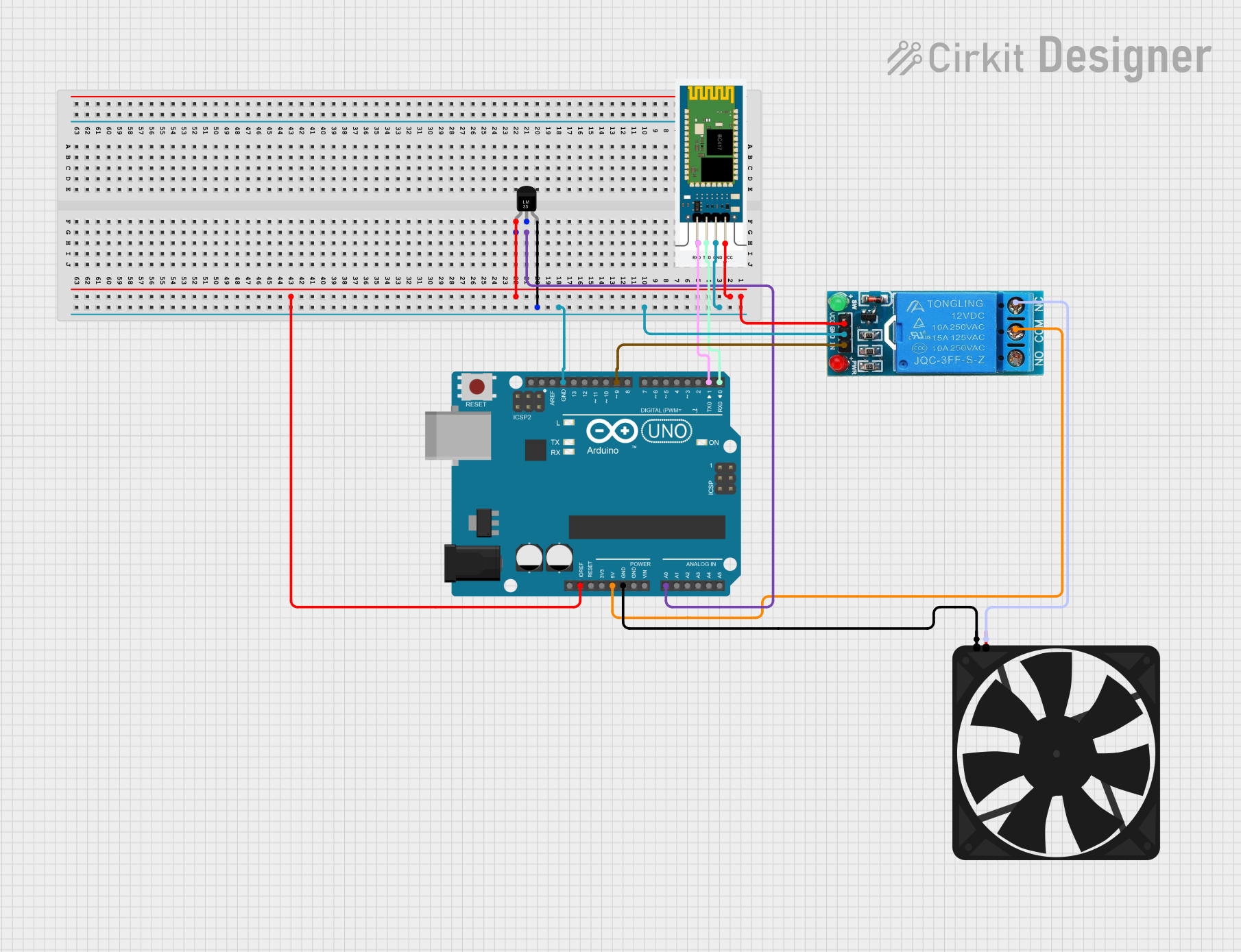
Circuit Documentation
Summary
This circuit is designed to control a fan based on temperature readings from an LM35 temperature sensor. The fan is controlled via a 12V single-channel relay, and the system can be manually overridden using Bluetooth commands sent to an HC-06 Bluetooth module. The entire system is managed by an Arduino UNO microcontroller.
Component List
Fan
- Description: A simple DC fan.
- Pins: GND, 5V
12V Single Channel Relay
- Description: A relay module used to control the fan.
- Pins: NC, COM, NO, IN, GND, VCC
Temperature Sensor (LM35)
- Description: An analog temperature sensor.
- Pins: +Vs, Vout, GND
HC-06
- Description: A Bluetooth module for wireless communication.
- Pins: RXD, TXD, GND, VCC
Arduino UNO
- Description: The main microcontroller that controls the entire system.
- Pins: UNUSED, IOREF, Reset, 3.3V, 5V, GND, Vin, A0, A1, A2, A3, A4, A5, SCL, SDA, AREF, D13, D12, D11, D10, D9, D8, D7, D6, D5, D4, D3, D2, D1, D0
Wiring Details
Fan
- GND: Connected to Arduino UNO GND
- 5V: Connected to 12V Single Channel Relay NC
12V Single Channel Relay
- NC: Connected to Fan 5V
- COM: Connected to Arduino UNO 5V
- NO: Not connected
- IN: Connected to Arduino UNO D9
- GND: Connected to Arduino UNO GND
- VCC: Connected to Arduino UNO IOREF
Temperature Sensor (LM35)
- +Vs: Connected to Arduino UNO IOREF
- Vout: Connected to Arduino UNO A0
- GND: Connected to Arduino UNO GND
HC-06
- RXD: Connected to Arduino UNO D1
- TXD: Connected to Arduino UNO D0
- GND: Connected to Arduino UNO GND
- VCC: Connected to Arduino UNO IOREF
Arduino UNO
- D0: Connected to HC-06 TXD
- D1: Connected to HC-06 RXD
- D9: Connected to 12V Single Channel Relay IN
- A0: Connected to Temperature Sensor (LM35) Vout
- 5V: Connected to 12V Single Channel Relay COM
- GND: Connected to Fan GND, Temperature Sensor (LM35) GND, 12V Single Channel Relay GND, HC-06 GND
Code Documentation
// Pin Definitions
#define LM35_PIN A0         // LM35 temperature sensor pin
#define RELAY_PIN 9         // Relay control pin

// Constants
#define TEMP_THRESHOLD 20   // Temperature threshold for the fan

// Variables
bool overrideMode = false;  // Tracks if fan control is overridden
bool fanState = false;      // Tracks fan state (ON/OFF)

void setup() {
  // Initialize relay pin as output and set it to OFF
  pinMode(RELAY_PIN, OUTPUT);
  digitalWrite(RELAY_PIN, LOW);

  // Start serial communication for Bluetooth
  Serial.begin(9600);
  Serial.println("Bluetooth ready. Monitoring temperature...");
}

void loop() {
  // --- Temperature Reading ---
  int sensorValue = analogRead(LM35_PIN);            // Read analog value from LM35
  float voltage = sensorValue * (5.0 / 1023.0);      // Convert ADC value to voltage
  float temperature = voltage * 100.0;              // Convert voltage to temperature (°C)

  // --- Automatic Fan Control ---
  if (!overrideMode) {
    if (temperature > TEMP_THRESHOLD) {
      fanState = true;                               // Turn fan ON
      digitalWrite(RELAY_PIN, HIGH);
    } else {
      fanState = false;                              // Turn fan OFF
      digitalWrite(RELAY_PIN, LOW);
    }
  }

  // Send temperature data to mobile
  Serial.print("Temperature: ");
  Serial.print(temperature);
  Serial.println(" °C");

  // --- Bluetooth Command Handling ---
  if (Serial.available()) {
    String command = "";                             // To store received command

    while (Serial.available()) {
      char c = Serial.read();                       // Read characters from serial
      command += c;
      delay(10);                                    // Small delay to ensure full message is received
    }

    command.trim();                                 // Remove trailing newlines/spaces

    // Process the command
    if (command.equalsIgnoreCase("Fan ON")) {
      overrideMode = true;                          // Enable manual override
      fanState = true;                              // Turn fan ON
      digitalWrite(RELAY_PIN, HIGH);
      Serial.println("Fan turned ON via mobile.");
    } else if (command.equalsIgnoreCase("Fan OFF")) {
      overrideMode = true;                          // Enable manual override
      fanState = false;                             // Turn fan OFF
      digitalWrite(RELAY_PIN, LOW);
      Serial.println("Fan turned OFF via mobile.");
    } else if (command.equalsIgnoreCase("Auto")) {
      overrideMode = false;                         // Disable manual override
      Serial.println("Fan control set to AUTO mode.");
    }
  }

  // Display fan status
  Serial.print("Fan Status: ");
  Serial.println(fanState ? "ON" : "OFF");

  delay(2000); // Wait 2 seconds before next temperature reading
}
This code initializes the relay pin and sets up serial communication for the Bluetooth module. It reads the temperature from the LM35 sensor and controls the fan based on the temperature threshold. The fan can also be manually controlled via Bluetooth commands.