
Circuit Documentation
Summary
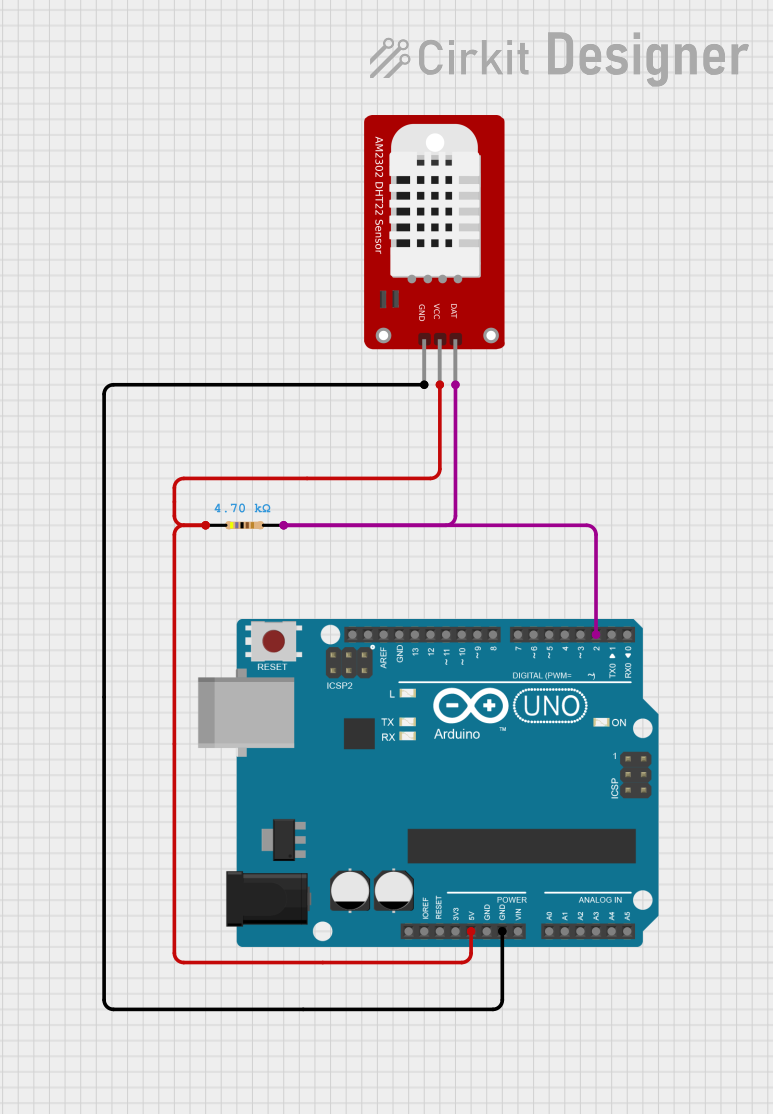
This document provides a detailed overview of a simple circuit that interfaces an Arduino UNO with a DHT22 temperature and humidity sensor. The circuit includes a resistor for pull-up configuration on the data line of the DHT22 sensor. The Arduino UNO is programmed to read temperature and humidity data from the DHT22 sensor and output the readings to the serial monitor.
Component List
Arduino UNO
- Description: A microcontroller board based on the ATmega328P.
- Pins: UNUSED, IOREF, Reset, 3.3V, 5V, GND, Vin, A0-A5, SCL, SDA, AREF, D13-D0.
- Purpose: Acts as the central processing unit for the circuit, reading sensor data and providing power to the DHT22 sensor.
DHT22
- Description: A digital temperature and humidity sensor.
- Pins: GND, VCC, DAT.
- Purpose: Measures the ambient temperature and humidity.
Resistor (4.7k Ohms)
- Description: A passive two-terminal electrical component that implements electrical resistance as a circuit element.
- Pins: pin1, pin2.
- Purpose: Acts as a pull-up resistor for the data line of the DHT22 sensor.
Wiring Details
Arduino UNO
- 5V: Connected to the VCC of the DHT22 sensor and pin1 of the Resistor.
- GND: Connected to the GND of the DHT22 sensor.
- D2: Connected to pin2 of the Resistor and the DAT pin of the DHT22 sensor.
DHT22
- VCC: Connected to the 5V of the Arduino UNO.
- GND: Connected to the GND of the Arduino UNO.
- DAT: Connected to the D2 of the Arduino UNO through the Resistor.
Resistor (4.7k Ohms)
- pin1: Connected to the 5V of the Arduino UNO.
- pin2: Connected to the D2 of the Arduino UNO and the DAT pin of the DHT22 sensor.
Documented Code
// Importing libraries
#include <DHT.h>
#include <DHT_U.h>

// Defining sensor pin
int SENSOR = 2;
// Variables to store temperature and humidity values
int TEMPERATURA;
int HUMEDAD;

// Initialize DHT sensor
DHT dht(SENSOR, DHT22);

void setup() {
  // Initialize Arduino and sensor
  Serial.begin(9600);
  dht.begin();
}

void loop() {
  // Sensor operation
  TEMPERATURA = dht.readTemperature();
  HUMEDAD = dht.readHumidity();
  // Print temperature and humidity to the serial monitor
  Serial.print("TEMPERATURA: ");
  Serial.print(TEMPERATURA);
  Serial.print(" HUMEDAD: ");
  Serial.println(HUMEDAD);
  // Wait for half a second before reading again
  delay(500);
}
- Filename: sketch.ino
- Description: This code initializes the DHT22 sensor and reads temperature and humidity data every 500 milliseconds. The readings are printed to the serial monitor with labels for easy reading.