
Circuit Documentation
Summary
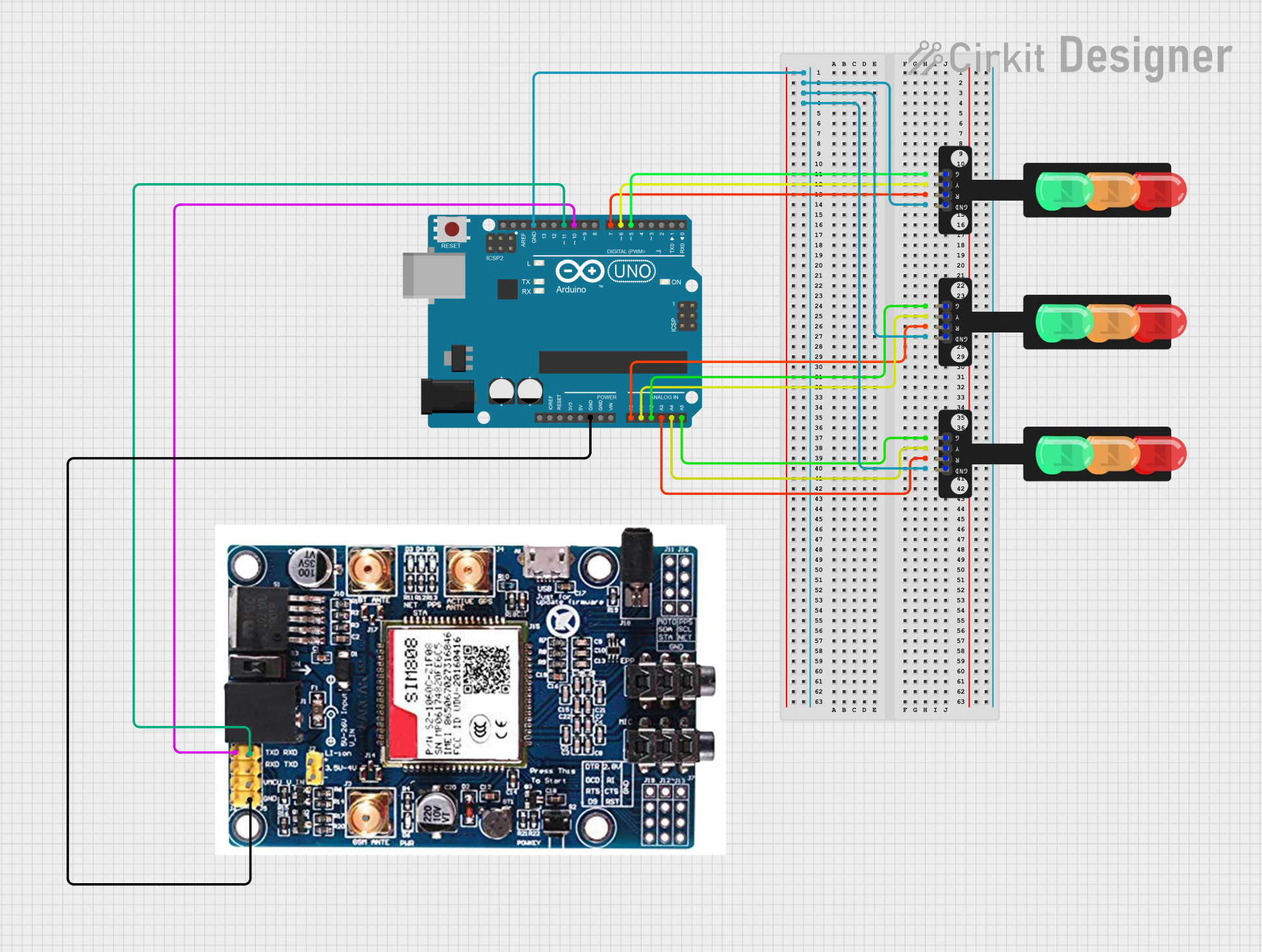
This circuit involves an Arduino UNO microcontroller interfacing with a GSM SIM808 module and three traffic light modules. The Arduino UNO controls the traffic lights and communicates with the GSM module for potential remote control or monitoring.
Component List
Arduino UNO
- Description: A microcontroller board based on the ATmega328P.
- Pins: UNUSED, IOREF, Reset, 3.3V, 5V, GND, Vin, A0, A1, A2, A3, A4, A5, SCL, SDA, AREF, D13, D12, D11, D10, D9, D8, D7, D6, D5, D4, D3, D2, D1, D0
GSM SIM808
- Description: A GSM module for communication over cellular networks.
- Pins: TXD, RXD, VMC, GND, LI-ion+, LI-ion-, GSM ANTENA
Traffic Light (1)
- Description: A traffic light module with Red, Yellow, and Green LEDs.
- Pins: Green, Yellow, Red, GND
Traffic Light (2)
- Description: A traffic light module with Red, Yellow, and Green LEDs.
- Pins: Green, Yellow, Red, GND
Traffic Light (3)
- Description: A traffic light module with Red, Yellow, and Green LEDs.
- Pins: Green, Yellow, Red, GND
Wiring Details
Arduino UNO
- D10 connected to GSM SIM808 TXD
- D11 connected to GSM SIM808 RXD
- GND connected to GSM SIM808 GND
- A0 connected to Traffic Light (3) Red
- A1 connected to Traffic Light (3) Yellow
- A2 connected to Traffic Light (3) Green
- A3 connected to Traffic Light (1) Red
- A4 connected to Traffic Light (1) Yellow
- A5 connected to Traffic Light (1) Green
- D7 connected to Traffic Light (2) Red
- D6 connected to Traffic Light (2) Yellow
- D5 connected to Traffic Light (2) Green
- GND connected to Traffic Light (1) GND, Traffic Light (2) GND, Traffic Light (3) GND
GSM SIM808
- TXD connected to Arduino UNO D10
- RXD connected to Arduino UNO D11
- GND connected to Arduino UNO GND
Traffic Light (1)
- Red connected to Arduino UNO A3
- Yellow connected to Arduino UNO A4
- Green connected to Arduino UNO A5
- GND connected to Arduino UNO GND
Traffic Light (2)
- Red connected to Arduino UNO D7
- Yellow connected to Arduino UNO D6
- Green connected to Arduino UNO D5
- GND connected to Arduino UNO GND
Traffic Light (3)
- Red connected to Arduino UNO A0
- Yellow connected to Arduino UNO A1
- Green connected to Arduino UNO A2
- GND connected to Arduino UNO GND
Code Documentation
Arduino UNO Code (sketch.ino)
void setup() {
  // put your setup code here, to run once:

}

void loop() {
  // put your main code here, to run repeatedly:

}
Additional Documentation (documentation.txt)
This document provides a comprehensive overview of the circuit, including a summary, detailed component list, wiring details, and the code used in the microcontroller.