
Arduino UNO-Based Line Following Robot with IR Sensors and Motor Control
View and Edit Project In Cirkit Designer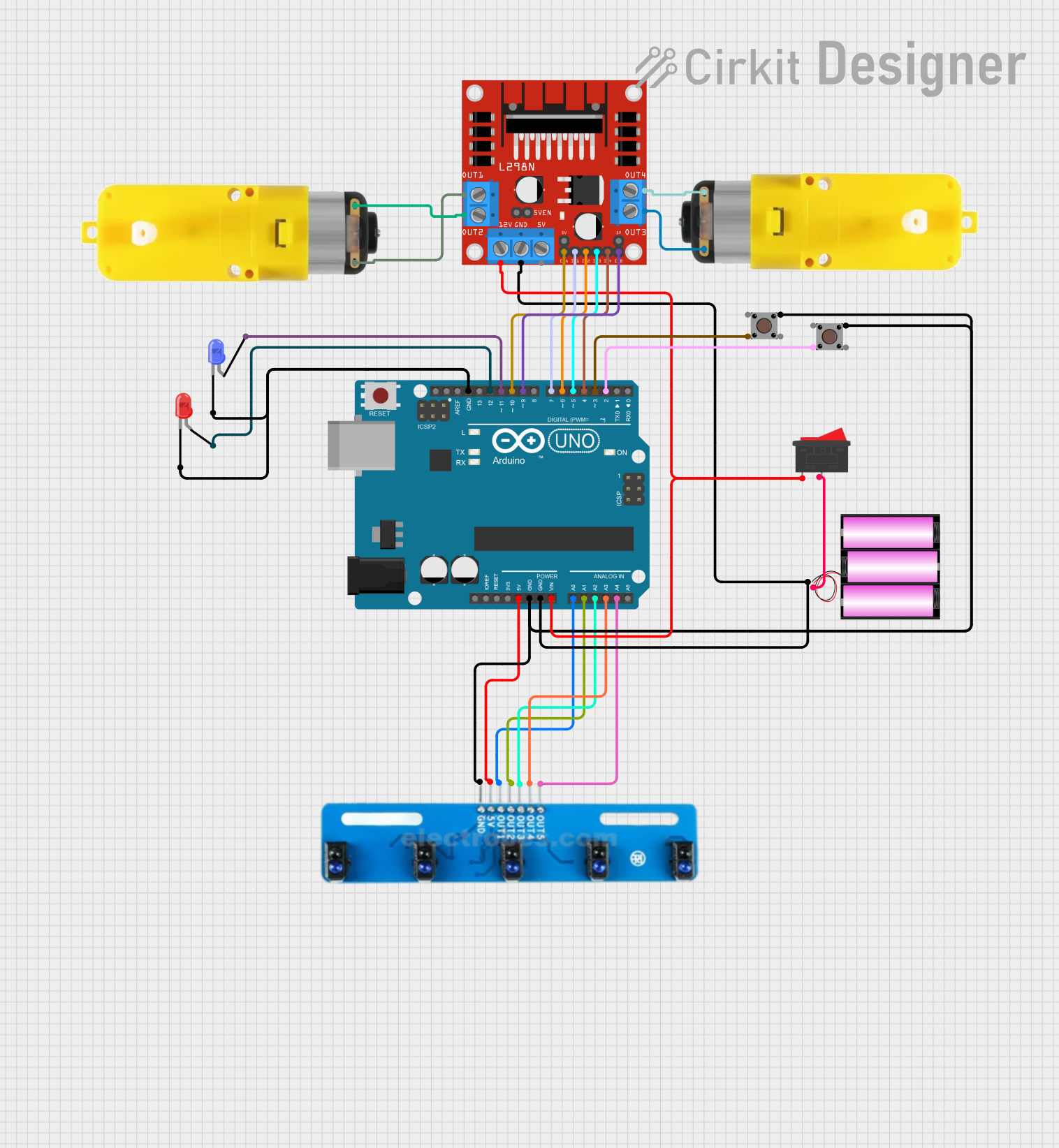
Circuit Documentation
Summary
This document provides a detailed overview of a circuit that includes a 5-channel IR array, a rocker switch, an L298N DC motor driver, motors with reducers, a 12V battery, an Arduino UNO, pushbuttons, and LEDs. The circuit is designed to interface with an Arduino UNO microcontroller, which controls the motors and reads inputs from the IR array and pushbuttons. The LEDs provide visual feedback.
Component List
5 Channel IR Array
- Description: An array of 5 infrared sensors.
- Pins: A5, A4, A3, A2, A1, VCC, GND
Rocker Switch
- Description: A two-position switch.
- Pins: 1, 2
L298N DC Motor Driver
- Description: A dual H-Bridge motor driver.
- Pins: OUT1, OUT2, 12V, GND, 5V, OUT3, OUT4, 5V-ENA-JMP-I, 5V-ENA-JMP-O, +5V-J1, +5V-J2, ENA, IN1, IN2, IN3, IN4, ENB
Motor with Reducer
- Description: A motor with a gear reducer.
- Pins: 3 - 6 VCC, GND
Battery 12V
- Description: A 12V battery.
- Pins: +, -
Arduino UNO
- Description: A microcontroller board based on the ATmega328P.
- Pins: UNUSED, IOREF, Reset, 3.3V, 5V, GND, Vin, A0, A1, A2, A3, A4, A5, SCL, SDA, AREF, D13, D12, D11, D10, D9, D8, D7, D6, D5, D4, D3, D2, D1, D0
Pushbutton
- Description: A simple pushbutton.
- Pins: Pin 3 (out), Pin 4 (out), Pin 1 (in), Pin 2 (in)
LED: Two Pin (Red)
- Description: A red LED.
- Pins: cathode, anode
LED: Two Pin (Blue)
- Description: A blue LED.
- Pins: cathode, anode
Wiring Details
5 Channel IR Array
- A5 connected to Arduino UNO A4
- A4 connected to Arduino UNO A3
- A3 connected to Arduino UNO A2
- A2 connected to Arduino UNO A1
- A1 connected to Arduino UNO A0
- VCC connected to Arduino UNO 5V
- GND connected to Pushbutton Pin 1 (in), Pushbutton Pin 1 (in), Arduino UNO GND
Rocker Switch
- Pin 1 connected to L298N DC Motor Driver 12V, Arduino UNO Vin
- Pin 2 connected to Battery 12V +
L298N DC Motor Driver
- GND connected to Battery 12V -, Arduino UNO GND
- 12V connected to Rocker Switch Pin 1
- OUT1 connected to Motor with Reducer GND
- OUT2 connected to Motor with Reducer 3 - 6 VCC
- OUT3 connected to Motor with Reducer 3 - 6 VCC
- OUT4 connected to Motor with Reducer GND
- ENA connected to Arduino UNO D10
- ENB connected to Arduino UNO D9
- IN1 connected to Arduino UNO D7
- IN2 connected to Arduino UNO D6
- IN3 connected to Arduino UNO D5
- IN4 connected to Arduino UNO D4
Motor with Reducer
- 3 - 6 VCC connected to L298N DC Motor Driver OUT2, L298N DC Motor Driver OUT3
- GND connected to L298N DC Motor Driver OUT1, L298N DC Motor Driver OUT4
Battery 12V
- + connected to Rocker Switch Pin 2
- - connected to L298N DC Motor Driver GND, Arduino UNO GND
Arduino UNO
- A0 connected to 5 Channel IR Array A1
- A1 connected to 5 Channel IR Array A2
- A2 connected to 5 Channel IR Array A3
- A3 connected to 5 Channel IR Array A4
- A4 connected to 5 Channel IR Array A5
- 5V connected to 5 Channel IR Array VCC
- GND connected to 5 Channel IR Array GND, Pushbutton Pin 1 (in), Pushbutton Pin 1 (in), Battery 12V -, LED: Two Pin (red) cathode, LED: Two Pin (blue) cathode
- Vin connected to Rocker Switch Pin 1
- D2 connected to Pushbutton Pin 4 (out)
- D3 connected to Pushbutton Pin 4 (out)
- D4 connected to L298N DC Motor Driver IN4
- D5 connected to L298N DC Motor Driver IN3
- D6 connected to L298N DC Motor Driver IN2
- D7 connected to L298N DC Motor Driver IN1
- D9 connected to L298N DC Motor Driver ENB
- D10 connected to L298N DC Motor Driver ENA
- D11 connected to LED: Two Pin (blue) anode
- D12 connected to LED: Two Pin (red) anode
Pushbutton
- Pin 1 (in) connected to 5 Channel IR Array GND, Arduino UNO GND
- Pin 4 (out) connected to Arduino UNO D3, Arduino UNO D2
LED: Two Pin (Red)
- cathode connected to Arduino UNO GND
- anode connected to Arduino UNO D12
LED: Two Pin (Blue)
- cathode connected to Arduino UNO GND
- anode connected to Arduino UNO D11
Documented Code
Arduino UNO Code (sketch.ino)
void setup() {
  // put your setup code here, to run once:

}

void loop() {
  // put your main code here, to run repeatedly:

}
Additional Documentation (documentation.txt)