
Arduino-Based Fingerprint Access Control System with LCD Display
View and Edit Project In Cirkit Designer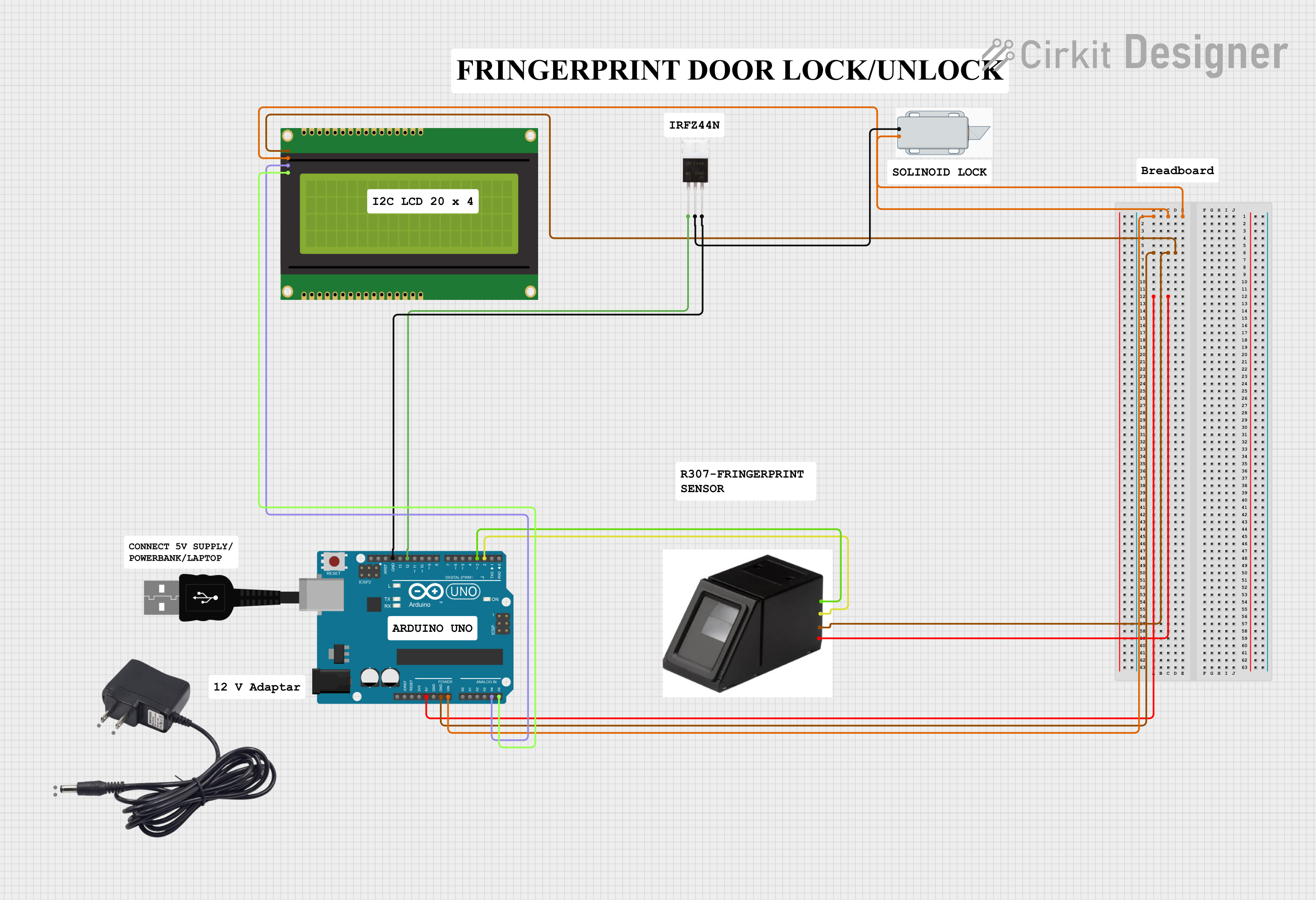
Circuit Documentation
Summary
This circuit is designed to interface an Arduino UNO with a fingerprint sensor, an I2C LCD panel, and a solenoid lock. The fingerprint sensor is used to enroll and verify fingerprints, the LCD panel displays messages to the user, and the solenoid lock is controlled based on fingerprint verification.
Component List
Fingerprint Sensor
- Pins: 5V, GND, TX, RX
- Description: A sensor used to capture and verify fingerprints.
- Purpose: To enroll and verify fingerprints.
USB Male 2 Pin Connection
- Pins: Negative -, Positive +
- Description: A USB connector for power supply.
- Purpose: To provide power to the circuit.
20x4 I2C LCD Panel
- Pins: GND, VCC, SDA, SCL
- Description: A 20x4 character LCD with I2C interface.
- Purpose: To display messages to the user.
Arduino UNO
- Pins: UNUSED, IOREF, Reset, 3.3V, 5V, GND, Vin, A0, A1, A2, A3, A4, A5, SCL, SDA, AREF, D13, D12, D11, D10, D9, D8, D7, D6, D5, D4, D3, D2, D1, D0
- Description: A microcontroller board based on the ATmega328P.
- Purpose: To control the fingerprint sensor, LCD panel, and solenoid lock.
12V Solenoid Lock
- Pins: -, +
- Description: A lock that can be controlled electronically.
- Purpose: To lock and unlock based on fingerprint verification.
IRFZ44N
- Pins: Gate, Drain, Source
- Description: A N-channel MOSFET.
- Purpose: To control the solenoid lock.
12V Adapter
- Pins: VCC, GND
- Description: A 12V power adapter.
- Purpose: To provide power to the solenoid lock.
Wiring Details
Fingerprint Sensor
- 5V: Connected to Arduino UNO 5V
- GND: Connected to Arduino UNO GND
- TX: Connected to Arduino UNO D2
- RX: Connected to Arduino UNO D3
USB Male 2 Pin Connection
- Negative -: Not connected
- Positive +: Not connected
20x4 I2C LCD Panel
- GND: Connected to Arduino UNO GND
- VCC: Connected to Arduino UNO Vin
- SDA: Connected to Arduino UNO A4
- SCL: Connected to Arduino UNO A5
Arduino UNO
- 5V: Connected to Fingerprint Sensor 5V
- GND: Connected to Fingerprint Sensor GND, IRFZ44N Source, 20x4 I2C LCD Panel GND
- Vin: Connected to 20x4 I2C LCD Panel VCC
- A4: Connected to 20x4 I2C LCD Panel SDA
- A5: Connected to 20x4 I2C LCD Panel SCL
- D2: Connected to Fingerprint Sensor TX
- D3: Connected to Fingerprint Sensor RX
- D12: Connected to IRFZ44N Gate
12V Solenoid Lock
- +: Connected to Arduino UNO Vin
- -: Connected to IRFZ44N Drain
IRFZ44N
- Gate: Connected to Arduino UNO D12
- Drain: Connected to 12V Solenoid Lock -
- Source: Connected to Arduino UNO GND
12V Adapter
- VCC: Not connected
- GND: Not connected
Code Documentation
#include <Adafruit_Fingerprint.h>
#include <SoftwareSerial.h>
#include <Wire.h>
#include <LiquidCrystal_I2C.h>

// Initialize LCD (address 0x27, 20 chars x 4 lines)
LiquidCrystal_I2C lcd(0x27, 20, 4);

SoftwareSerial mySerial(2, 3);
Adafruit_Fingerprint finger = Adafruit_Fingerprint(&mySerial);

uint8_t id;

void setup()
{
  Serial.begin(9600);

  // Initialize LCD
  lcd.init();
  lcd.backlight();
  lcd.clear();
  lcd.setCursor(0,0);
  lcd.print("Fingerprint Sensor");
  lcd.setCursor(0,1);
  lcd.print("Initializing...");

  while (!Serial);  // For Yun/Leo/Micro/Zero/...
  delay(100);

  // set the data rate for the sensor serial port
  finger.begin(57600);

  if (finger.verifyPassword()) {
    lcd.clear();
    lcd.setCursor(0,0);
    lcd.print("Sensor Found!");
    Serial.println("Found fingerprint sensor!");
  } else {
    lcd.clear();
    lcd.setCursor(0,0);
    lcd.print("No Sensor Found!");
    lcd.setCursor(0,1);
    lcd.print("Check Connections!");
    Serial.println("Did not find fingerprint sensor :(");
    while (1) { delay(1); }
  }
}

uint8_t readnumber(void) {
  uint8_t num = 0;

  while (num == 0) {
    while (! Serial.available());
    num = Serial.parseInt();
  }
  return num;
}

void loop()
{
  lcd.clear();
  lcd.setCursor(0,0);
  lcd.print("Ready to Enroll!");
  lcd.setCursor(0,1);
  lcd.print("Type ID (1-127)");

  Serial.println("Ready to enroll a fingerprint!");
  Serial.println("Please type in the ID # (from 1 to 127) you want to save this finger as...");
  id = readnumber();

  if (id == 0) {// ID #0 not allowed, try again!
     return;
  }

  lcd.clear();
  lcd.setCursor(0,0);
  lcd.print("Enrolling ID #");
  lcd.setCursor(13,0);
  lcd.print(id);

  Serial.print("Enrolling ID #");
  Serial.println(id);

  while (!  getFingerprintEnroll() );
}

uint8_t getFingerprintEnroll() {
  int p = -1;

  lcd.setCursor(0,1);
  lcd.print("Place finger...");
  Serial.print("Waiting for valid finger to enroll as #"); Serial.println(id);

  while (p != FINGERPRINT_OK) {
    p = finger.getImage();
    switch (p) {
    case FINGERPRINT_OK:
      lcd.setCursor(0,1);
      lcd.print("Image taken       ");
      Serial.println("Image taken");
      break;
    case FINGERPRINT_NOFINGER:
      lcd.setCursor(0,1);
      lcd.print("Waiting...       ");
      Serial.println(".");
      break;
    case FINGERPRINT_PACKETRECIEVEERR:
      lcd.setCursor(0,1);
      lcd.print("Comm Error       ");
      Serial.println("Communication error");
      break;
    case FINGERPRINT_IMAGEFAIL:
      lcd.setCursor(0,1);
      lcd.print("Imaging Error    ");
      Serial.println("Imaging error");
      break;
    default:
      lcd.setCursor(0,1);
      lcd.print("Unknown Error    ");
      Serial.println("Unknown error");
      break;
    }
  }

  // OK success!
  p = finger.image2Tz(1);
  switch (p) {
    case FINGERPRINT_OK:
      lcd.setCursor(0,1);
      lcd.print("Image Converted  ");
      Serial.println("Image converted");
      break;
    case FINGERPRINT_IMAGEMESS:
      lcd.setCursor(0,1);
      lcd.print("Image too Messy  ");
      Serial.println("Image too messy");
      return p;
    case FINGERPRINT_PACKETRECIEVEERR:
      lcd.setCursor(0,1);
      lcd.print("Comm Error       ");
      Serial.println("Communication error");
      return p;
    case FINGERPRINT_FEATUREFAIL:
      lcd.setCursor(0,1);
      lcd.print("No Features     ");
      Serial.println("Could not find fingerprint features");
      return p;
    case FINGERPRINT_INVALIDIMAGE:
      lcd.setCursor(0,1);
      lcd.print("Invalid Image   ");
      Serial.println("Could not find fingerprint features");
      return p;
    default:
      lcd.setCursor(0,1);
      lcd.print("Unknown Error   ");
      Serial.println("Unknown error");
      return p;
  }

  lcd.setCursor(0,1);
  lcd.print("Remove Finger    ");
  Serial.println("Remove finger");
  delay(2000);
  p = 0;
  while (p != FINGERPRINT_NOFINGER) {
    p = finger.getImage();
  }

  lcd.clear();
  lcd.setCursor(0,0);
  lcd.print("ID #");
  lcd.print(id);
  lcd