
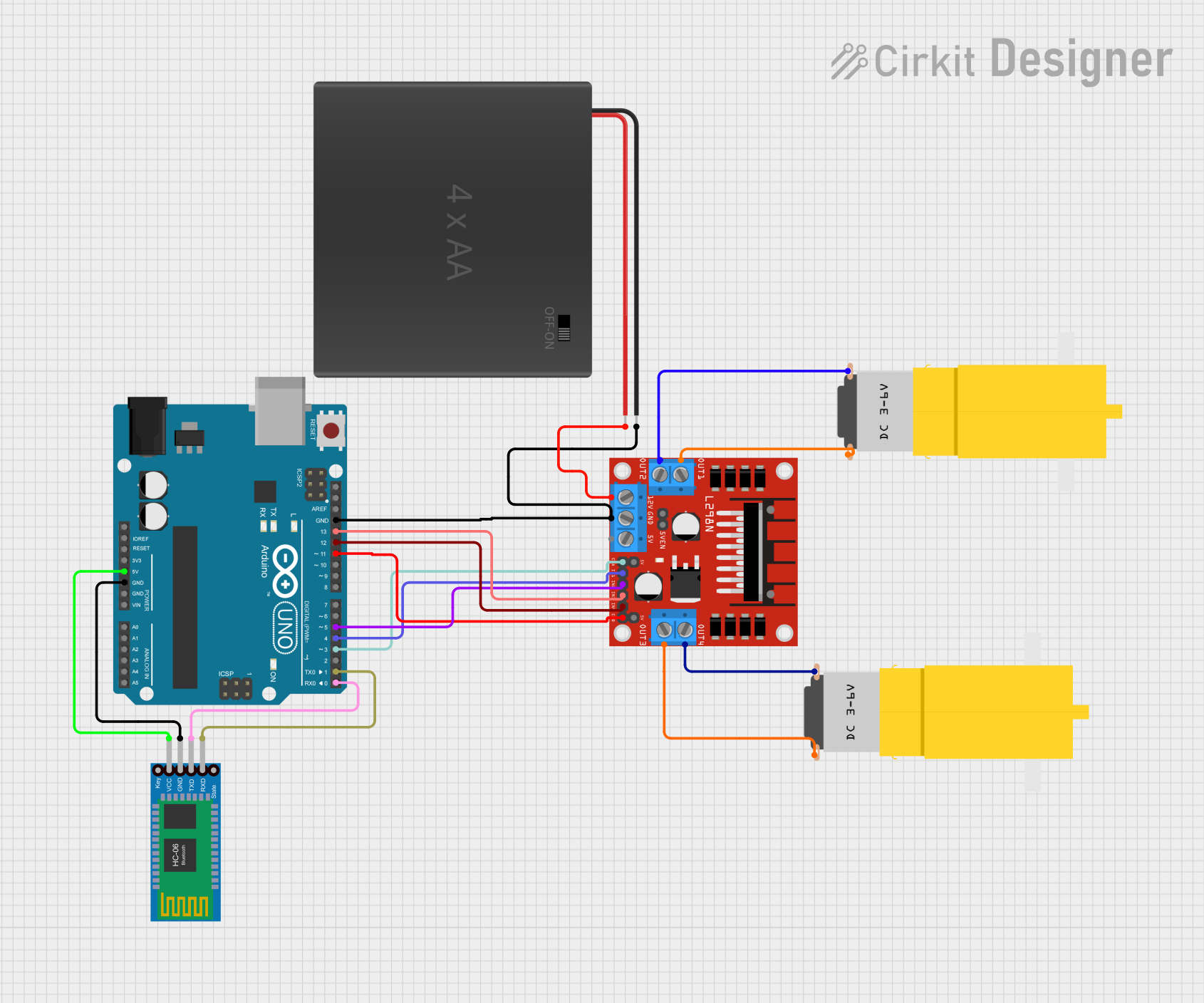
Circuit Documentation
Summary
This circuit is designed to control two DC motors using an Arduino UNO microcontroller board, interfaced with an L298N DC motor driver. The system is capable of receiving commands via a Bluetooth HC-06 module, allowing for wireless control of the motors. The motors are powered by a 4xAA battery pack, which also supplies 12V to the motor driver. The Arduino UNO controls the motor driver by sending signals to dictate the direction and speed of the motors.
Component List
Arduino UNO
- Microcontroller board based on the ATmega328P
- It has 14 digital input/output pins, 6 analog inputs, a 16 MHz quartz crystal, a USB connection, a power jack, an ICSP header, and a reset button.
Motor Amarillo Motorreductor Hobby (x2)
- A yellow hobby gear motor
- It operates on a typical voltage, suitable for interfacing with the L298N motor driver.
L298N DC Motor Driver
- A high-power motor driver capable of driving up to 4 DC motors or 2 stepper motors.
- It has 4 output channels and can provide a continuous current of 2A to each channel.
Bluetooth HC-06
- A wireless Bluetooth transceiver module
- It allows for serial communication over Bluetooth.
4xAA Battery Holder
- A battery holder for four AA batteries
- It provides a power source for the motors and the motor driver.
Wiring Details
Arduino UNO
5Vconnected to Bluetooth HC-06VCCGNDconnected to Bluetooth HC-06GND, L298NGND, and 4xAA battery holderNEGD13connected to L298NIN4D12connected to L298NIN3D11connected to L298NENBD5connected to L298NIN2D4connected to L298NIN1D3connected to L298NENAD1(TX) connected to Bluetooth HC-06RXDD0(RX) connected to Bluetooth HC-06TXD
Motor Amarillo Motorreductor Hobby
- First motor
vccconnected to L298NOUT2 - First motor
GNDconnected to L298NOUT1 - Second motor
vccconnected to L298NOUT4 - Second motor
GNDconnected to L298NOUT3
L298N DC Motor Driver
GNDconnected to Arduino UNOGNDand 4xAA battery holderNEGIN3connected to Arduino UNOD13IN4connected to Arduino UNOD12ENBconnected to Arduino UNOD11IN2connected to Arduino UNOD5IN1connected to Arduino UNOD4ENAconnected to Arduino UNOD3OUT1andOUT2connected to the first Motor Amarillo Motorreductor HobbyOUT3andOUT4connected to the second Motor Amarillo Motorreductor Hobby12Vconnected to 4xAA battery holderPOS
Bluetooth HC-06
VCCconnected to Arduino UNO5VGNDconnected to Arduino UNOGNDTXDconnected to Arduino UNOD0(RX)RXDconnected to Arduino UNOD1(TX)
4xAA Battery Holder
POSconnected to L298N12VNEGconnected to Arduino UNOGNDand L298NGND
Documented Code
/*
 * Control 4 DC motors with Smartphone via bluetooth
 */

int motor1Pin1 = 4;
int motor1Pin2 = 5;
int enable1Pin = 3;
int motor2Pin1  = 12;
int motor2Pin2 = 13;
int enable2Pin = 11;
int state;
int flag=0;
int stateStop=0;

void setup() {
    // sets the pins as outputs:
    pinMode(motor1Pin1, OUTPUT);
    pinMode(motor1Pin2, OUTPUT);
    pinMode(enable1Pin,  OUTPUT);
    pinMode(motor2Pin1, OUTPUT);
    pinMode(motor2Pin2, OUTPUT);
    pinMode(enable2Pin, OUTPUT);
    // sets enable1Pin and enable2Pin high so that motor can turn on:
    digitalWrite(enable1Pin, HIGH);
    digitalWrite(enable2Pin, HIGH);
    // initialize serial communication at 9600 bits per second:
    Serial.begin(9600);
}

void loop() {
    if(Serial.available() > 0){
      state = Serial.read();
      flag=0;
    }
    // if the state is 'F' the DC motor will go forward
    if (state == 'F') {
        digitalWrite(motor1Pin1, HIGH);
        digitalWrite(motor1Pin2, LOW);
        digitalWrite(motor2Pin1, LOW);
        digitalWrite(motor2Pin2, HIGH);
        if(flag == 0){
          Serial.println("Go Forward!");
          flag=1;
        }
    }

    // if the state is 'R' the motor will turn left
    else if (state == 'R') {
        digitalWrite(motor1Pin1, HIGH);
        digitalWrite(motor1Pin2, LOW);
        digitalWrite(motor2Pin1, LOW);
        digitalWrite(motor2Pin2, LOW);
        if(flag == 0){
          Serial.println("Turn LEFT");
          flag=1;
        }
        delay(1000);
        state=3;
        stateStop=1;
    }
    // if the state is 'S' the motor will Stop
    else if (state == 'S' || stateStop == 1) {
        digitalWrite(motor1Pin1, LOW);
        digitalWrite(motor1Pin2, LOW);
        digitalWrite(motor2Pin1, LOW);
        digitalWrite(motor2Pin2, LOW);
        if(flag == 0){
          Serial.println("STOP!");
          flag=1;
        }
        stateStop=0;
    }
    // if the state is 'L' the motor will turn right
    else if (state == 'L') {
        digitalWrite(motor1Pin1, LOW);
        digitalWrite(motor1Pin2, LOW);
        digitalWrite(motor2Pin1, LOW);
        digitalWrite(motor2Pin2, HIGH);
        if(flag == 0){
          Serial.println("Turn RIGHT");
          flag=1;
        }
        delay(1000);
        state=3;
        stateStop=1;
    }
    // if the state is 'B' the motor will Reverse
    else if (state == 'B') {
        digitalWrite(motor1Pin1, LOW);
        digitalWrite(motor1Pin2, HIGH);
        digitalWrite(motor2Pin1, HIGH);
        digitalWrite(motor2Pin2, LOW);
        if(flag == 0){
          Serial.println("Reverse!");
          flag=1;
        }
    }
    //For debugging purpose
    Serial.println(state);
}
This code is designed to be uploaded to the Arduino UNO microcontroller. It sets up the necessary pins as outputs and initializes serial communication. The loop function reads the state from the Bluetooth module and controls the motors accordingly. The commands 'F', 'R', 'S', 'L', and 'B' are used to control the motors' movements: forward, turn left, stop, turn right, and reverse, respectively.