
Arduino UNO Controlled Dual TF LUNA LIDAR Distance Measurement System
View and Edit Project In Cirkit Designer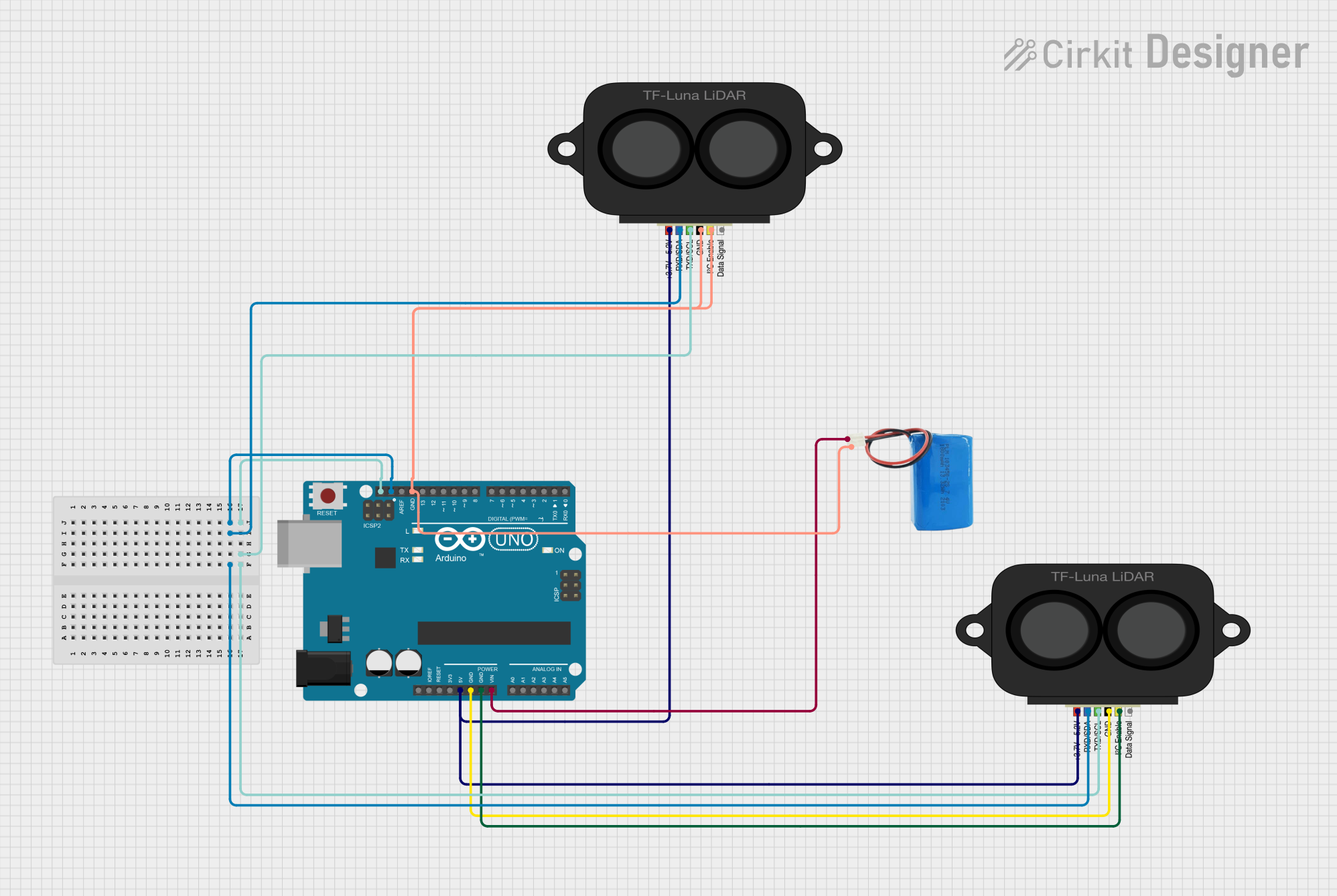
Circuit Documentation
Summary
This circuit integrates two TF LUNA LIDAR sensors with an Arduino UNO microcontroller and is powered by a 5V battery. The Arduino UNO serves as the central processing unit, interfacing with the LIDAR sensors via I2C communication protocol to collect distance measurements. The 5V battery provides power to the Arduino, which in turn powers the LIDAR sensors. The circuit is designed to measure distances and output the data through the Arduino's serial interface.
Component List
Arduino UNO
- Description: A microcontroller board based on the ATmega328P.
- Purpose: Acts as the central processing unit for controlling the LIDAR sensors and processing their data.
- Pins: IOREF, Reset, 3.3V, 5V, GND, Vin, Analog Pins (A0-A5), SCL, SDA, AREF, Digital Pins (D0-D13).
TF LUNA LIDAR (x2)
- Description: A compact time-of-flight (ToF) laser ranging sensor.
- Purpose: Measures distances by emitting laser pulses and calculating the time it takes for the reflected signal to return.
- Pins: Power, RXD/SDA, TXD/SCL, GND, ICL, DATA SIG.
5V Battery
- Description: A power source providing a stable 5V output.
- Purpose: Supplies power to the Arduino UNO and through it to other components in the circuit.
- Pins: Positive, Negative.
Wiring Details
Arduino UNO
- 5V: Connected to the power pins of both TF LUNA LIDAR sensors.
- SDA: Connected to the RXD/SDA pins of both TF LUNA LIDAR sensors for I2C data line.
- SCL: Connected to the TXD/SCL pins of both TF LUNA LIDAR sensors for I2C clock line.
- GND: Connected to the GND pins of both TF LUNA LIDAR sensors and the negative pin of the 5V battery.
- Vin: Connected to the positive pin of the 5V battery.
TF LUNA LIDAR
- Power: Connected to the 5V output from the Arduino UNO.
- RXD/SDA: Connected to the SDA pin on the Arduino UNO for I2C data line.
- TXD/SCL: Connected to the SCL pin on the Arduino UNO for I2C clock line.
- GND: Connected to the GND pin on the Arduino UNO.
- ICL: Connected to the GND pin on the Arduino UNO (for one of the LIDAR sensors).
5V Battery
- Positive: Connected to the Vin pin on the Arduino UNO.
- Negative: Connected to the GND pin on the Arduino UNO.
Documented Code
Arduino UNO Code
#include <Arduino.h>
#include <Wire.h>        // Instantiate the Wire library
#include <TFLI2C.h>      // TFLuna-I2C Library v.0.1.1

TFLI2C tflI2C;

int16_t  tfDist;    // distance in centimeters
int16_t  tfAddr = TFL_DEF_ADR;  // Use this default I2C address

void setup(){
    Serial.begin(115200);  // Initialize serial port
    Wire.begin();           // Initialize Wire library
}

void loop(){

    if(tflI2C.getData(tfDist, tfAddr)){
        Serial.println(String(tfDist)+" cm / " + String(tfDist/2.54)+" inches");
    }
    delay(50);
}
File Name: sketch.ino
Description: This code initializes the I2C communication and serial communication at a baud rate of 115200. In the loop, it reads distance measurements from the TF LUNA LIDAR sensors and prints the distance in centimeters and inches to the serial monitor.
TF LUNA LIDAR Code
Both TF LUNA LIDAR sensors are controlled by the Arduino UNO and do not have separate code provided for them.
Note: The provided code snippets are associated with the Arduino UNO and are intended to be uploaded to the Arduino IDE for execution. The TF LUNA LIDAR sensors are interfaced with the Arduino using the I2C protocol, and their operation is managed by the Arduino's code.