
Arduino Nano-Based Ultrasonic Distance Sensor with LED Indicators and Piezo Speaker
View and Edit Project In Cirkit Designer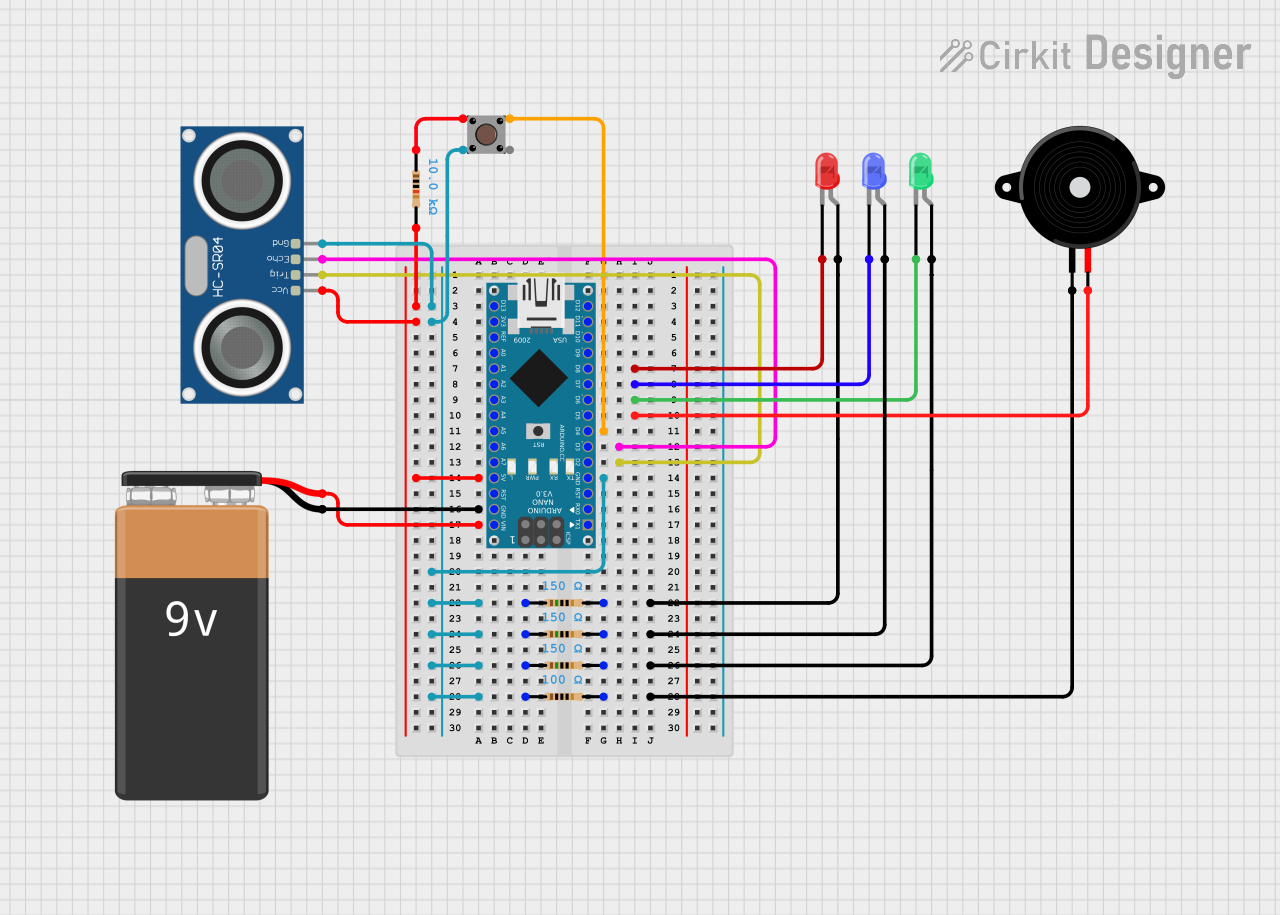
Circuit Documentation
Summary
This document provides a detailed overview of a circuit that includes an Arduino Nano microcontroller, various LEDs, a piezo speaker, an ultrasonic sensor, a pushbutton, resistors, and a 9V battery. The circuit is designed to interface with these components to perform various functions, as defined by the embedded code.
Component List
Arduino Nano
- Description: A small, complete, and breadboard-friendly board based on the ATmega328P.
- Pins: D1/TX, D0/RX, RESET, GND, D2, D3, D4, D5, D6, D7, D8, D9, D10, D11/MOSI, D12/MISO, VIN, 5V, A7, A6, A5, A4, A3, A2, A1, A0, AREF, 3V3, D13/SCK
LED: Two Pin (green)
- Description: A green LED with two pins.
- Pins: cathode, anode
LED: Two Pin (red)
- Description: A red LED with two pins.
- Pins: cathode, anode
LED: Two Pin (blue)
- Description: A blue LED with two pins.
- Pins: cathode, anode
Piezo Speaker
- Description: A piezoelectric speaker.
- Pins: pin1, pin2
HC-SR04 Ultrasonic Sensor
- Description: An ultrasonic sensor for distance measurement.
- Pins: VCC, TRIG, ECHO, GND
Pushbutton
- Description: A simple pushbutton switch.
- Pins: Pin 3 (out), Pin 4 (out), Pin 1 (in), Pin 2 (in)
9V Battery
- Description: A 9V battery for power supply.
- Pins: -, +
Resistor (10k Ohms)
- Description: A resistor with a resistance of 10k Ohms.
- Pins: pin1, pin2
Resistor (100 Ohms)
- Description: A resistor with a resistance of 100 Ohms.
- Pins: pin1, pin2
Resistor (150 Ohms)
- Description: A resistor with a resistance of 150 Ohms.
- Pins: pin1, pin2
Wiring Details
Arduino Nano
- D8: Connected to the cathode of the red LED.
- D7: Connected to the cathode of the blue LED.
- D6: Connected to the cathode of the green LED.
- D5: Connected to pin2 of the piezo speaker.
- D4: Connected to Pin 1 (in) of the pushbutton.
- D3: Connected to the ECHO pin of the HC-SR04 Ultrasonic Sensor.
- D2: Connected to the TRIG pin of the HC-SR04 Ultrasonic Sensor.
- 5V: Connected to pin2 of the 10k Ohms resistor and the VCC pin of the HC-SR04 Ultrasonic Sensor.
- GND: Connected to pin1 of the 150 Ohms resistors, the GND pin of the HC-SR04 Ultrasonic Sensor, Pin 4 (out) of the pushbutton, and the negative terminal of the 9V battery.
- VIN: Connected to the positive terminal of the 9V battery.
LED: Two Pin (green)
- cathode: Connected to D6 of the Arduino Nano.
- anode: Connected to pin2 of a 150 Ohms resistor.
LED: Two Pin (red)
- cathode: Connected to D8 of the Arduino Nano.
- anode: Connected to pin2 of a 150 Ohms resistor.
LED: Two Pin (blue)
- cathode: Connected to D7 of the Arduino Nano.
- anode: Connected to pin2 of a 150 Ohms resistor.
Piezo Speaker
- pin1: Connected to pin2 of a 100 Ohms resistor.
- pin2: Connected to D5 of the Arduino Nano.
HC-SR04 Ultrasonic Sensor
- VCC: Connected to pin2 of the 10k Ohms resistor and the 5V pin of the Arduino Nano.
- TRIG: Connected to D2 of the Arduino Nano.
- ECHO: Connected to D3 of the Arduino Nano.
- GND: Connected to pin1 of the 150 Ohms resistors and the GND pin of the Arduino Nano.
Pushbutton
- Pin 1 (in): Connected to D4 of the Arduino Nano.
- Pin 2 (in): Connected to pin1 of the 10k Ohms resistor.
- Pin 3 (out): Not connected.
- Pin 4 (out): Connected to the GND pin of the Arduino Nano.
9V Battery
- -: Connected to the GND pin of the Arduino Nano.
- +: Connected to the VIN pin of the Arduino Nano.
Resistor (10k Ohms)
- pin1: Connected to Pin 2 (in) of the pushbutton.
- pin2: Connected to the 5V pin of the Arduino Nano and the VCC pin of the HC-SR04 Ultrasonic Sensor.
Resistor (100 Ohms)
- pin1: Not connected.
- pin2: Connected to pin1 of the piezo speaker.
Resistor (150 Ohms)
- pin1: Connected to the GND pin of the Arduino Nano.
- pin2: Connected to the anode of the green LED, the anode of the red LED, and the anode of the blue LED.
Documented Code
Arduino Nano Code (sketch.ino)
void setup() {
  // put your setup code here, to run once:

}

void loop() {
  // put your main code here, to run repeatedly:

}
Additional Documentation (documentation.txt)