
Arduino UNO-Based Eye Pressure Monitor with OLED Display and TOF Sensor
View and Edit Project In Cirkit Designer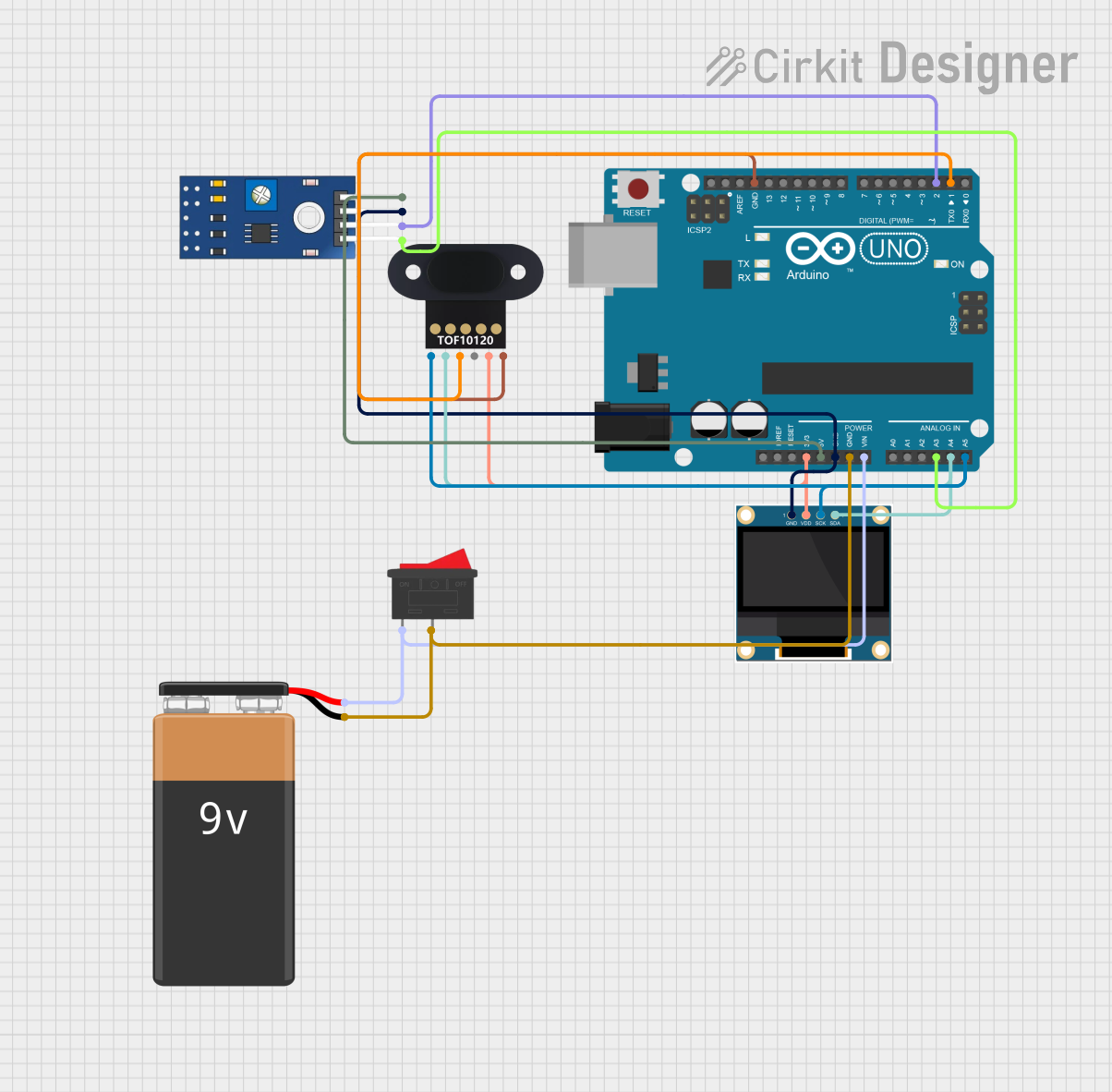
Circuit Documentation
Summary
This circuit is designed to measure eye pressure and detect changes in the surface using an array of sensors, including a TCRT 5000 IR sensor and a TOF10120 distance sensor. The data from these sensors is processed by an Arduino UNO microcontroller and displayed on a 0.96" OLED screen. The circuit is powered by a 9V battery, which is controlled by a rocker switch. The purpose of this circuit is to determine eye pressure status and ensure the correct positioning of an air puff for eye pressure measurement.
Component List
Arduino UNO
- Microcontroller board based on the ATmega328P
- Used for processing sensor data and controlling the OLED display
0.96" OLED
- Small display screen for visual output
- Displays eye pressure status and other information
TOF10120
- Time-of-flight distance sensor
- Measures the distance to the cornea to ensure correct air puff direction
9V Battery
- Provides power to the circuit
TCRT 5000 IR SENSOR
- Infrared reflective sensor
- Detects changes in the surface and eye pressure
Rocker Switch
- Mechanical switch to control the power supply to the circuit
Wiring Details
Arduino UNO
3.3Vconnected to OLEDVDDand TOF10120VCC5Vconnected to TCRT 5000 IR SENSORVCCGNDconnected to OLEDGND, TCRT 5000 IR SENSORGND, TOF10120GND, and one side of the Rocker SwitchVinconnected to the other side of the Rocker SwitchA3connected to TCRT 5000 IR SENSORAOA4(SDA) connected to OLEDSDAand TOF10120SDLA5(SCL) connected to OLEDSCKand TOF10120SCLD2connected to TCRT 5000 IR SENSORDOD1(TX) connected to TOF10120TXD
0.96" OLED
GNDconnected to Arduino UNOGNDVDDconnected to Arduino UNO3.3VSCKconnected to Arduino UNOA5SDAconnected to Arduino UNOA4
TOF10120
RXDnot connectedTXDconnected to Arduino UNOD1SDLconnected to Arduino UNOA4VCCconnected to Arduino UNO3.3VSCLconnected to Arduino UNOA5GNDconnected to Arduino UNOGND
9V Battery
+connected to one side of the Rocker Switch-connected to Arduino UNOGND
TCRT 5000 IR SENSOR
VCCconnected to Arduino UNO5VGNDconnected to Arduino UNOGNDDOconnected to Arduino UNOD2AOconnected to Arduino UNOA3
Rocker Switch
- One side connected to 9V Battery
+ - The other side connected to Arduino UNO
Vin - Middle pin connected to Arduino UNO
GND
Documented Code
Arduino UNO Code
/*
 * This Arduino Sketch reads data from the TCRT 5000 IR sensor and the TOF10120
 * sensor to determine eye pressure. It then displays the eye pressure status
 * (high, normal, or low) on a 0.96" OLED display. The eye pressure is
 * considered high if above 21 mmHg, normal if between 10 and 21 mmHg, and low
 * if below 10 mmHg.
 */

#include <Wire.h>
#include <Adafruit_GFX.h>
#include <Adafruit_SSD1306.h>

#define SCREEN_WIDTH 128
#define SCREEN_HEIGHT 64
#define OLED_RESET -1
Adafruit_SSD1306 display(SCREEN_WIDTH, SCREEN_HEIGHT, &Wire, OLED_RESET);

#define IR_SENSOR_DO 2
#define IR_SENSOR_AO A3
#define TOF_RX 1
#define TOF_TX 0

void setup() {
  pinMode(IR_SENSOR_DO, INPUT);
  pinMode(IR_SENSOR_AO, INPUT);
  Serial.begin(9600);
  display.begin(SSD1306_SWITCHCAPVCC, 0x3C);
  display.display();
  delay(2000);
  display.clearDisplay();
}

void loop() {
  int irValue = analogRead(IR_SENSOR_AO);
  float eyePressure = map(irValue, 0, 1023, 0, 30);
  display.clearDisplay();
  display.setTextSize(1);
  display.setTextColor(SSD1306_WHITE);
  display.setCursor(0, 0);
  display.print("Eye Pressure: ");
  display.print(eyePressure);
  display.print(" mmHg");
  display.setCursor(0, 10);
  if (eyePressure > 21) {
    display.print("Status: High");
  } else if (eyePressure >= 10) {
    display.print("Status: Normal");
  } else {
    display.print("Status: Low");
  }
  display.display();
  delay(1000);
}
(Note: The code for the other microcontroller instances appears to be mistakenly provided, as there is only one Arduino UNO in the circuit. The code for the TOF10120 and TCRT 5000 IR SENSOR is integrated into the Arduino UNO code.)